
OH-1202H Universal Humidity Touchscreen Thermostat Instruction Manual





INSTALLER/CONFIGURATION MENU
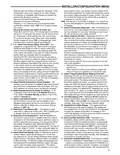
CONFIGURATION MENU
Comments
Screen
SS1 HP1 Press
Displayed
Factory
(Default)
Option
Selected
Press
o
r
Reference MS2 HP2
Number
key
to select from
listed options
-5 - 50
33
(35) dF
Selects Dual Fuel setpoint (°F), dF selected On with outdoor sen-
sor available.
34
(05) dF
0 - 09
Selects Dual Fuel setpoint (°F), dF selected On with no outdoor
sensor.
35
36
(60) Cd
(80) AO
0-99
Selects compressor off delay in seconds, dF selected On
-5 - 79
Selects Auxiliary Heat cut out temperature. This item appears
if HP1 or HP2 is selected and outdoor sensor is installed and
enabled.
37
(80) bP
79-20
On
Selects Blower balance point. Selection of 80 disables this feature.
This item appears if HP1 or HP2 is selected and outdoor sensor is
installed and enabled.
38
39
(OFF) Hd
Selects Humidity Display alternate with time.
Humidity 00
(Room Humidity)
-20 LO
20 HI
Selects Humidity Display adjustment.
40
41
42
43
44
(OFF) HR
(OFF) AH
(OFF) CH
OC (0)
LO, HI
H, C, A
On
Selects Auto Humidity reduction.
Selects Automatic Humidification.
Selects Cycle Humidifier.
od, OFF
On
Selects Optimum Comfort or Optimum Dehumidification or Off.
Selects Change UV Lamp feature.
(OFF) Change
UV Lamp
45
46
350 Days
25-1975
On
C
h
a
n
g
e
U
V
L
a
m
p
d
u
r
a
t
i
o
n
d
a
y
s
.
(OFF)
Change Pad
Selects Change Humidifier Pad feature.
47
48
100 Hrs
25-1975
On
Change Humidifier Pad duration hours.
Selects Change Filter feature.
OFF
Change Filter
49
200 Hrs
25-1975
Change Filter duration hours.
6. System Switch Configuration (MS2/SS1) – This ther-
mostat is configured for Heat and Cool with Auto change-
over default (Cool-Off-Heat-Auto). It can be configured as
Heat & Cool (Cool-Off-Heat), or Heat Only (Off-Heat), or
Cool Only (Cool-Off).
1. This control can be configured for:
MS2 – Multi-Stage System (2 heat/2 cool)
HP1 – Heat Pump with one stage of compressor (2
heat/1 cool)
HP2 – Heat Pump with two stage compressor or two
compressor system, Gas or Electric backup; (Dual Fuel
see screen reference number 33) (4 heat/2 cool)
SS1 – Single Stage System (3 wire zone see wiring
diagrams.
When the control is in heat pump configuration (HP1/
HP2), the system switch configuration will have an
additional mode, Em for Emergency.
7. Energy Management Recovery (EMR) – (this step is
skipped if configured as non-programmable). When set
to "On" causes the thermostat to start heating or cooling
early to make the building temperature reach the program
setpoint at the time you specify.
Example: The heating program is 65°F at night and 70°
at 7 AM. If the building temperature is 65°F, the difference
is 5°F. Allowing 5 minutes per °F rise, the thermostat set-
point will change to 70° at 6:35 AM. Cooling allows more
time per °F, because it takes longer to reach temperature.
8, 9 & 10. Cycle Rate Selection – The factory default setting
is fast cycle (FA Cr) in all modes (Heat, Cool, Em). To
2. GAS or Electric (ELE) fan operation. If the heating
system requires the thermostat to energize the fan, select
ELE. Select GAS if the heating system energizes the
fan on a call for heat. Note: Resetting the thermostat
switches the option to GAS.
3. O/B Terminal selection – Selects the operation of the
reversing valve (when item 1 is set to HP1 or HP2 only).
When set to "O" the changeover valve will be energized
in COOL to accommodate the majority of heat applica-
tions. If the heat pump requires the changeover valve to
energize in HEAT, select "B".
change to slow cycling (SL, Cr), press touch keys
or
toggle between FA & SL. The cycle rates are below:
4. Programs per week – This control can be configured for
7 independent day or 5+1+1 day programming or non-
programmable modes. Default is 7-day mode. The display
indicates "7 Days" as default. Other options "5 Days" or
"0 Days" can be selected. If "0 Days" is selected for non-
programmable mode, the step for EMR will be skipped, as
this feature will not be available in this mode.
Mode
Heat
Med
Slow
1.5°F
1.7°F
1.7°F
1.7°F
0.6°F
1.2°F
1.2°F
0.6°F
Cool
Heat Pump
Emer Heat
11. Select Compressor Lockout (CL) – Selecting (CL On)
will cause the thermostat to wait 5 minutes between cool-
ing cycles. This is intended to help protect the compressor
from short cycling. Some of the newer compressors have
5. Program Steps per day – Not available if configured for
non-programmable. This control can be configured for 4
or 2 program steps per day. Default is "4 PS" and can be
toggled between 4 PS and 2 PS.
7

| General | Details |
|---|---|
| Name | OH-1202H Universal Humidity Touchscreen Thermostat Instruction Manual |
| Make | OH |
| Language | English |
| Filetype | PDF (Download) |
| File size | 0.42 MB |
 (1 votes, average: 5.00 out of 5)
 Loading...


ecobee M5A Smart Wi-Fi Thermostat User Guide

NIBE RMU S40 Room Thermostat Instruction Manual

BEOK CONTROLS TGT70 WIFI Fan Coil Thermostat Owner’s Manual

ENGO CONTROLS E55-B, E55-W Wi-Fi Thermostat User Guide

warmup RFT-P Programmable Radiant Floor Thermostat User Manual

IMMERGAS 3.030909 Smartech Plus Smart Chrono Thermostat Installation Guide

Honeywell CT3500 Programmable Thermostat User Guide

heatit WiFi TRM3 Intelligent Smart Home Thermostat User Guide

Danfoss RET Series Electronic Thermostat Instruction Manual

Honeywell Lyric T5 Wi-Fi Thermostat Installation Guide