
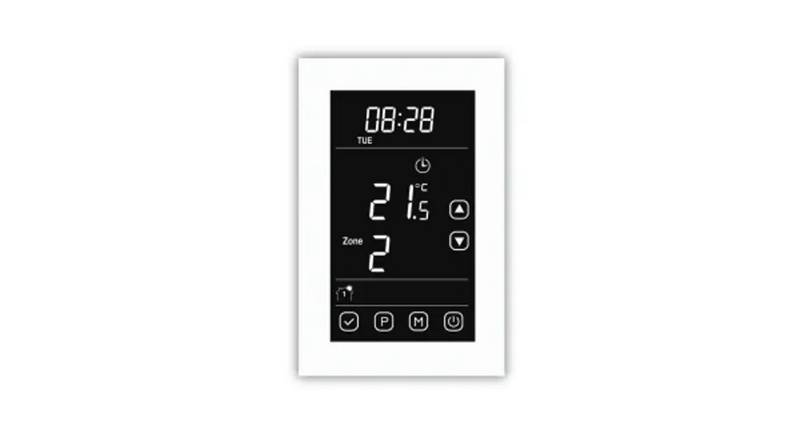
OH-1202H Universal Humidity Touchscreen Thermostat Instruction Manual





PROGRAMMING
Cooling Example:
Programmable Fan Option
In the Set Schedule mode, the Fan key is used to select the
fan operation during a program period. The default state of
the Fan key is FAN Auto (fan runs during a call for cool but
not on a call for heat). It can be changed to FAN Prog (fan
runs during a program period). Each press of the FAN key will
change the mode of the fan between Auto and Prog.
1. In cool, press Auto Schedule once.
2. Press
or
ture (example 75°).
to select a comfortable cooling tempera-
3. Press Auto Schedule again.Your thermostat is now pro-
grammed for 75° for all cooling time periods.
Your cooling program for each day of the week will look like
this:
In the Run mode, when a program period that has FAN Prog
begins, the fan will turn on and stay on during the complete
period. The display will show FAN On Prog. Pressing the FAN
key will change FAN On Prog to On (fan running continuous-
ly) or Auto. To return to FAN On Prog, press Run Schedule.
6:30
8:00
75°
75°
75°
75°
5:00
10:30
Energy Saving Factory Pre-Program
This thermostat is programmed with the energy saving settings shown in the table below for all days of the week. If this pro-
gram suits your needs, simply set the thermostat clock and press the RUN key.
The table below shows the factory set heating and cooling schedule for all days of the week.
* Wake Up
(Morning)
Leave For Work
(Day)
* Return Home
(Evening)
Go To Bed
(Night)
Heating Program
Cooling Program
6:00 AM
70°F
75°F
8:00 AM
8:00 AM
62°F
83°F
5:00 PM
5:00 PM
70°F
75°F
10:00 PM
62°F
78°F
6:00 AM
10:00 PM
* You can eliminate these two program periods in the configuration menu (reference #5) if the building is occupied all day.
Day period will change to 6:00 AM and 70° and can be programmed as required.
PlanningYour Program – Important
The Heating and Cooling Program schedules below allow you to pencil in your own program times and temperatures.
The thermostat comes configured for 7 day programming and can also be configured for 5+1+1 programming (see configura-
tion section).
Factory settings are listed on Monday, Saturday and Sunday. If you are re-programming a 5+1+1 day schedule, pencil in your
own times and temperatures directly below the factory times and temperatures.
If you are re-programming a 7 day schedule, fill in all lines with the times and temperatures you want.
Keep the following guidelines in mind when planning your program.
•InHeating,lowertemperatureswillsaveenergy.
•InCooling,highertemperatureswillsaveenergy.
•IfyouplanonusingAutoChangeover,donotprogramtheheatingtemperaturehigherthanthecoolingtemperature.
13

| General | Details |
|---|---|
| Name | OH-1202H Universal Humidity Touchscreen Thermostat Instruction Manual |
| Make | OH |
| Language | English |
| Filetype | PDF (Download) |
| File size | 0.42 MB |
 (1 votes, average: 5.00 out of 5)
 Loading...


COMAP L151002001 Smart Home Thermostat User Manual
COLDBUSTER CB Dual Thermostat User Manual

GENERAL LIFE ARUNA 302S RF Digital Room Thermostat User Manual

SALUS WQ610RF Wireless Slim Programmable Thermostat Installation Guide

White Rodgers 1E78 5 2 Day Programmable Thermostat Instruction Manual

GENERAL LIFE SENNA 300S Digital Room Thermostat User Manual

AJAX108845 White Digital Programmable Thermostat User Guide

EMOS P56211 Wireless Thermostat Instruction Manual

SIEMENS RDF660MB Flush Mount Room Thermostat Instruction Manual

GENERALLIFE MITRA 230S RF Wireless Room Thermostat User Manual