
Ideal 229177 Halo Heat and System 2 Zone Extension Thermostat User Guide




MAIN FEATURES
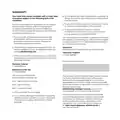
HOT WATER
ZONE 1 ONLY
To access the hot water
functions, when on the
heating home screen,
simply press the dial.
Alternatively press the menu
button, scroll to Hot Water
Control and press confirm.
To switch back to heating
from the hot water home
screen, press the dial again.
HW
Hot water on
until 10:00pm
hot water
menu
auto
mode
Hot water functions can only
be accessed via the Halo unit
controlling Zone 1. This is
indicated by “Zone 1” in the info
bar on the Halo home screen.
Push dial to alternate
between Central Heating
(CH) and Domestic Hot
Water (DHW)
Heating Plus Hours
The current mode is
displayed bottom right
Hot water control
Support
override
cancel
menu
Press the right hand button
to change the mode

| General | Details |
|---|---|
| Name | Ideal 229177 Halo Heat and System 2 Zone Extension Thermostat User Guide |
| Make | IDEAL |
| Language | English |
| Filetype | PDF (Download) |
| File size | 0.83 MB |
 (1 votes, average: 5.00 out of 5)
 Loading...


nVent RAYCHEM SENZ Wifi Programmable Floor Heating Thermostat User Guide

oventrop Vindo TH Thermostat Instruction Manual

Infracomfort HY312W Wifi Digital Thermostat User Manual

EMERSON 1F83C-11NP Single Stage Thermostat Owner’s Manual

Honeywell ADEMCO 4500 Thermostat User Guide

Moes BHT-006 Series Thermostat User Manual

Robertshaw RS9320T Programmable Touchscreen Wall Thermostat Instruction Manual

Danfoss TP5001B Programmable Room Thermostat User Guide

NT NetX X-Series Thermostat Installation Guide

Danfoss TP5001 Programmable Room Thermostat User Guide