×
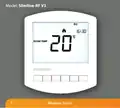
- 1. Model: Slimline-rf V3
- 2. Model: Slimline-rf V3 (Wireless Series)
- 3. Temperature Display (Comfort Levels Explained → Setting The Hot Water → What Is A Programmable Room Thermostat? → Locking The Thermostat → Installation Procedure → Optional Features Explained)
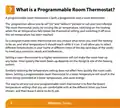
- 4. What Is A Programmable Room Thermostat? (The Programmer → The Room Thermostat → Wireless Series)
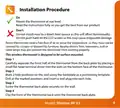
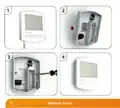
- 5. Installation Procedure (Do → Dont → Step 1 → Step 2 → Step 3 → Step 4)
- 6. Wireless Series
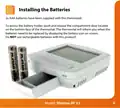
- 7. Installing The Batteries
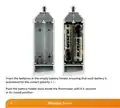
- 8. Insert The Batteries In The Empty Battery Holder (Wireless Series)
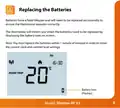
- 9. Replacing The Batteries (Battery Icon)
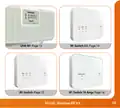
- 10. Receiver Type (Wireless Series)
- 11. Model: Slimline-rf V3
- 12. Pairing Menu Explained (Feature P1 - Pairing → Feature P2 - Setting The Uh8-rf Address → Feature P3 - Failsafe)
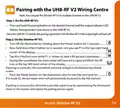
- 13. Pairing With The Uh8-rf V2 Wiring Centre (Step 1, On The Uh8-rf V2 → Step 2, On The Slimline-rf V3)
- 14. Pairing With The Uh8-rf Wiring Centre (Step 1, On The Uh8-rf → Step 2, On The Slimline-rf V3)
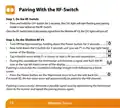
- 15. Pairing With The Rf-switch V2 (Step 1, On The Rf-switch V2 → Step 2, On The Slimline-rf V3)
- 16. Pairing With The Rf-switch (Step 1, On The Rf-switch → Step 2, On The Slimline-rf V3 → If Pairing Is Successful → If Pairing Is Unsuccessful)
- 17. Pairing With The Rf-switch 16 Amp (Step 1, On The Rf-switch 16 Amp → Step 2, On The Slimline-rf V3)
- 18. Wireless Series
- 19. Lcd Display (Frost Icon → Flame Icon → Temperature Hold → Room Temp → Set → Holiday Indicator)
- 20. Setting The Clock (Wireless Series)
- 21. Temperature Display (Room Temperature → Set Temperature)
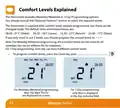
- 22. Comfort Levels Explained (Optional Features → Default Times And Temperatures → Weekday/weekend Programming → Day Programming → Programming Comfort Levels)
- 23. Use The Up/down Keys To Enter The Required Wake Time (Press H To Confirm Settings → Use The Up/down Keys To Enter The Required Wake Temperature → Repeat The Programming Steps For Each Period Until Complete → For Unused Periods Enter --.-- And The Thermostat Will Ignore The Setting → In 7 Day Programming Mode You Can Repeat For Each Day Independently → To Change The Programming Mode Please Refer To Pages 33 & 34)
- 24. Setting The Hot Water Switching Times (Timer Status)
- 25. Locking The Thermostat (Keypad Lock Indicator)
- 26. Temperature Control (Set Temperature → Set Icon → Wireless Series)
- 27. Temperature Hold (Hold On Indicator → Hold Time Remaining)
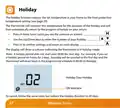
- 28. Holiday (Wireless Series)
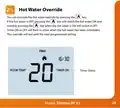
- 29. Hot Water Override (Timer Status)
- 30. Frost Mode (Setting The Frost Temperature → Heating On/off → Wireless Series)
- 31. Re-calibrating The Thermostat (Factory Reset)
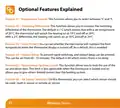
- 32. Optional Features Explained (Feature 01 - Temperature Format → Feature 02 Switching Differential → Feature 03 Frost Protect → Feature 04 Output Delay → Feature 05 Temperature Up/down Limit → Feature 06 Air Sensor Selection)
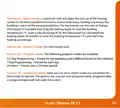
- 33. Feature 07 Optimum Start (Feature 09 Program Mode → Feature 10 Thermostat Mode)
- 34. Adjusting The Optional Settings (Wireless Series)
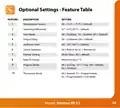
- 35. Optional Settings - Feature Table (Temperature Format → Switching Differential → Frost Mode → Output Delay → Up/down Limit → Sensor Selection → Program Mode)
- 36. Want More Information? (Call Our Support Team On: +44 (0)1254 669090 → Or View Technical Specifications Directly On Our Website: → Www.heatmiser.com)
×
heatmiser Slimline-RF V3 Programmable Wireless Thermostat Instructions
| General | Details |
|---|---|
| Name | heatmiser Slimline-RF V3 Programmable Wireless Thermostat Instructions |
| Make | heatmiser |
| Language | English |
| Filetype | PDF (Download) |
| File size | 0.35 MB |

heatmiser neoStat Touch-e Touchscreen Electric Floor Heating Thermostat Owner’s Manual

heatmiser DS1-V2 Thermostat Owner’s Manual

heatmiser neoStat-e Electric Floor Heating Thermostat Instructions

heatmiser neoStat-Pro Smart Thermostat Instruction Manual

heatmiser Slimline-B V3 Programmable Room Thermostat Owner’s Manual


APATOR TH 480 Bi Metallic Thermostat Instruction Manual

BEOK CONTROLS BOT-R6W Gas Boiler Thermostat Instruction Manual

AIRZONE Blueface Zero Thermostat User Manual

THORGEON 18007 Digital Plug In Thermostat Instructions

Ouellet Canada OTH24-AFR Programmable Low Voltage Electronic Thermostat User Guide

shadow-caster SCM-Series Thermostat Instruction Manual

Drayton 2290M Mains Digital Room Thermostat User Manual

Honeywell Home TH2110DH 1 Cool Programmable Digital Thermostat Installation Guide

ENSTO ECO16BT-J Floor Heating Thermostat User Guide

BEOK TGR86 Smart Underfloor Heating Thermostat User Guide
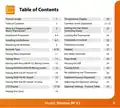
Table of Contents
- 1. Model: Slimline-rf V3 →
- 2. Model: Slimline-rf V3 - Wireless Series →
- 3. Temperature Display - Comfort Levels Explained →
- 4. What Is A Programmable Room Thermostat? - The Programmer →
- 5. Installation Procedure - Do →
- 6. Wireless Series →
- 7. Installing The Batteries →
- 8. Insert The Batteries In The Empty Battery Holder - Wireless ... →
- 9. Replacing The Batteries - Battery Icon →
- 10. Receiver Type - Wireless Series →
- 11. Model: Slimline-rf V3 →
- 12. Pairing Menu Explained - Feature P1 - Pairing →
- 13. Pairing With The Uh8-rf V2 Wiring Centre - Step 1, On The Uh... →
- 14. Pairing With The Uh8-rf Wiring Centre - Step 1, On The Uh8-r... →
- 15. Pairing With The Rf-switch V2 - Step 1, On The Rf-switch V2 →
- 16. Pairing With The Rf-switch - Step 1, On The Rf-switch →
- 17. Pairing With The Rf-switch 16 Amp - Step 1, On The Rf-switch... →
- 18. Wireless Series →
- 19. Lcd Display - Frost Icon →
- 20. Setting The Clock - Wireless Series →
- 21. Temperature Display - Room Temperature →
- 22. Comfort Levels Explained - Optional Features →
- 23. Use The Up/down Keys To Enter The Required Wake Time - Press... →
- 24. Setting The Hot Water Switching Times - Timer Status →
- 25. Locking The Thermostat - Keypad Lock Indicator →
- 26. Temperature Control - Set Temperature →
- 27. Temperature Hold - Hold On Indicator →
- 28. Holiday - Wireless Series →
- 29. Hot Water Override - Timer Status →
- 30. Frost Mode - Setting The Frost Temperature →
- 31. Re-calibrating The Thermostat - Factory Reset →
- 32. Optional Features Explained - Feature 01 - Temperature Forma... →
- 33. Feature 07 Optimum Start - Feature 09 Program Mode →
- 34. Adjusting The Optional Settings - Wireless Series →
- 35. Optional Settings - Feature Table - Temperature Format →
- 36. Want More Information? - Call Our Support Team On: +44 (0)12... →