×
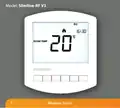
- 1. Model: Slimline-rf V3
- 2. Model: Slimline-rf V3 (Wireless Series)
- 3. Temperature Display (Comfort Levels Explained → Setting The Hot Water → What Is A Programmable Room Thermostat? → Locking The Thermostat → Installation Procedure → Optional Features Explained)
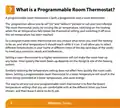
- 4. What Is A Programmable Room Thermostat? (The Programmer → The Room Thermostat → Wireless Series)
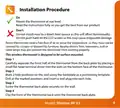
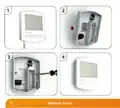
- 5. Installation Procedure (Do → Dont → Step 1 → Step 2 → Step 3 → Step 4)
- 6. Wireless Series
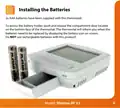
- 7. Installing The Batteries
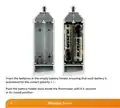
- 8. Insert The Batteries In The Empty Battery Holder (Wireless Series)
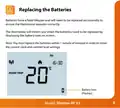
- 9. Replacing The Batteries (Battery Icon)
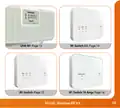
- 10. Receiver Type (Wireless Series)
- 11. Model: Slimline-rf V3
- 12. Pairing Menu Explained (Feature P1 - Pairing → Feature P2 - Setting The Uh8-rf Address → Feature P3 - Failsafe)
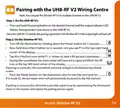
- 13. Pairing With The Uh8-rf V2 Wiring Centre (Step 1, On The Uh8-rf V2 → Step 2, On The Slimline-rf V3)
- 14. Pairing With The Uh8-rf Wiring Centre (Step 1, On The Uh8-rf → Step 2, On The Slimline-rf V3)
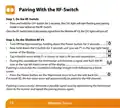
- 15. Pairing With The Rf-switch V2 (Step 1, On The Rf-switch V2 → Step 2, On The Slimline-rf V3)
- 16. Pairing With The Rf-switch (Step 1, On The Rf-switch → Step 2, On The Slimline-rf V3 → If Pairing Is Successful → If Pairing Is Unsuccessful)
- 17. Pairing With The Rf-switch 16 Amp (Step 1, On The Rf-switch 16 Amp → Step 2, On The Slimline-rf V3)
- 18. Wireless Series
- 19. Lcd Display (Frost Icon → Flame Icon → Temperature Hold → Room Temp → Set → Holiday Indicator)
- 20. Setting The Clock (Wireless Series)
- 21. Temperature Display (Room Temperature → Set Temperature)
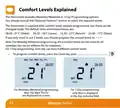
- 22. Comfort Levels Explained (Optional Features → Default Times And Temperatures → Weekday/weekend Programming → Day Programming → Programming Comfort Levels)
- 23. Use The Up/down Keys To Enter The Required Wake Time (Press H To Confirm Settings → Use The Up/down Keys To Enter The Required Wake Temperature → Repeat The Programming Steps For Each Period Until Complete → For Unused Periods Enter --.-- And The Thermostat Will Ignore The Setting → In 7 Day Programming Mode You Can Repeat For Each Day Independently → To Change The Programming Mode Please Refer To Pages 33 & 34)
- 24. Setting The Hot Water Switching Times (Timer Status)
- 25. Locking The Thermostat (Keypad Lock Indicator)
- 26. Temperature Control (Set Temperature → Set Icon → Wireless Series)
- 27. Temperature Hold (Hold On Indicator → Hold Time Remaining)
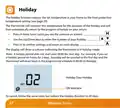
- 28. Holiday (Wireless Series)
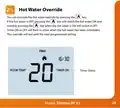
- 29. Hot Water Override (Timer Status)
- 30. Frost Mode (Setting The Frost Temperature → Heating On/off → Wireless Series)
- 31. Re-calibrating The Thermostat (Factory Reset)
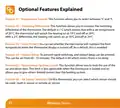
- 32. Optional Features Explained (Feature 01 - Temperature Format → Feature 02 Switching Differential → Feature 03 Frost Protect → Feature 04 Output Delay → Feature 05 Temperature Up/down Limit → Feature 06 Air Sensor Selection)
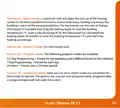
- 33. Feature 07 Optimum Start (Feature 09 Program Mode → Feature 10 Thermostat Mode)
- 34. Adjusting The Optional Settings (Wireless Series)
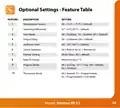
- 35. Optional Settings - Feature Table (Temperature Format → Switching Differential → Frost Mode → Output Delay → Up/down Limit → Sensor Selection → Program Mode)
- 36. Want More Information? (Call Our Support Team On: +44 (0)1254 669090 → Or View Technical Specifications Directly On Our Website: → Www.heatmiser.com)
×
heatmiser Slimline-RF V3 Programmable Wireless Thermostat Instructions
| General | Details |
|---|---|
| Name | heatmiser Slimline-RF V3 Programmable Wireless Thermostat Instructions |
| Make | heatmiser |
| Language | English |
| Filetype | PDF (Download) |
| File size | 0.35 MB |

heatmiser neoStat Touch-e Touchscreen Electric Floor Heating Thermostat Owner’s Manual

heatmiser DS1-V2 Thermostat Owner’s Manual

heatmiser neoStat-e Electric Floor Heating Thermostat Instructions

heatmiser neoStat-Pro Smart Thermostat Instruction Manual

heatmiser Slimline-B V3 Programmable Room Thermostat Owner’s Manual


Danfoss CF Wireless Floorheating Controller and Room Thermostat Instruction Manual

GLOBAL HY09RF WIFI Wireless Thermostat User Manual

HERSCHEL 12860 T-BT Battery Powered Wireless Thermostat Instruction Manual

VIMAR 30810.x-02973 Smart Home View Wireless Connected Dial Thermostat Instruction Manual

RATE R8 Weekly Programmable Handwheel Thermostat Instruction Manual

Honeywell 5000 Series Thermostat Instruction Manual

ENGO E901 Programmable Wired Thermostat User Manual

ESi Controls ESRTP4TOUCH Programmable Room Thermostat Instruction Manual

ideal BOILERS Combi RF Wireless Boiler Thermostat User Guide

LoRaWAN MC-LW-FCT-01 MClimate Fan Coil Thermostat User Manual
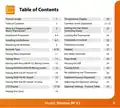
Table of Contents
- 1. Model: Slimline-rf V3 →
- 2. Model: Slimline-rf V3 - Wireless Series →
- 3. Temperature Display - Comfort Levels Explained →
- 4. What Is A Programmable Room Thermostat? - The Programmer →
- 5. Installation Procedure - Do →
- 6. Wireless Series →
- 7. Installing The Batteries →
- 8. Insert The Batteries In The Empty Battery Holder - Wireless ... →
- 9. Replacing The Batteries - Battery Icon →
- 10. Receiver Type - Wireless Series →
- 11. Model: Slimline-rf V3 →
- 12. Pairing Menu Explained - Feature P1 - Pairing →
- 13. Pairing With The Uh8-rf V2 Wiring Centre - Step 1, On The Uh... →
- 14. Pairing With The Uh8-rf Wiring Centre - Step 1, On The Uh8-r... →
- 15. Pairing With The Rf-switch V2 - Step 1, On The Rf-switch V2 →
- 16. Pairing With The Rf-switch - Step 1, On The Rf-switch →
- 17. Pairing With The Rf-switch 16 Amp - Step 1, On The Rf-switch... →
- 18. Wireless Series →
- 19. Lcd Display - Frost Icon →
- 20. Setting The Clock - Wireless Series →
- 21. Temperature Display - Room Temperature →
- 22. Comfort Levels Explained - Optional Features →
- 23. Use The Up/down Keys To Enter The Required Wake Time - Press... →
- 24. Setting The Hot Water Switching Times - Timer Status →
- 25. Locking The Thermostat - Keypad Lock Indicator →
- 26. Temperature Control - Set Temperature →
- 27. Temperature Hold - Hold On Indicator →
- 28. Holiday - Wireless Series →
- 29. Hot Water Override - Timer Status →
- 30. Frost Mode - Setting The Frost Temperature →
- 31. Re-calibrating The Thermostat - Factory Reset →
- 32. Optional Features Explained - Feature 01 - Temperature Forma... →
- 33. Feature 07 Optimum Start - Feature 09 Program Mode →
- 34. Adjusting The Optional Settings - Wireless Series →
- 35. Optional Settings - Feature Table - Temperature Format →
- 36. Want More Information? - Call Our Support Team On: +44 (0)12... →