Home > heatmiser > heatmiser neoStat Touch-e Touchscreen Electric Floor Heating Thermostat Owner’s Manual
×
- 1. Models: Neo, Stat, Touch-e & Touch-e Carbon
- 2. Models: Neo, Stat, Touch-e & Touch-e Carbon
- 3. What Is A Programmable Room Thermostat? (Adjusting The Optional Settings → Recalibrating The Thermostat → Error Codes → Installation Procedure → Mode Select → Setting The Time And Date)
- 4. What Is A Programmable Room Thermostat? (Setting A Programmable Room Thermostat)
- 5. The Way To Set And Use Your Programmable Room Thermostat Is To Find The Lowest Temperature Settings That You Are Comfortable With At The Dif…
- 6. Installation Procedure (Do → Dont → Step 1 → Step 2 → Step 3 → Step 4)
- 7. Section Header
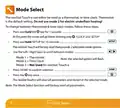
- 8. Mode Select (Thermostat → Time Clock → Factory Reset → Selectable Mode Options)
- 9. Mode 1 Thermostat
- 10.
- 11. Lcd Display (Holiday → Frost Protection → Flame Symbol → Advanced Until → Day Indicator → Hold Left)
- 12. Set Up & Pairing (Pairing The Neohub → Neostat Series)
- 13. Set Up & Pairing (Pairing The Neostat Touch-e)
- 14. Power On/off (Thermostat Completely Off → Thermostat Powered On)
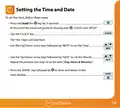
- 15. Setting The Time And Date
- 16. Temperature Display (Room Temperature → Floor Temperature)
- 17. Temperature Control (Set Temperature)
- 18. Edit Comfort Levels (Program Mode Options → Factory Programmed Comfort Levels → Weekday/weekend Programming → Day Programming → Hour Mode)
- 19. Use The Up/down Key At The Top To Set The Hours & Minutes (Use The Up/down Keys In The Center To Set The Temperature → Press The Right Arrow Key → Leave Will Now Show With The Current Settings Displayed. → Repeat These Steps Above To Set All Comfort Levels. → For Any Unused Periods Set Time To --: → Press Done To Confirm And Save The Settings)
- 20. Temperature Hold (Cancel/edit Temperature Hold)
- 21. Thermostat Advance (To Enable Advance → To View The Set Temperature → To Change The Set Temperature → To Cancel Advance)
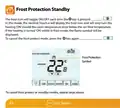
- 22. Frost Protection Standby (Frost Protection → Symbol)
- 23. Locking The Touch Display (Unlocking The Touch Display)
- 24. Holiday (To Set A Holiday → The Display Will Now Show And Indicate Frost Protection Active → To View Or Change The Set Frost Temperature While In Holiday Mode)
- 25. Optional Settings Explained (Switching Differential → Frost Protect Temperature → Output Delay → Temperature Up/down Limit → Sensor Selection → Floor Temp Limit)
- 26. Optimum Start (Rate Of Change → Program Mode → Temperature Format → Back-light Dimming (carbon Models Only))
- 27. Optional Settings - Feature Table (Pairing → Frost Protection Temperature → Output Delay → Up/down Temperature Limit → Sensor Selection → Program Mode)
- 28. Adjusting The Optional Settings (Feature No. → Feature Setting)
- 29. Recalibrating The Thermostat (Error Codes)
- 30. Remote Probe Connections (Probe Types → Remote Floor Sensor → Remote Air Thimble Sensor → Input Connections)
- 31. Wiring Diagram (Model: Neostat Touch-e → Do Not Connect To Electric Underfloor Heating Mat When Using This Device In Mode 2 'time Clock'. → This Product Must Only Be Installed By A Qualified Electrician And Comply With Local Installation Regulations.)
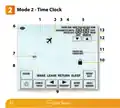
- 32. Mode 2 - Time Clock
- 33. Lcd Display (Holiday → Advanced → Day → Hold → Clock → Mesh)
- 34. Setting The Switching Times (Use The Day Key To Select Day/period Of Week → Press Next To Confirm Selection → Wake Will Now Flash And The On Time Will Be Displayed → Press Next → The Off Time Will Now Be Displayed → Press The Right Arrow Key → Leave Will Now Flash And The On Time Will Be Displayed)
- 35. Timer Advance (To Enable Advance → To Cancel Advance → Time Remaining → Output Status → Level → Advanced Until)
- 36. Timer Override (To Cancel Timer Override)
- 37. Optional Settings Explained (Program Mode → Weekday/weekend → Day Program Mode → Hour Mode → Back-light Dimming (carbon Models Only) → Optional Settings - Feature Table)
- 38. Adjusting The Optional Settings (Feature No. → Feature Setting)
- 39. Wiring Diagram (Time Clock Mode → Model: Neostat Touch-e → Do Not Connect To Electric Underfloor Heating Mat When Using This Device In Mode 2 'time Clock'. → This Product Must Only Be Installed By A Qualified Electrician And Comply With Local Installation Regulations.)
- 40. Want More Information? (Faq → Technical Specifications → Compliance Declaration)
×
heatmiser neoStat Touch-e Touchscreen Electric Floor Heating Thermostat Owner’s Manual
| General | Details |
|---|---|
| Name | heatmiser neoStat Touch-e Touchscreen Electric Floor Heating Thermostat Owner’s Manual |
| Make | heatmiser |
| Language | English |
| Filetype | PDF (Download) |
| File size | 0.64 MB |

heatmiser Slimline-RF V3 Programmable Wireless Thermostat Instructions

heatmiser DS1-V2 Thermostat Owner’s Manual

heatmiser neoStat-e Electric Floor Heating Thermostat Instructions

heatmiser neoStat-Pro Smart Thermostat Instruction Manual

heatmiser Slimline-B V3 Programmable Room Thermostat Owner’s Manual

PRO1 T755 Heat 2 Cool Dual Fuel Thermostat User Manual

PECO CONTROL SYSTEMS T8168B-2 BACnet IP Connection Thermostat Instructions

ATAG One Zone Thermostat User Manual

HASWILL ELECTRONICS STC-200 Thermostat User Guide

EPH CONTROLS RFR RF Room Thermostat Instruction Manual

GENERAL LIFE HT300 RF Digital Room Thermostat User Manual

GENERAL LIFE Senna 330S RF Wireless Room Thermostat User Manual

Honeywell Home TH2110WF4008 Series Smart Thermostat User Manual

Honeywell Home RTH Series T5 Smart Thermostat Installation Guide

ENGO CONTROLS EFAN-24W Fan Coil Thermostat User Guide
Table of Contents
- 1. Models: Neo, Stat, Touch-e & Touch-e Carbon →
- 2. Models: Neo, Stat, Touch-e & Touch-e Carbon →
- 3. What Is A Programmable Room Thermostat? - Adjusting The Opti... →
- 4. What Is A Programmable Room Thermostat? - Setting A Programm... →
- 5. The Way To Set And Use Your Programmable Room Thermostat Is ... →
- 6. Installation Procedure - Do →
- 7. Section Header →
- 8. Mode Select - Thermostat →
- 9. Mode 1 Thermostat →
- 10. Page 10 →
- 11. Lcd Display - Holiday →
- 12. Set Up & Pairing - Pairing The Neohub →
- 13. Set Up & Pairing - Pairing The Neostat Touch-e →
- 14. Power On/off - Thermostat Completely Off →
- 15. Setting The Time And Date →
- 16. Temperature Display - Room Temperature →
- 17. Temperature Control - Set Temperature →
- 18. Edit Comfort Levels - Program Mode Options →
- 19. Use The Up/down Key At The Top To Set The Hours & Minutes - ... →
- 20. Temperature Hold - Cancel/edit Temperature Hold →
- 21. Thermostat Advance - To Enable Advance →
- 22. Frost Protection Standby - Frost Protection →
- 23. Locking The Touch Display - Unlocking The Touch Display →
- 24. Holiday - To Set A Holiday →
- 25. Optional Settings Explained - Switching Differential →
- 26. Optimum Start - Rate Of Change →
- 27. Optional Settings - Feature Table - Pairing →
- 28. Adjusting The Optional Settings - Feature No. →
- 29. Recalibrating The Thermostat - Error Codes →
- 30. Remote Probe Connections - Probe Types →
- 31. Wiring Diagram - Model: Neostat Touch-e →
- 32. Mode 2 - Time Clock →
- 33. Lcd Display - Holiday →
- 34. Setting The Switching Times - Use The Day Key To Select Day/... →
- 35. Timer Advance - To Enable Advance →
- 36. Timer Override - To Cancel Timer Override →
- 37. Optional Settings Explained - Program Mode →
- 38. Adjusting The Optional Settings - Feature No. →
- 39. Wiring Diagram - Time Clock Mode →
- 40. Want More Information? - Faq →