Home > heatmiser > heatmiser neoStat Touch-e Touchscreen Electric Floor Heating Thermostat Owner’s Manual
×
- 1. Models: Neo, Stat, Touch-e & Touch-e Carbon
- 2. Models: Neo, Stat, Touch-e & Touch-e Carbon
- 3. What Is A Programmable Room Thermostat? (Adjusting The Optional Settings → Recalibrating The Thermostat → Error Codes → Installation Procedure → Mode Select → Setting The Time And Date)
- 4. What Is A Programmable Room Thermostat? (Setting A Programmable Room Thermostat)
- 5. The Way To Set And Use Your Programmable Room Thermostat Is To Find The Lowest Temperature Settings That You Are Comfortable With At The Dif…
- 6. Installation Procedure (Do → Dont → Step 1 → Step 2 → Step 3 → Step 4)
- 7. Section Header
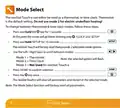
- 8. Mode Select (Thermostat → Time Clock → Factory Reset → Selectable Mode Options)
- 9. Mode 1 Thermostat
- 10.
- 11. Lcd Display (Holiday → Frost Protection → Flame Symbol → Advanced Until → Day Indicator → Hold Left)
- 12. Set Up & Pairing (Pairing The Neohub → Neostat Series)
- 13. Set Up & Pairing (Pairing The Neostat Touch-e)
- 14. Power On/off (Thermostat Completely Off → Thermostat Powered On)
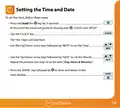
- 15. Setting The Time And Date
- 16. Temperature Display (Room Temperature → Floor Temperature)
- 17. Temperature Control (Set Temperature)
- 18. Edit Comfort Levels (Program Mode Options → Factory Programmed Comfort Levels → Weekday/weekend Programming → Day Programming → Hour Mode)
- 19. Use The Up/down Key At The Top To Set The Hours & Minutes (Use The Up/down Keys In The Center To Set The Temperature → Press The Right Arrow Key → Leave Will Now Show With The Current Settings Displayed. → Repeat These Steps Above To Set All Comfort Levels. → For Any Unused Periods Set Time To --: → Press Done To Confirm And Save The Settings)
- 20. Temperature Hold (Cancel/edit Temperature Hold)
- 21. Thermostat Advance (To Enable Advance → To View The Set Temperature → To Change The Set Temperature → To Cancel Advance)
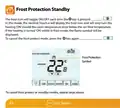
- 22. Frost Protection Standby (Frost Protection → Symbol)
- 23. Locking The Touch Display (Unlocking The Touch Display)
- 24. Holiday (To Set A Holiday → The Display Will Now Show And Indicate Frost Protection Active → To View Or Change The Set Frost Temperature While In Holiday Mode)
- 25. Optional Settings Explained (Switching Differential → Frost Protect Temperature → Output Delay → Temperature Up/down Limit → Sensor Selection → Floor Temp Limit)
- 26. Optimum Start (Rate Of Change → Program Mode → Temperature Format → Back-light Dimming (carbon Models Only))
- 27. Optional Settings - Feature Table (Pairing → Frost Protection Temperature → Output Delay → Up/down Temperature Limit → Sensor Selection → Program Mode)
- 28. Adjusting The Optional Settings (Feature No. → Feature Setting)
- 29. Recalibrating The Thermostat (Error Codes)
- 30. Remote Probe Connections (Probe Types → Remote Floor Sensor → Remote Air Thimble Sensor → Input Connections)
- 31. Wiring Diagram (Model: Neostat Touch-e → Do Not Connect To Electric Underfloor Heating Mat When Using This Device In Mode 2 'time Clock'. → This Product Must Only Be Installed By A Qualified Electrician And Comply With Local Installation Regulations.)
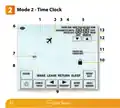
- 32. Mode 2 - Time Clock
- 33. Lcd Display (Holiday → Advanced → Day → Hold → Clock → Mesh)
- 34. Setting The Switching Times (Use The Day Key To Select Day/period Of Week → Press Next To Confirm Selection → Wake Will Now Flash And The On Time Will Be Displayed → Press Next → The Off Time Will Now Be Displayed → Press The Right Arrow Key → Leave Will Now Flash And The On Time Will Be Displayed)
- 35. Timer Advance (To Enable Advance → To Cancel Advance → Time Remaining → Output Status → Level → Advanced Until)
- 36. Timer Override (To Cancel Timer Override)
- 37. Optional Settings Explained (Program Mode → Weekday/weekend → Day Program Mode → Hour Mode → Back-light Dimming (carbon Models Only) → Optional Settings - Feature Table)
- 38. Adjusting The Optional Settings (Feature No. → Feature Setting)
- 39. Wiring Diagram (Time Clock Mode → Model: Neostat Touch-e → Do Not Connect To Electric Underfloor Heating Mat When Using This Device In Mode 2 'time Clock'. → This Product Must Only Be Installed By A Qualified Electrician And Comply With Local Installation Regulations.)
- 40. Want More Information? (Faq → Technical Specifications → Compliance Declaration)
×
heatmiser neoStat Touch-e Touchscreen Electric Floor Heating Thermostat Owner’s Manual
| General | Details |
|---|---|
| Name | heatmiser neoStat Touch-e Touchscreen Electric Floor Heating Thermostat Owner’s Manual |
| Make | heatmiser |
| Language | English |
| Filetype | PDF (Download) |
| File size | 0.64 MB |

heatmiser Slimline-RF V3 Programmable Wireless Thermostat Instructions

heatmiser DS1-V2 Thermostat Owner’s Manual

heatmiser neoStat-e Electric Floor Heating Thermostat Instructions

heatmiser neoStat-Pro Smart Thermostat Instruction Manual

heatmiser Slimline-B V3 Programmable Room Thermostat Owner’s Manual

Vaillant VRC 700 Weather Compensating Thermostat Instruction Manual

EPH CDTP2 Room Thermostat Installation Guide

ecoer EST02 Smart Wi-Fi Thermostat User Guide

GLOBAL WiFi Heating Thermostat User Manual

Honeywell T7350 Programmable Thermostat Owner’s Manual

technolysis HY703RF WIFI Thermostat User Manual

DIGITEN DTC-310 Electronic Temperature Controller Thermostat User Manual

BEOK BOT-R7X Wireless Gas Boiler Heating Thermostat Instruction Manual

BOSCH RT20 RF Room Thermostat User Manual

tekmar U-T-562 WiFi Thermostat User Manual
Table of Contents
- 1. Models: Neo, Stat, Touch-e & Touch-e Carbon →
- 2. Models: Neo, Stat, Touch-e & Touch-e Carbon →
- 3. What Is A Programmable Room Thermostat? - Adjusting The Opti... →
- 4. What Is A Programmable Room Thermostat? - Setting A Programm... →
- 5. The Way To Set And Use Your Programmable Room Thermostat Is ... →
- 6. Installation Procedure - Do →
- 7. Section Header →
- 8. Mode Select - Thermostat →
- 9. Mode 1 Thermostat →
- 10. Page 10 →
- 11. Lcd Display - Holiday →
- 12. Set Up & Pairing - Pairing The Neohub →
- 13. Set Up & Pairing - Pairing The Neostat Touch-e →
- 14. Power On/off - Thermostat Completely Off →
- 15. Setting The Time And Date →
- 16. Temperature Display - Room Temperature →
- 17. Temperature Control - Set Temperature →
- 18. Edit Comfort Levels - Program Mode Options →
- 19. Use The Up/down Key At The Top To Set The Hours & Minutes - ... →
- 20. Temperature Hold - Cancel/edit Temperature Hold →
- 21. Thermostat Advance - To Enable Advance →
- 22. Frost Protection Standby - Frost Protection →
- 23. Locking The Touch Display - Unlocking The Touch Display →
- 24. Holiday - To Set A Holiday →
- 25. Optional Settings Explained - Switching Differential →
- 26. Optimum Start - Rate Of Change →
- 27. Optional Settings - Feature Table - Pairing →
- 28. Adjusting The Optional Settings - Feature No. →
- 29. Recalibrating The Thermostat - Error Codes →
- 30. Remote Probe Connections - Probe Types →
- 31. Wiring Diagram - Model: Neostat Touch-e →
- 32. Mode 2 - Time Clock →
- 33. Lcd Display - Holiday →
- 34. Setting The Switching Times - Use The Day Key To Select Day/... →
- 35. Timer Advance - To Enable Advance →
- 36. Timer Override - To Cancel Timer Override →
- 37. Optional Settings Explained - Program Mode →
- 38. Adjusting The Optional Settings - Feature No. →
- 39. Wiring Diagram - Time Clock Mode →
- 40. Want More Information? - Faq →