
Home > EPH CONTROLS > EPH CONTROLS CRTP2 Room Thermostat Instruction Manual
EPH CONTROLS CRTP2 Room Thermostat Instruction Manual


Page 2 of 3
Operating Instructions
CRTP2 Room Thermostat Battery Operated
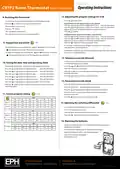
12. Adjusting the program settings for 5/2d
8. Resetting the thermostat
Set
Press the
button twice.
It is necessary to reset the thermostat prior to initial programming.
RESET
Programming for Monday to Friday is now selected.
Press the
‘NO’will appear on the screen.
Press the button.
button on the side of the thermostat.
Press the
Press the
and
and
buttons to adjust the P1 time. Press the ‘OK’button.
buttons to adjust the P1 temp. Press the ‘OK’button.
Repeat this process to adjust P2 to P6 times and temperatures.
Set
‘YES’will appear on the screen.
Press the
button.
Press the ‘OK’button to return to normal operation.
Programming for Saturday to Sunday is now selected.
Press the
Press the
and
and
buttons to adjust the P1 time. Press the ‘OK’button.
buttons to adjust the P1 temp. Press the ‘OK’button.
Repeat this process to adjust P2 to P6 times and temperatures.
Press the button to return to automatic mode.
OFF
9. Keypad lock and unlock
If 7 D mode is selected, you can program each day of the week with 6
individual times and temperatures.
To lock the keypad, press and hold the
will appear on the screen. The keypad is now locked.
To unlock the keypad, press and hold the and buttons for 10 seconds.
and
buttons for 10 seconds.
If 24H mode is selected, you can only program each day of the week with the
same 6 times and temperatures.
will disappear from the screen. The keypad is now unlocked.
13. Temporary override (Manual)
In this mode the thermostat will switch to the temperature set by the user
until the next program is activated.
10. Setting the date, time and operating mode
Set
Press the
and
buttons to adjust the temperature setpoint.
Press the
Press the
Press the
Press the
Press the
Press the
Press the
Press the
button once. ‘Set Date Year’will appear on the screen.
‘Manual’will appear on the screen.
or
or
or
or
or
or
buttons to adjust the year.
Press the ‘OK’button.
Press ‘OK’or after 10 seconds the thermostat will operate in this
temporary override.
buttons to adjust the month. Press the ‘OK’button.
buttons to adjust the day.
buttons to adjust the hour.
Press the ‘OK’button.
Press the ‘OK’button.
Press the
button to return to automatic mode.
buttons to adjust the minute. Press the ‘OK’button.
buttons to adjust from 5/2d to 7d or 24h mode.
14. Permanent override (Hold)
In this mode the thermostat will operate to the temperate set by the user.
button or wait 10 seconds and the thermostat will return to
Hold
normal operation.
Press the
Press the
button. ‘Hold’will appear on the screen.
and buttons to adjust the temperature setpoint.
Press ‘OK’or after 10 seconds the thermostat will operate in this
permanent override.
11. Factory program setting
5 / 2d
Press the
button to return to automatic mode.
5/2D
P1
P2
P3
P4
P5
P6
06:30
21˚C
08:00
21˚C
08:00
18˚C
10:00
18˚C
12:00
21˚C
12:00
21˚C
14:00
18˚C
14:00
18˚C
17:30
21˚C
17:30
21˚C
22:00
16˚C
23:00
16˚C
Mon-Fri
Sat-Sun
15. Adjusting the switching differential
0.4˚C
Press the ‘OK’and ‘Hold’buttons for 5 seconds.
‘0.4˚C’will appear on the screen.
7D
Press the up or down buttons to adjust from 0.2, 0.4, 0.6, 0.8 or 1C.
Press the button to return to normal operation.
P1
P2
P3
P4
P5
P6
06:30
21˚C
08:00
21˚C
08:00
18˚C
10:00
18˚C
12:00
21˚C
12:00
21˚C
14:00
18˚C
14:00
18˚C
17:30
21˚C
17:30
21˚C
22:00
16˚C
23:00
16˚C
Mon-Fri
Sat-Sun
16. Replacing the batteries
24H
Slacken the fastening screw on the bottom of the thermostat with a
philips head screwdriver.
P1
P2
P3
P4
P5
P6
Everyday
06:30
08:00
12:00
14:00
17:30
22:00
21˚C
18˚C
21˚C
18˚C
21˚C
16˚C
The thermostat is hinged and can be opened 180 degrees.
Replace the batteries with 2 x AA Alkaline batteries.
Close the thermostat and tighten
the fastening screw.
EPH Controls Ireland
EPH Controls UK
20221013_CRTP2_OpIns_PK

| General | Details |
|---|---|
| Name | EPH CONTROLS CRTP2 Room Thermostat Instruction Manual |
| Make | EPH CONTROLS |
| Language | English |
| Filetype | PDF (Download) |
| File size | 0.25 MB |
 (1 votes, average: 5.00 out of 5)
 Loading...

EPH CONTROLS eTRV-HW Smart Cylinder Thermostat User Guide

EPH CONTROLS eTRV-HW Smart Hot Water Thermostat Instruction Manual

EPH CONTROLS eTRV Smart Radiator Thermostat Instruction Manual

EPH CONTROLS 20221026 RFRA – RF Room Thermostat Instruction Manual

EPH CONTROLS CDTP2 Hardwired Room Thermostat Instruction Manual

EPH Controls CDT2-24 24V Room Thermostat Installation Guide

EPH CONTROLS RFCA RF Cylinder Thermostat Instruction Manual

EPH CONTROLS PR092K7 RF Cylinder Thermostat Instruction Manual

EPH CONTROLS COMBIPACK2 Smart Thermostat with Automation and Optimum Start Instructions

EPH CONTROLS CRT2 Room Thermostat Instruction Manual


STELPRO STCP MULTIPLE PROGRAMMING ELECTRONIC THERMOSTAT User Guide

Network Thermostat X7C-WIFI Smart Touchscreen Thermostat Instruction Manual

Danfoss ECtemp Smart Intelligent Electronic Timer Thermostat Installation Guide

Gigaset Thermostat Instruction Manual

Cielo CT101WA Smart Thermostat User Manual

WILLIAMS P322016 Millivolt Wall Thermostat Instructions

HEAT-MY-HOME HMH200 WiFi Thermostat User Guide

SIEMENS M3182 Room Thermostat Instruction Manual

Robertshaw RS9423T Thermostat Installation Guide

AIRZONE Blueface Zero Thermostat User Manual