Home > HEAT-MY-HOME > HEAT-MY-HOME HMH200 WiFi Thermostat User Guide
HEAT-MY-HOME HMH200 WiFi Thermostat User Guide
| General | Details |
|---|---|
| Name | HEAT-MY-HOME HMH200 WiFi Thermostat User Guide |
| Make | HEAT-MY-HOME |
| Language | English |
| Filetype | PDF (Download) |
| File size | 0.23 MB |

HEAT-MY-HOME HMH200 WiFi Thermostat User Guide Overview
Summary of Contents
- Page 1: Scan QR on backside for app download.
- Page 2: Page 2
- Page 3: Introduction HMH200 fulfills the demands set out in Ecodesign Lot20. The thermostat is programmable, has adaptive heating and includes an open window function. The control of the floor heating is easily adapted to fit the requirements in different rooms. A floor temperature limiting function is included, ideal for use together with wooden or engineered floor boards. The controller can operate using its room temperature or floor temperature sensors individually or in combination. The thermostat is easily controlled through the App when connected to your WiFi.
- Page 4: Page 4
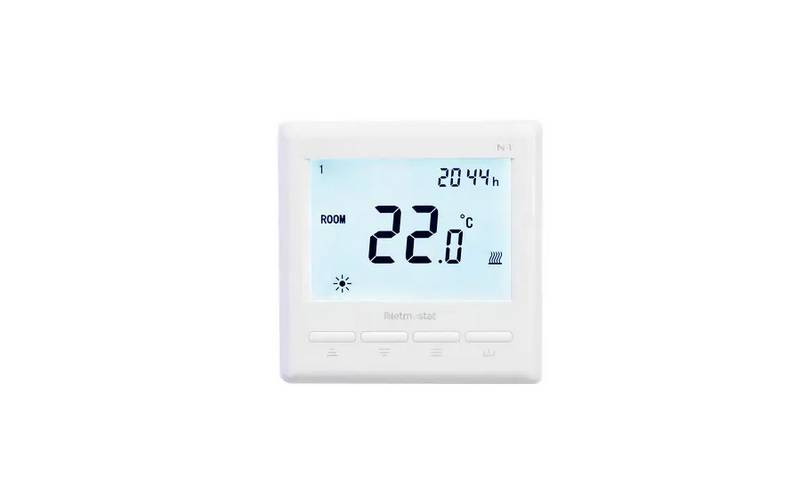
- Page 5: Buttons are used for various functions. A short press changes the working mode or acts as enter during configuration. A long press allows for adjustments to time and day settings. Holding for 5 seconds enables editing of events in standby mode. The thermostat can be toggled between standby and ON. Pressing the temperature or setting up button for 5 seconds toggles the screen lock. The temperature or setting down button is also available.
- Page 6: Page 6
- Page 7: Display description includes temperature displayed, room, floor, and target temperature. Current operating modes are Eco, Auto, and Manual. In Auto mode, it shows the active event: Morning, Away, Home, Comfort, Holiday, and Night. The display indicates the day of the week and time of day. A steady indicator shows when connected to the app, while blinking indicates connecting. Heating and frost protection statuses are displayed, ensuring safe room temperature. An open window indicator is also present.
- Page 8: Set time and day of week. To edit weekday and time of day, press. Weekday is blinking. Adjust with. Confirm selection. Hours are blinking. Adjust with. Confirm selection. Minutes are blinking. Adjust with. Confirm selection.
- Page 9: To edit events, make sure thermostat is in standby. Long-press for 5 seconds. Weekday and event type is blinking. Choose event and day. Confirm to edit. Time is blinking. Adjust with controls. Confirm selection. Temperature is blinking. Adjust with controls.
- Page 10: Set days away on holiday by ensuring the thermostat is in standby. Press F1 to display the option. Choose F4 and confirm your selection. Adjust the upper right digits until they reach 11. Large digits in the center of the display indicate the days for holiday. Confirm your selection to save and exit.
- Page 11: Choose the desired operating mode for the thermostat. Mode changes for each press. Modes include Auto, Comfort, Eco, and Holiday. Comfort is preset to a comfortable temperature. Eco is preset to a low temperature to save energy. Holiday lowers temperature for a number of days. When changing temperature in Auto mode, the thermostat will operate in Manual until the next event occurs.
- Page 12: Screen lock can be toggled by pressing and holding for 5 seconds. When the screen lock is active, a specific indicator will be displayed. The user menu provides access to all settings of the thermostat. Ensure the thermostat is in standby before accessing the user menu. F1 is displayed to choose settings, and confirmation is done with a specific action. F1 and F2 functions are described in detail earlier in the instructions. F1 allows setting the time and day of the week. F2 is for editing events. F3 shows the on status counter for day-month-year. F4 provides access to advanced settings. F5 is for connecting to the app.
- Page 13: Advanced settings provide options for configuration. The upper right digits indicate the setting currently being edited. Large digits in the center of the display show the setting value. Adjustments can be made with specific controls. Confirm selection to proceed with changes. Save and exit to finalize settings. Sensor applications include combined, room, and floor sensors. Calibration options are available for room and floor temperatures. Temperature limits range from 5 to 60°C. Week type settings allow for different configurations for weekdays and weekends.
- Page 14: Adaptive heating Open window Frost protection Holiday, days away Hysteresis, heating Display accuracy Setting accuracy Restore defaults Temperature unit Power failure state
- Page 15: WIFI - connect to app Upper right digits display Large digits in center of display indicate the setting value. Adjust with Confirm selection Save and exit 000 is the default value 001 ~ reset WiFi connection and set the thermostat as visible for the app.
- Page 16: Connections section outlines terminal descriptions and specifications. N1 is designated for load and power supply connections. L is another terminal with no function specified. L1 is associated with sensor connections. The floor sensor has a resistance value in kΩ. The supply specifications indicate a maximum of 16A / 3600W. The device operates within a voltage range of 85-240Vac and a frequency of 50-60Hz. The product has an IP21 rating. A serial number format is provided as YYYYMMXXXX. The type of sensor used is HMH200.
- Page 17: Precautions Do not install thermostat in direct sunlight. Do not install on severely cold outer walls. If the thermostat is not in the same room as the heating, the floor sensor only setting can be used. Install floor sensor min 0.5m from the wall (cable can be extended with up to 7m, min. 2x0.5mm² cable). Do not cover the thermostat, this will cause overheating. All connections to the thermostat must comply with national regulations and be installed by an authorised electrician. Power supply to the thermostat must be supplied through a 30mA RCD and include overload protection through a suitably rated fuse.
- Page 18: Remove front panel by loosening the screw in the bottom. Pull out on the lower half of the front panel. Assemble by inserting tabs of the front panel into the base panel. Tilt the lower half in and tighten the screw.
- Page 19: Specifications include supply voltage, maximum load, IP class, temperature range, sensor settings, display type, floor sensor type, color, dimensions, and regulations. The supply voltage is 85-240 V / 50-60 Hz. The maximum load is 3600 W (16 A). The IP class is IP21. The temperature range is +5° C to +40° C. Sensor settings include options for floor, room, or room with floor sensor as temperature limiter. The display type is a 3.2” VA LCD backlit. The floor sensor type is 10 KΩ @25°C, length 3m. The color options are white and black (RAL 9003 / 9005). Dimensions are 86 x 86 x 39 mm. Regulations include LVD 2014/35/EU, EMC 2014/30/EU, RED 2014/53/EU, RoHS (EU) 2015/1188, and REACH regulation (EC) No.1907/2006. Troubleshooting codes include E1 for room sensor error and E2 for floor sensor error.
- Page 20: Page 20