
Home > Commercial Electric > Commercial Electric HTSA15CWB Smart Thermostat User Guide
Commercial Electric HTSA15CWB Smart Thermostat User Guide





Installation (continued)
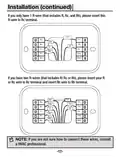
Insert R-wire or wires.
11
□
Depress the tabs to put the wires into the inner holes of their
corresponding terminals on the Back Plate (B) (one wire per terminal)
until it is firmly in place.
NOTE:Make sure at least 1/4-inch of each wire is exposed for
easy insertion into the wire terminals.
Press the terminal block levers to insert the wires.
□
Stretch the wires gently to ensure they are securely connected. When a
wire has been connected correctly, the lever on the block will lower.
-16-

| General | Details |
|---|---|
| Name | Commercial Electric HTSA15CWB Smart Thermostat User Guide |
| Make | Commercial Electric |
| Language | English |
| Filetype | PDF (Download) |
| File size | 1.81 MB |
 (1 votes, average: 5.00 out of 5)
 Loading...


PNI-CT40 Smart Wireless Thermostat User Manual

Honeywell Lyric Thermostat THP2400A1019 Installation Guide

GENERAL LIFE HT250S Smart Room Thermostat User Manual

Wengart TP808 Low Voltage Thermostat User Guide

GENERAL LIFE FH105S Underfloor Heating Thermostat User Manual

GENERAL LIFE FH250 Underfloor Heating Thermostat User Manual

Honeywell RCHT8610WF Series Smart Thermostat Installation Guide

DELTA DORE TYBOX 1127 Programmable Thermostat User Guide

HYSEN HY608 Wi-Fi Digital Heating Thermostat User Manual

Honeywell Home RTH Series X2S Smart Thermostat Installation Guide