Home > Commercial Electric > Commercial Electric HTSA15CWB Smart Thermostat User Guide
×
- 1. Smart Thermostat
- 2. Safety Information (Fcc Regulation → Wireless Protocol → Warranty → Package Contents → Pre-installation → Installation)
- 3. Safety Information (Required 24vac Power With 0.7a Maximum Current Only → Note → Caution)
- 4. Fcc Regulation (Suppliers Declaration Of Conformity → Cfr 2.1077 Compliance Information → Responsible Party)
- 5. Fcc Regulation (continued) (Compliance With Fcc Rules → Conditions Of Operation → Testing And Compliance → Interference And Solutions)
- 6. Wireless Protocol (Warranty → Year Limited Warranty)
- 7. Package Contents (User Guide → Smart Thermostat → Power Extender Kit (pek) → Quick Start Guide)
- 8. Pre-installation (Planning Installation → Tools Required)
- 9. Installation
- 10. Installation (continued) (Remove Your Old Thermostat From The Wall Plate → Note)
- 11. Installation (continued) (Take A Picture Of The Wires → Connected To The Terminals → Of Your Old Thermostat. → The Smart Thermostat Is → Designed For 24vac With → A 0.7a Maximum Current. → Use The Wire Labels (g) Included As Each Wire Is Removed)
- 12. Installation (continued) (Power Extender Kit (pek) Installation)
- 13. Installation (continued) (Carefully Disconnect And Label The Wires From Your Old Thermostat One At A Time, Using The Labels Provided. → Note: The Existing Wire May Not Be Color Coded To The Letter On The Terminal.)
- 14. Installation (continued) (Follow The Step Below To Install Your Thermostat)
- 15. Installation (continued) (Insert The Wall Anchors (f) → Level The Wall Plate (c) → Use The Drill Bit Size Φ6mm To Make The Holes For The Wall Anchors (f) → Insert Wall Anchors (f))
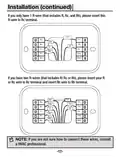
- 16. Installation (continued) (Insert R-wire Or Wires)
- 17. Installation (continued) (If You Only Have 1 R-wire → If You Have Two R-wires → Note)
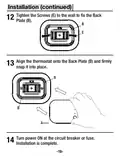
- 18. Installation (continued) (Tighten The Screws To The Wall To Fix The Back Plate → Align The Thermostat Onto The Back Plate → Turn Power On At The Circuit Breaker Or Fuse → Installation Is Complete)
- 19. Power Extender Kit (pek) Installation (If You Do Not See A C Wire In The Wall, Please Install As Below Steps With The Included Pek (d) In The Box.)
- 20. Power Extender Kit (pek) Installation (Control Board → Hvac System → Be Careful)
- 21. Power Extender Kit (pek) Installation (Take A Picture Of The Wires Connected To Your Control Board → Label Only The R, Y, G And W Wire With The Matching Labels Provided → Disconnect The Wires Labeled R, Y, G And W From The Hvac Control Board)
- 22. Power Extender Kit (pek) Installation (Connect The Wires You Disconnected From The Hvac Control Board → Connect The Five Wires Coming Out From Pek With Hvac Control Board)
- 23. Power Extender Kit (pek) Installation (Check Installation Of Pek → Mounting The Pek Inside Hvac System)
- 24. Power Extender Kit (pek) Installation (Remove The Old Thermostat And Install The Smart Thermostat)
- 25. Operation (Download The Hubspace App From The Apple App Store Or The Google Play Store. → Connect Your Thermostat To Power And Follow The Instructions On The App Screen. → My Home)
- 26. Hubspace App Quick Start Guide (Using Your Smart Thermostat → Power & Hvac Types → Control Temperature → Change Modes → Configure Presets → Create Schedules)
- 27. Current Temperature (Schedule Mode → Wifi Status → Auto Status → Fan Button → 'temperature+' Button → 'temperature-' Button)
- 28. Operation (continued) (Adjust Temperature → Adjust The Fan Mode → Mode Change)
- 29. Power & Hvac Types
- 30. Specification (Compatibility → Troubleshooting)
- 31. Troubleshooting (Problem → Solution → Wi-fi Connection Issues → Qr Code Issues → Product Offline Issues → Adding A Product)
- 32. Questions, Problems, Missing Parts? Before Returning To The Store, Call Hubspace Customer Service 8 A.m. - 7 P.m., Est, Monday-friday, 9 A.m…
×
Commercial Electric HTSA15CWB Smart Thermostat User Guide
Power Extender Kit (PEK) Installation (continued)
I. Remove the old thermostat and install the smart thermostat
according to the following wiring. Refer to the previous installation
steps (from STEP 1 to STEP 11 on the Installation Section).
Rc
RH
C
Y1
Y2
G
W1
W2
O/B
PEK
Must pay a attention that:
R/RC/RH wire -> RC terminal
G wire -> C terminal
Y1 wire -> PEK terminal
-24-
| General | Details |
|---|---|
| Name | Commercial Electric HTSA15CWB Smart Thermostat User Guide |
| Make | Commercial Electric |
| Language | English |
| Filetype | PDF (Download) |
| File size | 1.81 MB |


CENTER EHE0200322 RF Wireless 7 Day Programmable Thermostat Installation Guide

Danfoss DEVIreg 530 Electronic Thermostat Installation Guide

expert4house BHT-006 Series Thermostat Instruction Manual

Global Sources WT598 1T1 Smart Thermostat Instructions

Carrier EB-STATE7ICR-01 Ecobee for Smart Thermostat Owner’s Manual

Danfoss CET B-RF Wireless Electronic Hot Water Cylinder Thermostat Installation Guide

Honeywell TC300 Commercial Thermostat Instruction Manual

White Rodgers 1E78 5 2 Day Programmable Thermostat Instruction Manual

Danfoss CF Wireless Floorheating Controller and Room Thermostat Instruction Manual

iO HVAC Controls T-32-P2 Universal Thermostat Instruction Manual
Table of Contents
- 1. Smart Thermostat →
- 2. Safety Information - Fcc Regulation →
- 3. Safety Information - Required 24vac Power With 0.7a Maximum ... →
- 4. Fcc Regulation - Suppliers Declaration Of Conformity →
- 5. Fcc Regulation (continued) - Compliance With Fcc Rules →
- 6. Wireless Protocol - Warranty →
- 7. Package Contents - User Guide →
- 8. Pre-installation - Planning Installation →
- 9. Installation →
- 10. Installation (continued) - Remove Your Old Thermostat From T... →
- 11. Installation (continued) - Take A Picture Of The Wires →
- 12. Installation (continued) - Power Extender Kit (pek) Installa... →
- 13. Installation (continued) - Carefully Disconnect And Label Th... →
- 14. Installation (continued) - Follow The Step Below To Install ... →
- 15. Installation (continued) - Insert The Wall Anchors (f) →
- 16. Installation (continued) - Insert R-wire Or Wires →
- 17. Installation (continued) - If You Only Have 1 R-wire →
- 18. Installation (continued) - Tighten The Screws To The Wall To... →
- 19. Power Extender Kit (pek) Installation - If You Do Not See A ... →
- 20. Power Extender Kit (pek) Installation - Control Board →
- 21. Power Extender Kit (pek) Installation - Take A Picture Of Th... →
- 22. Power Extender Kit (pek) Installation - Connect The Wires Yo... →
- 23. Power Extender Kit (pek) Installation - Check Installation O... →
- 24. Power Extender Kit (pek) Installation - Remove The Old Therm... →
- 25. Operation - Download The Hubspace App From The Apple App Sto... →
- 26. Hubspace App Quick Start Guide - Using Your Smart Thermostat →
- 27. Current Temperature - Schedule Mode →
- 28. Operation (continued) - Adjust Temperature →
- 29. Power & Hvac Types →
- 30. Specification - Compatibility →
- 31. Troubleshooting - Problem →
- 32. Questions, Problems, Missing Parts? Before Returning To The ... →