
Rayotec Coloursense Wi-Fi Thermostat Instruction Manual

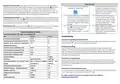


Rayotec Coloursense Wi-Fi Thermostat Manual
Description of icons
Before wiring and installing
1. Read instructions carefully. Failure to follow them could cause damage or a hazardous condition.
Programming mode
Installer must be a trained and qualified Electrician.
2. Thermostat is 16 Amp max rated – Do not exceed max load.
3. When installing heating in a bathroom/wet room the thermostat needs to be placed outside the room.
4. The thermostat is mounted onto a standard 35mm backbox, this should be placed at light switch level,
away from other heat sources, so that it can get an average temperature of the room.
Manual mode
Temporary manual mode
Wiring Order in Terminals
3 & 4 = Incoming power
5 & 6 = Heating mat
7 & 8 = Floor probe
Child lock
Holiday mode
Heating on
Sensor error
Activate window function
Return to last menu
Password
The default password for the thermostat is “123456” You can change the password in the advanced settings
menu. You can turn password request off in the Advanced settings menu by clicking function to “off”.
Programming the thermostat
Default Programming Schedule
Floor probe sensor
Time Schedule
06:00-08:00
08:00-11:30
11:30-12:30
12:30-17:30
17:30-22:00
22:00-06:00
Temperature (default)
You must always install the floor probe sensor. Always check that the temperature limit for the floor probe
is set to a suitable temperature for your flooring (typically 27℃). This can be done in the advanced setting
menu A6 (see next page). Always test the floor probe with a megger tester or fluke tester set to 2000 ohms,
the reading should be between 8-15 ohms. The live and neutral are interchangeable. Floor probe must
fitted under the heating mat, equal distance between two heating elements within a conduit (see heating
mat instructions). Failure to do so will cause heating to turn off prematurely or not provide adequate
protection.
Period 1
Period 2
Period 3
Period 4
Period 5
Period 6
20
15
15
15
20
15
This icon will indicate an error with the floor probe, if this appears check the connection and run a
continuity test on the cables to ensure no damage has been done.
Programming schedule directly on thermostat: To access schedule tap
“Settings” button,
then press the “Programming Parameters” tab. To change the time and temperature of each section,
simply tap on the desired option and then use the up and down arrows on screen to change it to your
required time / temperature, when you have the correct setting click “confirm” to accept. Repeat this until
you are happy with all of the time and temperature schedules. You can have different times and
temperatures for weekdays and weekends if you are on 5+2 mode (default) or have all days the same on 7
day mode. If you just want a different setting for Sunday only, select the 6+1 day mode.
Button Functions
Symbol
Function
A
B
Turns the display ON/OFF
1. Tap to change temperature until next programmed time schedule
2. Hold for a few seconds to unlock child lock
C
1. Tap to change temperature until next programmed time schedule
Programming schedule using “Smart life” App: Once Wi-Fi pairing has been completed (see
last page) – Go to “Settings” and select “Weekly Program Setting”. Then simply set the “Workday” and
D
Tap to enter Settings menu


| General | Details |
|---|---|
| Name | Rayotec Coloursense Wi-Fi Thermostat Instruction Manual |
| Make | Rayotec |
| Language | English |
| Filetype | PDF (Download) |
| File size | 0.18 MB |
 (1 votes, average: 5.00 out of 5)
 Loading...

Rayotec PERGARP0DCN6YB3I Wi-Fi Thermostat Instruction Manual

Rayotec Freedom Wi-Fi Thermostat Instructions

Rayotec Coloursense Manual: Questions and Answers
How do I change the temperature schedule on my Rayotec Coloursense thermostat?
Access the schedule through Settings, then Programming Parameters. Tap the time or temperature you want to change, use the arrows to adjust it, and click confirm.
- Tap the Settings button.
- Press the Programming Parameters tab.
- Tap the desired time or temperature option.
- Use the up and down arrows to change the value.
- Click confirm to accept. Instruction Manual, p. 1
How do I install the floor probe sensor in my Rayotec Coloursense thermostat?
Place the probe under the heating mat in a conduit, positioned equally between two heating elements.
- Position the floor probe under the heating mat.
- Place it in a conduit.
- Space it equally between two heating elements. Instruction Manual, p. 1
What's the maximum current my Rayotec Coloursense can handle, and can I use it in a bathroom?
The thermostat is rated for 16 Amp maximum. If installing heating in a bathroom or wet room, the thermostat must be mounted outside that room. Instruction Manual, p. 1
More Rayotec thermostat manuals

STELPRO STE302NP Single Programming Electronic Thermostat User Guide

EPH CONTROLS RFRP-HW-OT Wireless Cylinder Thermostat Installation Guide

SUNSKY BAC-2005 Smart Thermostat User Manual

Beca BHT-009 AI KnobThermostat User Guide

PRO T751 Thermostat Installation Guide

GENERAL LIFE SENNA 300 Wired Room Thermostat User Manual

GENERAL LIFE HT300S Digital Room Thermostat User Manual

Danfoss TP5001 Programmable Room Thermostat User Guide

Tense STC-1000 Thermostat User Guide

EPH CONTROLS RDTP Recessed Room Thermostat Installation Guide