Home > Commercial Electric > Commercial Electric HTSA15CWB Smart Thermostat User Guide
×
- 1. Smart Thermostat
- 2. Safety Information (Fcc Regulation → Wireless Protocol → Warranty → Package Contents → Pre-installation → Installation)
- 3. Safety Information (Required 24vac Power With 0.7a Maximum Current Only → Note → Caution)
- 4. Fcc Regulation (Suppliers Declaration Of Conformity → Cfr 2.1077 Compliance Information → Responsible Party)
- 5. Fcc Regulation (continued) (Compliance With Fcc Rules → Conditions Of Operation → Testing And Compliance → Interference And Solutions)
- 6. Wireless Protocol (Warranty → Year Limited Warranty)
- 7. Package Contents (User Guide → Smart Thermostat → Power Extender Kit (pek) → Quick Start Guide)
- 8. Pre-installation (Planning Installation → Tools Required)
- 9. Installation
- 10. Installation (continued) (Remove Your Old Thermostat From The Wall Plate → Note)
- 11. Installation (continued) (Take A Picture Of The Wires → Connected To The Terminals → Of Your Old Thermostat. → The Smart Thermostat Is → Designed For 24vac With → A 0.7a Maximum Current. → Use The Wire Labels (g) Included As Each Wire Is Removed)
- 12. Installation (continued) (Power Extender Kit (pek) Installation)
- 13. Installation (continued) (Carefully Disconnect And Label The Wires From Your Old Thermostat One At A Time, Using The Labels Provided. → Note: The Existing Wire May Not Be Color Coded To The Letter On The Terminal.)
- 14. Installation (continued) (Follow The Step Below To Install Your Thermostat)
- 15. Installation (continued) (Insert The Wall Anchors (f) → Level The Wall Plate (c) → Use The Drill Bit Size Φ6mm To Make The Holes For The Wall Anchors (f) → Insert Wall Anchors (f))
- 16. Installation (continued) (Insert R-wire Or Wires)
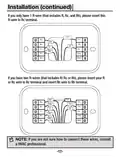
- 17. Installation (continued) (If You Only Have 1 R-wire → If You Have Two R-wires → Note)
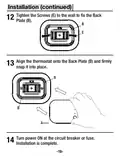
- 18. Installation (continued) (Tighten The Screws To The Wall To Fix The Back Plate → Align The Thermostat Onto The Back Plate → Turn Power On At The Circuit Breaker Or Fuse → Installation Is Complete)
- 19. Power Extender Kit (pek) Installation (If You Do Not See A C Wire In The Wall, Please Install As Below Steps With The Included Pek (d) In The Box.)
- 20. Power Extender Kit (pek) Installation (Control Board → Hvac System → Be Careful)
- 21. Power Extender Kit (pek) Installation (Take A Picture Of The Wires Connected To Your Control Board → Label Only The R, Y, G And W Wire With The Matching Labels Provided → Disconnect The Wires Labeled R, Y, G And W From The Hvac Control Board)
- 22. Power Extender Kit (pek) Installation (Connect The Wires You Disconnected From The Hvac Control Board → Connect The Five Wires Coming Out From Pek With Hvac Control Board)
- 23. Power Extender Kit (pek) Installation (Check Installation Of Pek → Mounting The Pek Inside Hvac System)
- 24. Power Extender Kit (pek) Installation (Remove The Old Thermostat And Install The Smart Thermostat)
- 25. Operation (Download The Hubspace App From The Apple App Store Or The Google Play Store. → Connect Your Thermostat To Power And Follow The Instructions On The App Screen. → My Home)
- 26. Hubspace App Quick Start Guide (Using Your Smart Thermostat → Power & Hvac Types → Control Temperature → Change Modes → Configure Presets → Create Schedules)
- 27. Current Temperature (Schedule Mode → Wifi Status → Auto Status → Fan Button → 'temperature+' Button → 'temperature-' Button)
- 28. Operation (continued) (Adjust Temperature → Adjust The Fan Mode → Mode Change)
- 29. Power & Hvac Types
- 30. Specification (Compatibility → Troubleshooting)
- 31. Troubleshooting (Problem → Solution → Wi-fi Connection Issues → Qr Code Issues → Product Offline Issues → Adding A Product)
- 32. Questions, Problems, Missing Parts? Before Returning To The Store, Call Hubspace Customer Service 8 A.m. - 7 P.m., Est, Monday-friday, 9 A.m…
×
Commercial Electric HTSA15CWB Smart Thermostat User Guide
Installation (continued)
Tighten the Screws (E) to the wall to fix the Back
Plate (B).
12
B
Rc
Y1
Y2
G
RH
E
C
W1
O/B
W2
PEK
Align the thermostat onto the Back Plate (B) and firmly
snap it into place.
13
B
Rc
RH
C
Y1
Y2
G
W1
O/B
W2
PEK
B
A
Turn power ON at the circuit breaker or fuse.
Installation is complete.
14
-18-
| General | Details |
|---|---|
| Name | Commercial Electric HTSA15CWB Smart Thermostat User Guide |
| Make | Commercial Electric |
| Language | English |
| Filetype | PDF (Download) |
| File size | 1.81 MB |


GENERAL SENNA 270S Smart Room Thermostat User Manual

ENGO E20i Series Wi-Fi Wireless Internet Thermostat User Guide
ESi ESRTP4 TOUCH Programmable Room Thermostat Instruction Manual

MODINE DFG Mild Temperature Thermostat Installation Guide

Klima 825201 Intelligent Control Wi-Fi Underfloor Heating Thermostat User Manual

LEHNER VERSAND 01477 Easymaxx Digital Radiator Thermostat User Manual

Google G953-01573-01-A Nest 4th Gen Smart Wi-Fi Thermostat Owner’s Manual

GENERAL MITRA 220 RF Digital Room Thermostat User Manual

ESP ECSPST Fort Programmable Thermostat User Manual

Honeywell Home T3 Pro Non-Programmable Thermostat User Manual
Table of Contents
- 1. Smart Thermostat →
- 2. Safety Information - Fcc Regulation →
- 3. Safety Information - Required 24vac Power With 0.7a Maximum ... →
- 4. Fcc Regulation - Suppliers Declaration Of Conformity →
- 5. Fcc Regulation (continued) - Compliance With Fcc Rules →
- 6. Wireless Protocol - Warranty →
- 7. Package Contents - User Guide →
- 8. Pre-installation - Planning Installation →
- 9. Installation →
- 10. Installation (continued) - Remove Your Old Thermostat From T... →
- 11. Installation (continued) - Take A Picture Of The Wires →
- 12. Installation (continued) - Power Extender Kit (pek) Installa... →
- 13. Installation (continued) - Carefully Disconnect And Label Th... →
- 14. Installation (continued) - Follow The Step Below To Install ... →
- 15. Installation (continued) - Insert The Wall Anchors (f) →
- 16. Installation (continued) - Insert R-wire Or Wires →
- 17. Installation (continued) - If You Only Have 1 R-wire →
- 18. Installation (continued) - Tighten The Screws To The Wall To... →
- 19. Power Extender Kit (pek) Installation - If You Do Not See A ... →
- 20. Power Extender Kit (pek) Installation - Control Board →
- 21. Power Extender Kit (pek) Installation - Take A Picture Of Th... →
- 22. Power Extender Kit (pek) Installation - Connect The Wires Yo... →
- 23. Power Extender Kit (pek) Installation - Check Installation O... →
- 24. Power Extender Kit (pek) Installation - Remove The Old Therm... →
- 25. Operation - Download The Hubspace App From The Apple App Sto... →
- 26. Hubspace App Quick Start Guide - Using Your Smart Thermostat →
- 27. Current Temperature - Schedule Mode →
- 28. Operation (continued) - Adjust Temperature →
- 29. Power & Hvac Types →
- 30. Specification - Compatibility →
- 31. Troubleshooting - Problem →
- 32. Questions, Problems, Missing Parts? Before Returning To The ... →