
Home > Blue Universal > Blue Universal OH-1202 Touchscreen Thermostat Instruction Manual
Blue Universal OH-1202 Touchscreen Thermostat Instruction Manual






PROGRAMMING
Cooling Example:
1. In cool, press Auto Schedule once.
2. Press or to select a comfortable cooling
Enter the Cooling Program
1. Press the SYSTEM key until the "Cool" icon appears.
2. Follow Enter Heating Program instructions for entering
cooling times and temperatures.
temperature (example 75°).
3. Press Auto Schedule again.Your thermostat is now
programmed for 75° for all cooling time periods.
Automatic Schedule
Auto Schedule Heat is a fast way to program all the heating
temperatures during the day to a comfortable temperature
and then lower the temperature 6° at night. Auto Schedule
Cool will program all of the cooling time periods to the same
temperature.
Your cooling program for each day of the week will look like
this:
6:30
8:00
75°
75°
75°
75°
Note: Auto Schedule is available only when the thermostat
is first powered on, after the thermostat has been reset, or
anytime you turn AS on in the Configuration Menu (item 17
AS Heat or 18 AS Cool).
5:00
10:30
Programmable Fan Option
Heating Example:
In the Set Schedule mode, the Fan key is used to select the
fan operation during a program period. The default state of
the Fan key is FAN Auto (fan runs during a call for cool but
not on a call for heat). It can be changed to FAN Prog (fan
runs during a program period). Each press of the FAN key will
change the mode of the fan between Auto and Prog.
1. In Heat mode, press Auto Schedule once.
2. Press
or
temperature (example 72°).
to select a comfortable day time
3. Press Auto Schedule again.Your thermostat is now
programmed for 72° from 6:30 AM until 10:30 PM at 72°.
At 10:30 PM, your thermostat will set back 6° to 66°.
In the Run mode, when a program period that has FAN Prog
begins, the fan will turn on and stay on during the complete
period. The display will show FAN On Prog. Pressing the FAN
key will change FAN On Prog to On (fan running continuous-
ly) or Auto. To return to FAN On Prog, press Run Schedule.
Your heating program for each day of the week will look like
this:
6:30
8:00
72°
72°
72°
66°
5:00
10:30
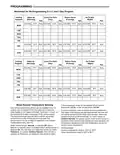
Energy Saving Factory Pre-Program
The 1F95-1291 thermostats are programmed with the energy saving settings shown in the table below for all days of the week.
If this program suits your needs, simply set the thermostat clock and press the RUN key.
The table below shows the factory set heating and cooling schedule for all days of the week.
* Wake Up
(Morning)
Leave For Work
(Day)
* Return Home
(Evening)
Go To Bed
(Night)
Heating Program
Cooling Program
6:00 AM
70°F
75°F
8:00 AM
8:00 AM
62°F
83°F
5:00 PM
5:00 PM
70°F
75°F
10:00 PM
62°F
78°F
6:00 AM
10:00 PM
* You can eliminate these two program periods in the configuration menu (reference #5) if the building is occupied all day.
Day period will change to 6:00 AM and 70° and can be programmed as required.
PlanningYour Program – Important
The Heating and Cooling Program schedules below allow you to pencil in your own program times and temperatures.
The thermostat comes configured for 7 day programming and can also be configured for 5+1+1 programming (see
configuration section).
Factory settings are listed on Monday, Saturday and Sunday. If you are re-programming a 5+1+1 day schedule, pencil in your
own times and temperatures directly below the factory times and temperatures.
If you are re-programming a 7 day schedule, fill in all lines with the times and temperatures you want.
Keep the following guidelines in mind when planning your program.
• In Heating, lower temperatures will save energy.
• In Cooling, higher temperatures will save energy.
• If you plan on using Auto Changeover, do not program the heating temperature higher than the cooling temperature.
11

| General | Details |
|---|---|
| Name | Blue Universal OH-1202 Touchscreen Thermostat Instruction Manual |
| Make | Blue Universal |
| Language | English |
| Filetype | PDF (Download) |
| File size | 0.4 MB |
 (1 votes, average: 5.00 out of 5)
 Loading...


ADEPT T6100 Thermostat Instruction Manual

Honeywell RTH9580 Wi-Fi Color Touchscreen Programmable Thermostat User Guide

TOUPWELL TP808 WiFi Low Voltage Thermostat User Guide

GENERAL Life HT100S Digital Room Thermostat User Guide

ATAG One Zone Thermostat User Manual

Honeywell T4M Programmable Modulating Thermostat Installation Guide

Danfoss 014G0251 Eco Radiator Thermostat User Guide

Beca BHT-9000 Thermostat User Guide

GENERAL LIFE HT250S Smart Room Thermostat User Manual

hysencontrol HYT001 WIFI Digital Heating Thermostat Instruction Manual