
Home > Blue Universal > Blue Universal OH-1202 Touchscreen Thermostat Instruction Manual
Blue Universal OH-1202 Touchscreen Thermostat Instruction Manual


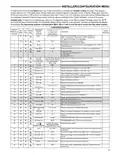




INSTALLER/CONFIGURATION MENU
CONFIGURATION MENU
Screen
Reference
Number
Displayed
Factory
(Default)
Press
or
to select from
listed options
On
Press
key
SS1 HP1
MS2 HP2
Option
Selected
Comments
33
34
35
(OFF) dF
(35) dF
(05) dF
Selects Dual Fuel feature On or OFF (this item appears if HP1 or
HP2 is selected above).
-5 - 50
0 - 09
Selects Dual Fuel setpoint (°F), dF selected On with outdoor sen-
sor available.
Selects Dual Fuel setpoint (°F), dF selected On with no outdoor
sensor.
36
37
(60) Cd
(80) AO
0-99
Selects compressor off delay in seconds, dF selected On
-5 - 79
Selects Auxiliary Heat cut out temperature. This item appears
if HP1 or HP2 is selected and outdoor sensor is installed and
enabled.
38
(OFF) Change
UV Lamp
On
Selects Change UV Lamp feature.
39
40
350 Days
25-1975
On
Change UV Lamp duration days.
Selects Change Filter feature.
OFF
Change Filter
41
200 Hrs
25-1975
Change Filter duration hours.
1. This control can be configured for:
MS2 – Multi-Stage System (2 heat/2 cool)
Example: The heating program is 65°F at night and 70°
at 7 AM. If the building temperature is 65°F, the difference
is 5°F. Allowing 5 minutes per °F rise, the thermostat
setpoint will change to 70° at 6:35 AM. Cooling allows
more time per °F, because it takes longer to reach
temperature.
HP1 – Heat Pump with one stage of compressor (2
heat/1 cool)
HP2 – Heat Pump with two stage compressor or two
compressor system, Gas or Electric backup; (Dual Fuel
see screen reference number 33) (4 heat/2 cool)
SS1 – Single Stage System (3 wire zone see wiring
diagrams.
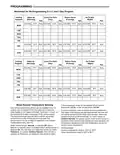
8, 9 & 10. Cycle Rate Selection – The factory default setting
is fast cycle (FA Cr) in all modes (Heat, Cool, Em). To
change to slow cycling (SL, Cr), press touch keys
or
toggle between FA & SL. The cycle rates are below:
2. GAS or Electric (ELE) fan operation. If the heating
system requires the thermostat to energize the fan, select
ELE. Select GAS if the heating system energizes the
fan on a call for heat. Note: Resetting the thermostat
switches the option to GAS.
3. O/B Terminal selection – Selects the operation of the
reversing valve (when item 1 is set to HP1 or HP2 only).
When set to "O" the changeover valve will be energized in
COOL to accommodate the majority of heat applications.
If the heat pump requires the changeover valve to
energize in HEAT, select "B".
4. Programs per week – This control can be configured
for 7 independent day or 5+1+1 day programming or
nonprogrammable modes. Default is 7-day mode. The
display indicates "7 Days" as default. Other options
"5 Days" or "0 Days" can be selected. If "0 Days" is
selected for non-programmable mode, the step for EMR
will be skipped, as this feature will not be available in
this mode.
5. Program Steps per day – Not available if configured for
non-programmable. This control can be configured for 4
or 2 program steps per day. Default is "4 PS" and can be
toggled between 4 PS and 2 PS.
Mode
Heat
Cool
Heat Pump
Emer Heat
Med
Slow
1.5°F
1.7°F
1.7°F
1.7°F
0.6°F
1.2°F
1.2°F
0.6°F
11. Stage Cycle Completion (SC) – Selecting (SC ON) will
cause the thermostat to complete heating and/or cooling
cycles on the highest stage engaged during the cycle.
Thermostat will not reduce heating or cooling stages
before the heating or cooling cycle is satisfied and all
stages are turned off.
12. Select Compressor Lockout (CL) – Selecting (CL On)
will cause the thermostat to wait 5 minutes between
cooling cycles. This is intended to help protect the
compressor from short cycling. Some of the newer
compressors have a time delay built in and do not
require this feature to be activated in the thermostat.
Your compressor manufacturer can tell you if this lockout
feature is already present in their system. When the
thermostat compressor time delay is activated, it will flash
the set point for up to five minutes.
13. Select Continuous Display Lighting (dL) – In low
lighting conditions, display backlight improves the display
contrast. (See Table 1)
14. Select Temperature Display Adjustment 5 LO to 5 HI
This allows you to adjust the room temperature display by
-5°F to +5°F in 1° steps.Your thermostat was accurately
calibrated at the factory, however you have the option
to change the display temperature value to match the
previous thermostat, if you so prefer.
6. System Switch Configuration (MS2/SS1) – This
thermostat is configured for Heat and Cool with Auto
changeover default (Cool-Off-Heat-Auto). It can be
configured as Heat & Cool (Cool-Off-Heat), or Heat Only
(Off-Heat), or Cool Only (Cool-Off).
When the control is in heat pump configuration (HP1/
HP2), the system switch configuration will have an
additional mode, Em for Emergency.
7. Energy Management Recovery (EMR) – (this step is
skipped if configured as non-programmable). When set
to "On" causes the thermostat to start heating or cooling
early to make the building temperature reach the program
setpoint at the time you specify.
15. Select °F or °C Readout – Changes the display readout
to Celsius or Fahrenheit as required.
16. Select Audio Prompting (Beeper) On or Off – Factory
default setting is b, On. If you wish to turn off the beeper
select OFF.
6

| General | Details |
|---|---|
| Name | Blue Universal OH-1202 Touchscreen Thermostat Instruction Manual |
| Make | Blue Universal |
| Language | English |
| Filetype | PDF (Download) |
| File size | 0.4 MB |
 (1 votes, average: 5.00 out of 5)
 Loading...


TECH CONTROLLERS EU-T-4.1n, EU-T-4.2n Wireless Thermostat User Manual

EUROTRONIC Programmable Energy-Saving Radiator Thermostat User Manual

HEAT DECOR HD-T1000 WIFI Thermostat User Guide

HONEYWELL RTH5160 Series Non-Programmable Thermostat Installation Guide

Danfoss AN325057 Icon Wireless Room Thermostat Installation Guide

BOSCH 6721807275 Smart Radiator Thermostat Installation Guide

tado 104388 Smart Thermostat Installation Guide

Honeywell FocusPRO 5000 Series Digital Thermostat User Guide

STELPRO STCP Floor Heating Thermostat Multiple Programming User Guide

Honeywell TH3110D1008 Non Programmable Digital Thermostat Instruction Manual