
Home > Blue Universal > Blue Universal OH-1202 Touchscreen Thermostat Instruction Manual
Blue Universal OH-1202 Touchscreen Thermostat Instruction Manual


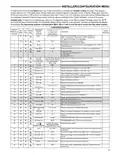


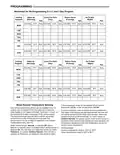


INSTALLER/CONFIGURATION MENU
Power Stealing Switches ON
(Factory Default)
Power Stealing Switches ON
(Factory Default)
Table 1
Backlight Option
Backlight Option
Backlight Option
Backlight Option
OFF
OFF
ON
(Factory Default)
ON
Momentary
Backlight
(Factory Default)
Power Method
Battery Only (before thermostat installation or mV heat systems) No Backlight
Momentary Backlight
No Backlight
Common Attached to "C" Terminal
Momentary Backlight
Continuous Backlight
Momentary Backlight
No Backlight
Continuous Backlight
Continuous
Backlight*
Momentary
Backlight
Battery with Power Stealing on "W/E" and "Y"
Momentary Backlight*
No Backlight*
Battery with "W/E" and "Y" but system does not allow Power
Stealing*
Momentary
Backlight*
Momentary
Backlight
No Backlight
* Power Stealing Backlight Notes:
•
•
If the system is heat or cool only, or does not allow power
•
•
The display light will increase in brightness when a button
is pressed.
On high impedance systems, the display light may dim
slightly when the thermostat is calling for heat or cool.
stealing on the thermostat terminalsW/E andY the backlight
may not operate continuously or drop out when heat or cool
is running.
If the power stealing switches (see page 2) on the back of the
thermostat are set to off the backlight will not be continuous.
17. Select Daylight Saving Time Calculation – This feature
will allow the thermostat to calculate the DST automatically
and apply it to the Real Time Clock display. Default is On.
18 & 19. Select Automatic Schedule – Not available if
configured for non-programmable. This feature allows
programming a “Comfort Temperature” into all program
periods with the Auto Schedule key. When Heat AS
(for Heat mode) or Cool AS (for Cool mode) is selected
On, the Auto Schedule feature is ready to be set. Off
indicates that the feature is not ready to be used or a
“Comfort Temperature" is already set. See Auto Schedule
in Programming section.
20 & 21. Select Cool Savings™ – Cool Savings™ provides an
energy saving temperature offset (from 1-6 degrees) under
peak cooling load conditions (high outdoor temperatures).
If selected on, Cool Savings™ becomes active when the
air-conditioner runs for periods of longer than 20 minutes.
When active, Cool Savings™ gradually offsets the indoor
temperature display downward. The first 1° of adjustment
will take one hour of continuous air conditioner run time
with subsequent 1° adjustments occurring with each
additional half hour of run time (ex for a 2° offset, the air
conditioner would need to run continuously for 1 ½ hours).
The offset is limited to the number of degrees you select
from 1 up to 6. When an offset starts or is active, “Cool
Savings” will flash on the display.
for cool, the fan will continue to run for 20 seconds to
capture additional cooling from the system. If CO is set to
OFF, there will be no delay in fan operation.
23. Comfort Alert with Active Protection – (not available
on earlier models) Turn this feature ON to enable
active protection. This allows the thermostat to identify
fault codes sent by the Comfort Alert module when
compressor damage is possible and react to those codes
by turning the compressor off. Fault codes from the
Comfort Alert module will flash on the thermostat. (Refer
to Comfort Alert Codes in Troubleshooting section.) If
a Comfort Alert module is not connected, or to disable
active protection, turn this feature OFF. If a Comfort Alert
module is connected and this feature is turned OFF, the
thermostat will still receive and flash the fault codes from
the Comfort Alert module, but the active protection will
not be enabled to protect the compressor.
24. Heat Temperature Limit Range – This feature adjusts
the highest setpoint temperature for heat. The default
setting is 99°F. It can be changed to a setting between
62°F and 98°F. The "temperature limit" icon will be
displayed to the left of your setpoint temperature when
using this feature. The "temperature limit" icon will flash
if an attempt is made to adjust the temperature beyond
the range selected.
25. Cool Temperature Limit Range – This feature adjusts
the lowest setpoint temperature for cool. The default
setting is 45°F. It can be changed to a setting between
46°F and 82°F. The "temperature limit" icon will be
displayed to the left of your setpoint temperature when
using this feature. The "temperature limit" icon will flash
if an attempt is made to adjust the temperature beyond
the range selected.
The principle of this energy saving feature takes advantage
of the long air conditioning run times lowering the indoor
humidity allowing a slightly higher temperature to feel
comfortable. As the peak load subsides, this feature also
takes advantage of the air conditioner's increased capacity
under more efficient conditions to gradually reduce the
offset back to zero and return control to the selected
setpoint temperature.
26 & 27. Keypad Lockout – This step allows you to select
the type of lockout or limited range security required. If no
If Cool Savings is selected off, no temperature offset will occur.
22. Compressor Optimization – (Not available on earlier
models) CO provides a delay in circulator fan operation
after the compressor turns on or off. With CO selected
ON, when the compressor turns on (for a call for heat
in heat pump or a call for cool) the fan will be delayed
for five seconds before turning on to allow the air to be
heated or cooled. After the compressor turns off for call
lockout or limited range security is required, press
advance the menu.
to
Three security settings are available in this menu item.
Use the or keys to select the lockout desired.
Lockout selections are:
"Keypad Lockout and L" = Total Lockout. Total Lockout
locks all keys.
7

| General | Details |
|---|---|
| Name | Blue Universal OH-1202 Touchscreen Thermostat Instruction Manual |
| Make | Blue Universal |
| Language | English |
| Filetype | PDF (Download) |
| File size | 0.4 MB |
 (1 votes, average: 5.00 out of 5)
 Loading...


Honeywell Home T3 Pro Non-Programmable Thermostat User Manual

Hydro Smart HSRADSTATWIFI HSRadStat Wi Fi Thermostat User Guide

OJ ELECTRONICS UTN-4991 Non Programmable Thermostat Owner’s Manual

BEOK Color TFT-LCD Heating Thermostat User Manual

YOLINK YS4003-UC Smart Thermostat User Guide

Haswill Electronics STC-9200 Thermostat User Guide

Futurehome Co020, Co021 Smart Thermostat PR Owner’s Manual

JABLOTRON TP-98TX Wireless Thermostat Instruction Manual

HYSEN HY312 Wi-Fi Digital Heating Thermostat Instruction Manual

Danfoss TVM-H Thermostat Valve Owner’s Manual