
TIMEGUARD TRT05 Plug In Thermostat Instruction Manual







•
If the screen is completely blank the device
will need to be fully re-charged. Plug in for
4 hours and press the reset button, located on
the back of the device, to bring the screen on.
•
•
•
The factory fitted non replaceable battery will
keep the programmed times during power
down situations for up to 4 weeks.
The internal battery will continue to be
charged as long as there is a supply
to the unit.
Battery life (approx.) 1000 hours.
5. Programming the Time
•
•
•
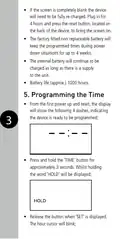
From the first power up and reset, the display
will show the following 4 dashes, indicating
the device is ready to be programmed;
3
Press and hold the ‘TIME’ button for
approximately 3 seconds. Whilst holding
the word ‘HOLD’ will be displayed;
Release the button when ‘SET’ is displayed.
The hour cursor will blink;

| General | Details |
|---|---|
| Name | TIMEGUARD TRT05 Plug In Thermostat Instruction Manual |
| Make | TIMEGUARD |
| Language | English |
| Filetype | PDF (Download) |
| File size | 0.63 MB |
 (1 votes, average: 5.00 out of 5)
 Loading...


telethings 2D Smart LoRaWAN Thermostat User Manual

Robertshaw RS9220 Programmable Thermostat Installation Guide

beca BAC-2000-ML Modulating Touch Button Thermostats User Guide
Netmostat N-1 Smart Wifi Programmable Thermostat User Manual

GENERAL LIFE HT220 Smart Digital Room Thermostat User Manual

namron 4512737 Touch Zigbee 16A Thermostat Instruction Manual

SALUS HTRS-RF(30) Wireless Digital Room Thermostat User Manual

Honeywell TH6100AF2004 T6 Hydronic Programmable Thermostat User Manual

Danfoss TP7000 Series Electronic 7 Day Programmable Room Thermostat Instruction Manual

GENERAL HT220S Smart Room Thermostat Instruction Manual