
Home > Telethings > telethings 2D Smart LoRaWAN Thermostat User Manual
telethings 2D Smart LoRaWAN Thermostat User Manual



USER MANUAL
TELEBUTTON-2D
TELETHINGS D.O.O.
A: Gračaničkih gazija b.b., 75320 Gračanica, Bosna i Hercegovina
T: +387 (0)35 700 209 • F: +387 (0)35 700 201 • E: iot@telethings.com • W: www.telethings.com


| General | Details |
|---|---|
| Name | telethings 2D Smart LoRaWAN Thermostat User Manual |
| Make | Telethings |
| Language | English |
| Filetype | PDF (Download) |
| File size | 0.12 MB |
 (1 votes, average: 5.00 out of 5)
 Loading...

telethings teleRelays-2D Tele Thermostat User Manual

telethings teleRelays-2L Device Thermostat User Manual

telethings TELESWITCH – 2L Smart LoRaWAN Thermostat User Manual

telethings 2D Smart LoRaWAN Thermostat User Manual Overview
Summary of Contents
- Page 1: USER MANUAL TELEBUTTON-2D TELETHINGS D.O.O.
- Page 2: Overview Basic information Work principle of the device Sending a request for registration/deregistration Normal working mode Troubleshooting and support
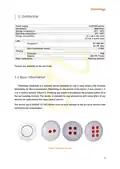
- Page 3: Overview of the teleButton device, which utilizes long-range LoRa wireless technology for data transmission. The device may contain 1, 2, 4, or 6 control buttons that broadcast the pressed button ID to surrounding devices. It is intended for use and pairing with other devices for applications like relay control. The teleButton operates with a CR2045 3.3 VDC battery, featuring extremely low energy consumption. Power supply specifications include a 1xCR2450 battery. Operating temperature ranges from 0°C to 60°C, while storage temperature ranges from -10°C to 60°C. The device has a data transmission power of 0 dBm. It is housed in an IP68 rated enclosure made of ABS+PC plastic. The device includes mechanical buttons for user interaction. Values for frequency and other specifications may vary based on the purchase version.
- Page 4: Work principle of the device LoRa is a physical proprietary radio communication technique based on spread spectrum modulation techniques derived from chirp spread spectrum technology. Excitation of the device is done by pressing any of the buttons. Each of the keys has its own unique ID number. By pressing any of the buttons, the command is transmitted to the paired devices via the LoRa interface. To effectively use the device, it must be registered to at least one of the allowed group of devices. To register the device, press button 1 and hold it for a minimum of 3 and maximum of 5 seconds. After a proper button press, the device sends a registration request. If the answer is confirmative, the device is paired. A certain type of signaling is proof of the validity of a successful registration. The process of sending a deregistration request is similar and consists of pressing button 1 and holding it for a minimum of 6 and maximum of 10 seconds.
- Page 5: After a proper button press, the device sends a deregistration request, after which it should receive a response about successful deregistration from the device that received that request. A certain type of signaling is proof of the validity of a successful deregistration. The device is idle most of the time. The device is activated by pressing any of the buttons, after which the device loads the settings related to the pressed button and transmits data about the pressed button depending on the type of device and type of system in which the device is used.
- Page 6: Troubleshooting and support. For assistance, please contact Telethings support. Hours: Mon-Fri 8 AM – 4 PM.

nVent RAYCHEM GM-TA Thermostat Instruction Manual

nVent RAYCHEM Elexant 3500i Electronic Thermostat Installation Guide

Beca BHT-002 Electric Heating Wifi Thermostat User Guide

HONEYWELL RTH5160 Series Non-Programmable Thermostat Installation Guide

Hydro Smart HSRADSTATWIFI HSRadStat Wi Fi Thermostat User Guide

Primevolve NFJ2002E Space Heater with Thermostat Instruction Manual

Stelpro Uniwatt UTE202NP NON PROGRAMMABLE ELECTRONIC THERMOSTAT

DELTA DORE Tybox 2300 Wireless Thermostat User Guide

GENERAL LIFE MITRA 250S RF Digital Room Thermostat User Manual

Cielo CT101WA Smart Thermostat User Manual