
TIMEGUARD TRT05 Plug In Thermostat Instruction Manual


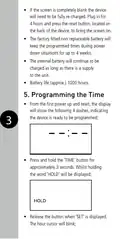





•
Use the ‘TEMP’ button to increase the
numeric value, or ‘MODE’ button to decrease
the numeric value. The clock is set in
24 hour format.
Note: When the ‘TEMP’ or ‘MODE’ buttons
are held down, the adjusted setting will scroll
more rapidly. Holding down the ‘TIME’ button
for approximately 3 seconds will exit the
programming time mode (this can be done
at any time during programming).
•
•
•
Set the hour and press the ‘TIME’ button
to move to the minutes.
4
Use the ‘TEMP’ or ‘MODE’ button to set
the minutes.
Press the ‘TIME’ button to save and exit t
he Time/Date entry and return to the
operating mode.
•
The display will now show the correct time,
and the output status will show OFF.
See the below example;

| General | Details |
|---|---|
| Name | TIMEGUARD TRT05 Plug In Thermostat Instruction Manual |
| Make | TIMEGUARD |
| Language | English |
| Filetype | PDF (Download) |
| File size | 0.63 MB |
 (1 votes, average: 5.00 out of 5)
 Loading...


HBX THM-0500 Touch Screen Programmable Thermostat Instruction Manual

SALUS Wired Electronic Thermostat – Non-programmable HTR230 User Manual

Honeywell T3 Programmable Thermostat User Guide

White Rodgers 1F72 5 2 Day Programmable Thermostat Instructions

lae AC2-2 Two Stage Thermostat Instructions

iO HVAC Controls T-32-P2 Universal Thermostat Instruction Manual

CYDATA DAISY Wi-Fi Enabled Thermostat Installation Guide

GENERAL 261S RF Digital Room Thermostat Instruction Manual

Honeywell ADEMCO 4500 Thermostat User Guide

beca BAC-005 Series Thermostat User Guide