
TCS SZ1051 Communicating Thermostat User Guide
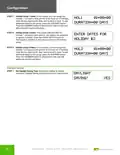


Configuration
Setting Clock and Schedule
NOTE: Access to the Clock and Schedule Mode can be completely disabled via dip switch settings (see “Programming
Keypad Access” on page 4, or access can be restricted by requiring an access code (see “Keypad Access Code” on
page 10).
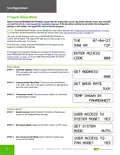
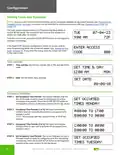
The main screen displays when not in Programming Setup Mode or
CLOCK SETUP Mode. The SuperSTAT will revert to this screen if no
TUE
07-04-23
72F
entries are made after 10 minutes.
9:00 AM
From the main screen, press the CLOCK SETUP button on the keypad to
configure the settings.
If the SuperSTAT has been configured to require an access code to
enter Programming Mode, this screen will appear (see “Keypad Access
Code” on page 10). If you enter the wrong code, the screen will revert
to the main screen.
ENTER ACCESS
CODE
000
Time and Date
STEP 1 Time and Day: Set the hour, minute, AM or PM, and day of the
week.
SET TIME & DAY:
12:00 AM
MON
STEP 2 Date: Set the month, date, and year.
SET DATE:
08-08-18
Occupancy Schedules
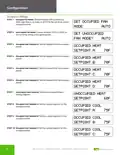
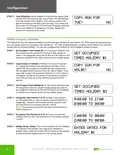
STEP 1 Set Occupancy Time Periods: This screen indicates that the
day of the week shown is ready for configuring up to four
occupancy time periods. Press the CLOCK SETUP button on
the keypad to advance to the setup screens for the day shown.
SET OCCUPIED
TIMES MONDAY:
STEP 2 Occupancy Time Periods (1 of 2): Set hours and minutes
(military time) for start and stop times for occupancy time
periods A and B.
A:08:00 TO 17:00
B:00:00 TO 00:00
NOTE: Time periods with start and end times of 00:00 are
inactive.
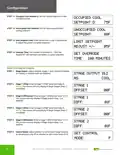
STEP 3 Occupancy Time Periods (2 of 2): Set hours and minutes
(military time) for start and stop times for occupancy time
periods C and D.
C:00:00 TO 00:00
D:00:00 TO 00:00
STEP 4 Set Occupancy Time Periods: This screen indicates the day of
the week shown is ready for configuring up to four occupancy
time periods. Press the CLOCK SETUP button on the keypad to
advance to the setup screens for the day shown.
SET OCCUPIED
TIMES TUESDAY:
11

| General | Details |
|---|---|
| Name | TCS SZ1051 Communicating Thermostat User Guide |
| Make | TCS |
| Language | English |
| Filetype | PDF (Download) |
| File size | 0.28 MB |
 (1 votes, average: 5.00 out of 5)
 Loading...


Honeywell Programmable Thermostat T4 Pro Installation Guide

EPH CONTROLS RDT Recessed Room Thermostat Installation Guide

GENERAL HT250S Digital Room Thermostat User Manual

Gelia ip24 1.5m Cable With Stepless Thermostat Instruction Manual

TRANE XR202 Programmable Thermostat User Guide

EAE TECHNOLOGY KNX ORIA Thermostat Installation Guide

AIRZONE AZS62THINKRB, AZS62THINKRN Wireless Think Thermostat Instruction Manual

ELECTECK 701 Non-Programmable Digital Thermostat for Home Instruction Manual

HITACHI ATW-RTU-05 Wireless Intelligent Room Thermostat Instruction Manual

TELUS ASSORTED Smart Thermostat User Manual