
TCS SZ1051 Communicating Thermostat User Guide



Configuration
Programming Keypad Access
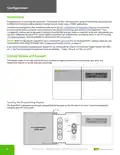
The keypad can be configured to restrict access to the Programming Setup and Clock and Schedule functions. You can
control the access to either function by configuring the keypad dip switches on the inside of the front cover as shown.
ON
1
2
3
4
5
Keypad Dip Switch Settings
The dip switch panel controls access to clock,
schedules, and programming.
Access to
PROGRAM
SETUP and
CLOCK SETUP
(Default)
Access to
PROGRAM
SETUP only
No access to
PROGRAM
Access to
CLOCK SETUP
only
SETUP and
CLOCK SETUP
Cover
(Inside)
Navigating Via Keypad
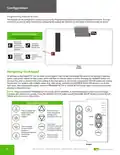
All settings on the SuperSTAT can be made via the keypad. Each screen will display the name of the setting, a selection
option, and current values for that screen, which will flash to indicate which is active. Pressing the WARMER button will
increase the value or advance the active setting to the next option on the screen; pressing the COOLER button will reverse
the process. For screens with multiple values (e.g., date setup), pressing the OVERRIDE button will advance you to the
next value. After adjusting the values, press the PROGRAM SETUP or CLOCK SETUP button again to save the values and
advance to the next screen.
NOTE: Press and hold the PROGRAM SETUP, CLOCK SETUP, WARMER, or COOLER buttons in order to scroll through
screens and values more quickly. Press the SERVICE STATUS button to exit PROGRAM SETUP Mode or CLOCK SETUP
Mode and return to the main screen.
Occupied
Keypad Button Functions
Heating
Cooling
fan
switch
fan
switch
service
status
Fan
Service
Data/
Press to change fan
speed and system
modes (when
Press to raise or
lower temperature
settings when
Program
WARMER
enabled)
OCCUPIED LED is on
system
switch
system
switch
Press when
program
setup
COOLER
OCCUPIED LED is off
to restore occupied
temperature settings
program
setup
OVERRIDE
Press to change
fan thermostat’s
program or
clock
setup
temperature setback
times (when
OVERRIDE
Press to review
service screens
clock
setup
service
status
enabled)
Keypad
4

| General | Details |
|---|---|
| Name | TCS SZ1051 Communicating Thermostat User Guide |
| Make | TCS |
| Language | English |
| Filetype | PDF (Download) |
| File size | 0.28 MB |
 (1 votes, average: 5.00 out of 5)
 Loading...


eurotronic Comet Zigbee Energy Saving Radiator Thermostat Instruction Manual

AXOR 15707000 Ecostat E Thermostat Instruction Manual

PRO1 T805 Non Programmable Thermostat Instruction Manual

Comfortmaker TSTATIIEWF-01 Ion Gray Smart Thermostat Owner’s Manual

EPH Controls TRFPi2 Programmable RF Thermostat Instruction Manual

Honeywell CT87N The Round Non Programmable Thermostat Owner’s Manual

DAIKIN DTST-ONE-ADA-A One Touch Smart Thermostat Installation Guide

ENGO CONTROLS ESIMPLE230B 230V Simple Dial Thermostat User Guide

BEOK TDR89 Glass Screen Thermostat Instruction Manual

White Rodgers 1E78 5 2 Day Programmable Thermostat Instruction Manual