
TCS SZ1051 Communicating Thermostat User Guide


Configuration
Time Clock
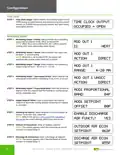
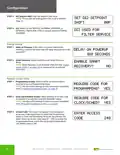
STEP 1 Time Clock Output: Select whether the auxiliary output will be
OPEN during occupied periods and closed during unoccupied
periods, or CLOSED during occupied periods and open during
unoccupied periods.
TIME CLOCK OUTPUT
OCCUPIED = OPEN
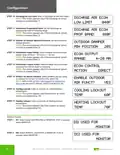
Modulating Output
STEP 1 Modulating Output 1 Define: Select whether the modulating
output will be used for COOL, HEAT, or AQUASTAT.
MOD OUT 1
NOTE: When DI2 is set to AQUASTAT, AO 1 will be used for
cooling when open and heating when closed.
IS:
HEAT
DIRECT
STEP 2 Modulating Output 1 Action: Select whether the output will
be direct- or reverse-acting.
MOD OUT 1
ACTION:
NOTE: When DI2 is set to AQUASTAT, the output will
automatically reverse action when DI2 is closed.
STEP 3 Modulating Output 1 Range: Select whether the modulating
MOD OUT 1
RANGE:
output range will be 0 – 20 mA or 4 – 20 mA.
4-20 MA
STEP 4 Modulating Output 1 Unoccupied Action: Select whether the
MOD OUT 1 UNOCC
unoccupied action will be modulating 0 mA, 4 mA, or 20 mA.
ACTION:
DIRECT
STEP 5 Modulating Output 1 Proportional Band: Enter the number of
degrees from the setpoint that the heating or cooling device
will be completely open.
MOD1 PROPORTIONAL
BAND:
04F
STEP 6 Output Setpoint Offest: Enter a value below the heating
setpoint or above the cooling setpoint where the AO1 begins
to modulate.
MOD1 SETPOINT
OFFSET:
00F
STEP 7 Discharge Air Sensor: Select whether to use a discharge air
sensor. To monitor only, select NO.
ENABLE DISCHARGE
AIR FUNCT.? YES
NOTE: Refer to the SZ1051/1053 SuperSTAT Installation
Manual for dip switch settings, which must also be set.
STEP 8 Outdoor Air Economizer: Enter an outdoor setpoint:
NOTE: This screen appears only if the discharge air sensor
function is enabled (Step 7).
OUTDOOR AIR ECON
SETPOINT:
068F
STEP 9 Discharge Air Economizer: Enter a discharge air setpoint:
NOTE: This screen appears only if the discharge air sensor
function is enabled (Step 7).
DSCHRGE AIR ECON
SETPOINT: 055F
8

| General | Details |
|---|---|
| Name | TCS SZ1051 Communicating Thermostat User Guide |
| Make | TCS |
| Language | English |
| Filetype | PDF (Download) |
| File size | 0.28 MB |
 (1 votes, average: 5.00 out of 5)
 Loading...


GTS TR8100V WiFi Pairing Thermostat Instruction Manual

Aideepen STC-3028 Temperature Humidity Controller User Manual

homematic IP HmIP-eTRV-2 Radiator Thermostat Instruction Manual

EPH CONTROLS CMF Room Frost Thermostat Instruction Manual

DEVI AN420938619179 Touch Electronic Intelligent Timer Thermostat Installation Guide

Honeywell Home T2 Programmable Thermostat Installation Guide

BOSCH RT_II_230V Room Thermostat Instructions

WYZE WTMSRS 3-in-1 Digital Room Sensor for Smart Thermostat User Manual

Danfoss MBC 8000 Heavy Duty Thermostat Installation Guide

Expert4house BHT-9000 Smart Knob Thermostat User Guide