
SKYTECH 5320P Programmable Thermostat Fireplace Remote Control Instruction Manual


TRANSMITTER
The transmitter operates on (4) AAA 1.5V batteries that are included.
Install the batteries supplied with the unit into the battery compartment. It
is recommended that ALKALINE batteries always be used for this product.
Be sure the batteries are installed with the (+) and (-) ends facing the
correct direction.
BATTERY
COMPARTMENT
When you start up the remote, if a low battery signal appears or if the LCD
screen does not illuminate when you touch it, check battery position and if
the batteries are fully charged.
PROG
MODE
SET
BACK
FRONT
SET
PROG MODE
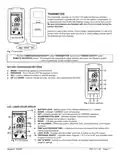
Fig. 1 Transmitter.
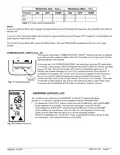
Review COMMUNICATION SAFETY under TRANSMITTER section and THERMO SAFETY under
REMOTE RECEIVER section. These signal and temperature saety eatures shut down the replace system
when a potentially unsafe condition exists.
KEY AND TOUCHSCREEN SETTINGS
1
1. MODE - Switches the appliance On/Thermo/Off.
2. PROGRAM - Turns ON and OFF the program function.
3. SET - Used in dierent unctions to conrm settings.
4. UP and DOWN - Used to change the time, set temp, and programming functions.
3
2
4
PROG
MODE
SET
3
2
1
Fig. 2 Button settings.
LCD - LIQUID COLOR DISPLAY
1. BATTERY ICON - Battery power is low. Replace Batteries in 2 - 4 weeks.
2. ROOM - Indicates CURRENT room temperature.
5
3. SET- Indicates desired SET room temperature for THERMO operation.
4. FAHRENHEIT/CELSIUS - Indicates degrees Fahrenheit or Celsius.
5. FLAME- Indicates burner/valve in operation.
6
1
6. MODE – Indicates operation mode of system.
2
3
4
7. UP and DOWN – These are used to adjust the Time, Set temperature, and Program
functions.
9
8. TIME and PROGRAM TIME – Indicates current time or program time setting when
editing program settings.
11
8
10
9. LOCK ICON - Disables the transmitter when lock is visible on the LCD screen.
10. PROGRAM ON/OFF – Indicates when Program 1 (P1) is on or off, and indicates when
Program 2 (P2) is on or off.
7
11. DAY of WEEK - Indicates current day of week, or program segment when editing
program settings.
Fig. 3 LCD display.
REV. 8-11-20 Page 2
Skytech: 5320P

| General | Details |
|---|---|
| Name | SKYTECH 5320P Programmable Thermostat Fireplace Remote Control Instruction Manual |
| Make | Skytech |
| Language | English |
| Filetype | PDF (Download) |
| File size | 0.49 MB |
 (1 votes, average: 5.00 out of 5)
 Loading...


Honeywell 69-2384ES-01 RTH111 Non Programmable Thermostat Installation Guide

Beca BHT-006 Series Thermostat User Manual

GENERAL LIFE HT220 RF Wireless Room Thermostat User Manual

ECOSTAR AC7300 WiFi Programmable Thermostat User Guide

Network Thermostat X7C-WIFI Smart Touchscreen Thermostat Instruction Manual

TFC Group OP-WFSTAT Wi-Fi Programmable Thermostat User Guide

GENERAL LIFE ARUNA 302S Smart Room Thermostat User Manual

ESi ESRTP6C, ESRTP6CW Centro Prog Room Thermostat User Guide

ikon ITG-24 Thermostat Control User Manual

Ouellet Canada OTH24-AFR Programmable Low Voltage Electronic Thermostat User Guide