
SKYTECH 5320P Programmable Thermostat Fireplace Remote Control Instruction Manual


BASIC TRANSMITTER FUNCTIONS AND INITIAL SETUP
NOTE: Touch anyplace on the screen and the back light will light up and
stay lit for 5 seconds.
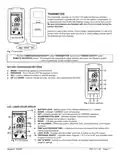
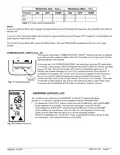
MODE FUNCTION
To select an operational mode, press the MODE (top) button or touch the MODE( top)
SECTION of the touch screen.
Mode: Touch
Portion
•
•
ON turns the appliance manually ON; the fame icon will appear.
THERMO sets the remote to Thermostatic mode.
•
OFF turns the appliance OFF; the fame icon will disappear.
SETTING ºF / ºC SCALE
The actory setting or temperature is ºF. To change this setting to ºC, rst press and hold
the UP touch button and the DOWN touch button on the transmitter at the same time.
Follow this same procedure to change from ºC back to ºF.
PROG
MODE
SET
Mode: Button
Fig. 4 Transmitter functions.
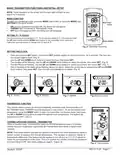
SETTING THE CLOCK
•
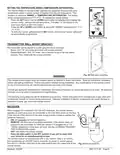
Press and hold the SET button, or touch the SET (middle) section on the touch screen, for 5 seconds. The hour sec-
tion should begin to fash. (Fig. 5)
•
•
•
•
Use the UP and DOWN touch buttons to select the hour, then press SET.
The minutes will be fashing. Use the UP and DOWN touch buttons to select the minute, then press SET. (Fig. 6)
The AM PM will be fashing. Use the UP and DOWN touch buttons to select one of them, then press SET. (Fig. 7)
One o the days o the week will be fashing (above the clock). Select the correct day by pressing the UP and DOWN
touch buttons, then press SET. Your time will automatically be accepted. (Fig. 8)
Fig. 5 Hours.
Fig. 6 Minutes.
Fig. 7 AM/PM.
Fig. 8 Days of week.
THERMOSTAT FUNCTION
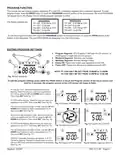
This remote control system can be thermostatically controlled when the transmitter is in
the THERMO mode (THERMO must be displayed on the screen). To set the desired room
temperature, press the MODE button to place the transmitter into thermo mode, then press
the UP or DOWN touch buttons to select the desired room temperature. The highest set
temperature is 99º F (32º C).
THERMO UPDATING FEATURE - TRANSMITTER
When in thermo mode, the transmitter reads the ROOM temperature every 2 minutes,
checks the room temperature against the SET temperature then sends a signal to the
receiver.
NOTE: The thermo feature operates the appliance whenever the room temperature varies a
certain number of degrees from the set temperature. This variation is called the “swing” or
temperature differential. This feature lets the appliance turn off and on 2º F (1º C) above or
below the set temperature of the room. This is to cushion the number of times the appliance
is turned ON and OFF. See Swing setting on page 6, Figure 19.
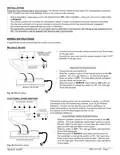
Fig. 9 Thermo mode.
REV. 8-11-20 Page 3
Skytech: 5320P

| General | Details |
|---|---|
| Name | SKYTECH 5320P Programmable Thermostat Fireplace Remote Control Instruction Manual |
| Make | Skytech |
| Language | English |
| Filetype | PDF (Download) |
| File size | 0.49 MB |
 (1 votes, average: 5.00 out of 5)
 Loading...


Shanghai Beok Controls TGR85 Smart Zigbee Underfloor Heating Thermostat User Guide

EPH CONTROLS TRFPi2 COMBIPACK2 Programmable RF Thermostat Instruction Manual

Garza 400616B Digital Thermostat User Guide

Hotwire HWGL2 Dual Programming Thermostat Instructions

GENERAL LIFE ARUNA HT300S Digital Room Thermostat User Manual

HERSCHEL T-BT Battery Powered Wireless Thermostat Instruction Manual

Danfoss RT 107 Series Thermostat Installation Guide

INKBIRD ITC-306A Digital Thermostat User Manual

GREYSTONE TLDF Series Flexible Cable Duct Average Low Limit Thermostat Instruction Manual

QC Manufacturing Inc IT-30003 Attic Fan Adjustable Thermostat User Manual