
PURMO M16MI419 Advanced Thermostat Instruction Manual




EN
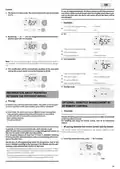
Automatic activation (factory settings)
2- By pressing
or
, you can change temporarily the desired tem-
perature up to 18°C for example.
To disable this mode, see page 15.
The device detects a temperature fall. An opened window, a door to the
outside, can cause this temperature fall.
auto
prog
Note: The difference between the air from the inside and the outside
must cause a significant temperature fall to be perceptible by the device.
This temperature drop detection triggers the change to Frost Protection
mode.
boost
mode
OK
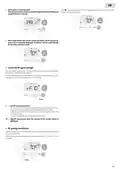
Manual activation
Note: The cursor corresponding to the operating mode, i.e Eco mode in
our example, is blinking during the duration of the temporary deroga-
tion.
By pressing
more than
the device will switch on
Frost protection mode.
for
seconds,
auto
prog
5
boost
3- This change will be automatically cancelled at the next change of
programme or transition to 0:00.
mode
OK
auto
prog
5 sec.
boost
3
Frost protection digital meter
mode
OK
When the device performs a lower temperature cycle due to opened
window, a meter appears on the display to show the cycle time. The
counter is automatically reset at the next time to Frost protection by
opened window (automatic or manual activation).
OPEN WINDOW DETECTION, ENERGY
SAVINGS
Important information about the open window detec-
tion
Stop the Frost protection mode
By pressing one button, you stop the Frost protection mode.
Important: the open window detection is sensitive to temperature va-
riations. The device will react to the window openings in accordance
with different parameters: temperature setting, rise and fall of tempe-
rature in the room, outside temperature, location of the device.
If the device is located close to a front door, the detection may be dis-
turbed by the air caused by opening door. If this is a problem, we recom-
mend that you disable the automatic mode open window detection (see
page 15). You can, however, use the manual activation (see below).
Note: if a temperature rise is detected, the device may return to the
previous mode (active mode before the open window detection).
OCCUPANCY DETECTION, ENERGY SAVINGS
Important information about the occupancy detection
The occupancy detector is sensitive to temperature variations and light.
It is likely to be disturbed by the following items:
-
-
-
-
Hot or cold sources such as forced air vents, lights, air conditioners.
Reflective surfaces such as mirrors.
Animal crossing in the detection area.
1
2
Objects moving with the wind like curtains and plants.
Disable the occupancy detection if your device was installed near one
of these.
To disable the occupancy detection, see page 15.
Note: the detection range varies depending on the ambient tempera-
ture.
Legend
= the favoured
location
Overview
= another location
The device fits your lifestyle while kee-
ping your power consumption
under control.
Overview
With its front infrared sensor, the device
smartly optimizes the management of
heating : it detects movement in the
room where it is installed
and in case of absence, automatically
performs a progressive lowering of the
setting temperature resulting in: energy
savings. To ensure proper operation, do not block the sensor’s field of
view by any obstacle (curtains, furnitures.).
Lowering temperature cycle by setting frost protection during venti-
lation of a room by opened window. You can access the open window
detection from the Comfort, Eco and Auto modes. Two ways to enable
the detector:
- Automatic activation, the lowering temperature cycle starts as soon
as the device detects a temperature change.
- Manual activation, the cycle of lowering temperature starts by pres-
sing a button.
8

| General | Details |
|---|---|
| Name | PURMO M16MI419 Advanced Thermostat Instruction Manual |
| Make | PURMO |
| Language | English |
| Filetype | PDF (Download) |
| File size | 1.02 MB |
 (1 votes, average: 5.00 out of 5)
 Loading...


King K901-B Wifi Programmable Thermostat Instruction Manual

nVent RAYCHEM GM-TA Thermostat Instruction Manual

MClimate MC-LW-V02 Smart Radiator Thermostat User Manual

SASWELL T11FHL Heated Floor Thermostat User Manual

DAIKIN EKRRVATR2BA Home Controls Radiator Thermostat User Guide

OJ ELECTRONICS UTN5 Non Programmable Touch Thermostat Instruction Manual

TRANE SC360 Link System Controller and Smart Thermostat Instructions

Ebeco EB-Therm 55 Thermostat User Manual

vtech W960 E-Smart Wireless Thermostat

COPELAND 1F86-0244 Blue 2 Inch Single Stage Thermostat Instruction Manual