
LoRaWAN MC-LW-FCT-01 MClimate Fan Coil Thermostat User Manual






Turning the thermostat ON/OFF
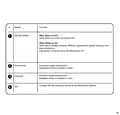
The button on the far left of the thermostat serves two functions - turn it on and off and switch
between modes.
If the thermostat is currently off (screen is blank), a short press of the ON/OFF/MODE button will
turn it on. The device should show more information, incl. measured temperature & relative
humidity, fan speed and target temperature if the selected mode is heating or cooling.
If you want to turn the thermostat OFF, hold the
ON/OFF/MODE button for 3s.
17

| General | Details |
|---|---|
| Name | LoRaWAN MC-LW-FCT-01 MClimate Fan Coil Thermostat User Manual |
| Make | LoRaWAN |
| Language | English |
| Filetype | PDF (Download) |
| File size | 0.52 MB |
 (1 votes, average: 5.00 out of 5)
 Loading...


Danfoss RT 115 Thermostat Installation Guide

Honeywell TH6320ZW2003 Pro Z-Wave Programmable Thermostat Installation Guide

Honeywell RLV450 Programmable Thermostat

Wengart TP808-3 7 Day Programmable Thermostat User Manual

EvenAir T21WF WiFi Thermostat User Manual

GENERAL FH260S Underfloor Heating Thermostat User Manual

Honeywell Lyric T5 Wi-Fi Thermostat Installation Guide

Honeywell Home T10 Programmable Smart Thermostat Installation Guide

SIEMENS RDZ100ZB Zigbee Room Thermostat Owner’s Manual

DAIKIN DKN509 Wireless Communicating Thermostat Instruction Manual