
LoRaWAN MC-LW-FCT-01 MClimate Fan Coil Thermostat User Manual






Installation Guide
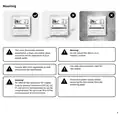
Tools required (not exhaustive, depends on what
thermostat you are replacing):
- T5 torx screwdriver (used on secure bolt on
mounting plate).
- Small flat screwdriver (used for connecting wires
to the terminal block).
Before you install the device, we highly recommend that you first commission it on your LNS. Once the device
is powered, it’ll initiate a LoRaWAN join-procedure using SF12. Please, make sure you enable ADR in your LNS
and/or mark the device as static. The lower the spreading factor, the better the communication interval from
the FCT to the LoRaWAN gateway will be.
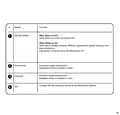
Open your LoRaWAN® Network provider access panel and
add the device using the supplied Serial Number, DevEUI,
AppEUI (JoinEUI) and AppKey.
Continue the Installation with the instructions
of your LoRaWAN® Network provider.
1
2
You can get DevEUI, AppEUI (JoinEUI) &
AppKey information from the
LoRaWAN® credentials .csv file we sent
you with the fulfillment confirmation.
The data is example. Do not use.
5

| General | Details |
|---|---|
| Name | LoRaWAN MC-LW-FCT-01 MClimate Fan Coil Thermostat User Manual |
| Make | LoRaWAN |
| Language | English |
| Filetype | PDF (Download) |
| File size | 0.52 MB |
 (1 votes, average: 5.00 out of 5)
 Loading...


GROHE 26984001 Vitalio Comfort 250 Shower System with Bath Thermostat Installation Guide

SALUS AT10 Pipe-Fitted Thermostat User Guide

TRANE BAYECON089A Programmable Touch Screen Thermostat Instruction Manual

EPH CONTROLS RFRB RF Room Cylinder Thermostat Instruction Manual

Danfoss 220V Electronic Intelligent Timer Thermostat Installation Guide

SALUS Wired Digital Thermostat – Non-programmable HTRS230 User Manual

Vine Smart Wi-Fi Thermostat with Nightlight TJ-225 User Guide

tekmar U-T-562 WiFi Thermostat User Manual

Honeywell Home N100 Series Non Programmable Thermostat User Guide

stelpro STZW402 ELECTRONIC THERMOSTAT SMART HOME User Guide