
LoRaWAN MC-LW-FCT-01 MClimate Fan Coil Thermostat User Manual






9
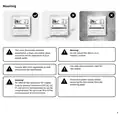
Do not use
non-flat head
screws for the
mounting
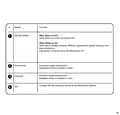
Once you enter the Installer’s menu, select
the correct wiring diagram for your
application.
bracket.
10
7
Validate that the Fan Coil Unit is reacting to adjusting
the modes, fan speed and target temperature through
the FCT.
8
Slide the FCT on the mounting bracket and
tighten the security screw on the bottom.
Mount the mounting
bracket on the wall using
the enclosed screws and
if needed - dowels.
11

| General | Details |
|---|---|
| Name | LoRaWAN MC-LW-FCT-01 MClimate Fan Coil Thermostat User Manual |
| Make | LoRaWAN |
| Language | English |
| Filetype | PDF (Download) |
| File size | 0.52 MB |
 (1 votes, average: 5.00 out of 5)
 Loading...


Robertshaw RS8110 Non Programmable Thermostat Instruction Manual

GENERAL LIFE NORA 270S RF Wireless Room Thermostat User Manual

EPH CONTROLS RFRB RF Room Cylinder Thermostat Instruction Manual

Honeywell TL5110 Digital Non-programmable Thermostat User Guide

LATICRETE Strata Heat WiFi Thermostat Instruction Manual

GENERAL LIFE FH105S Underfloor Heating Thermostat User Manual

Fantini Cosmi CH121E Flush Mounting Thermostat User Manual

SALUS TS600 Wireless Temperature Sensor Thermostat User Guide

DEVI 316 Electronic Thermostat Installation Guide

FRIGIDAIRE W960 Installing E-Smart Thermostat User Manual