
Home > Honeywell Home > Honeywell Home FocusPRO S200 Smart Thermostat User Manual
Honeywell Home FocusPRO S200 Smart Thermostat User Manual









Troubleshooting
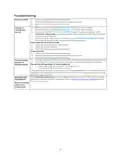
Display is blank
•
•
•
Check circuit breaker and reset if necessary
Make sure power switch for heating & cooling system is on
Make sure furnace door is closed securely
•
•
•
When running heat, display will show HEAT ON in lower right of display
When running cool, display will show COOL ON in lower right of display
If display shows WAITING FOR EQUIPMENT under temperature reading, it is in
compressor delay mode to protect the system. Wait 5 minutes to see if the thermostat
makes a Heat or Cool call
Heating or
cooling does
not run
•
If display doesn’t indicate a call for Heat or Cool or WAITING FOR EQUIPMENT, verify
the mode setting, temperature setpoint and room temperature
If you press the Up or Down arrow
•
•
•
Upper left of display shows mode setting
Upper right shows setpoint
Center of display shows room temperature
If issue persists
•
•
•
•
•
Check circuit breaker and reset if necessary
Make sure power switch at heating & cooling system is on
Make sure furnace door is closed securely
If display indicates UNLOCK next to the left center button, see Keypad Lockout section
If not, verify the mode setting (Heat, Cool, Auto, or Em Heat in upper left of display)
Cannot change
setpoint to
desired setting
The default setting ranges for these modes are
o
o
Heat or Em Heat: 40 ºF to 90 ºF (4.5 ºC to 32.0 ºC)
Cool: 50 ºF to 99 ºF (10.0 ºC to 37.0 ºC)
If the setpoint can be adjusted, but not to the full range shown above, the installer may have
configured the thermostat for a maximum heat or minimum cool setpoint to restrict settings
that are energy inefficient.
The compressor protection feature is engaged. Wait a few minutes for the system to safely
restart to avoid damaging the compressor. See the Built-in Compressor Protection section
for more information
WAITING FOR
EQUIPMENT
Shown in display
under room
temperature
10

| General | Details |
|---|---|
| Name | Honeywell Home FocusPRO S200 Smart Thermostat User Manual |
| Make | Honeywell Home |
| Language | English |
| Filetype | PDF (Download) |
| File size | 1.29 MB |
 (1 votes, average: 5.00 out of 5)
 Loading...

Honeywell Home TH8320R1003-Uv VisionPRO 8000 with RedLINK Multistage Thermostat Installation Guide

Honeywell Home TH2110DH 1 Cool Programmable Digital Thermostat Installation Guide

Honeywell Home DT4R Wireless Room Thermostat User Guide

Honeywell Home N100 Series Non Programmable Thermostat User Guide

Honeywell Home X1N Non Programmable Thermostat Installation Guide

Honeywell Home DT4M Wired Room Thermostat User Manual

Honeywell Home T834 Series Thermostat Owner’s Manual

Honeywell Home M38794 T10 and T10 plus Pro Smart Thermostat with RedLINK Installation Guide

Honeywell Home DT4 Channel Wired Room Thermostat Instruction Manual

Honeywell Home T10 Smart Home Thermostat Instructions


iO HVAC Controls UT32 Titan 3H or 2C Touchscreen Thermostat Owner’s Manual

telethings teleRelays-2D Tele Thermostat User Manual

EAE Technology EAE-KNX MONA Series Thermostat Instruction Manual

ARUNA 302S RF Digital Room Thermostat User Manual

thermokon JOY 5DO Digital Room Thermostat User Manual

BEOK TGM50 Thermostat User Guide

KINGHOME WK-010WC1 Smart Thermostat Owner’s Manual

GENERAL HT250 Smart Room Thermostat User Manual

neptronic ITO3-C Wall Thermostat Owner’s Manual

ideal HEATING HALO LITE Room Thermostat User Guide