
Home > Honeywell Home > Honeywell Home FocusPRO S200 Smart Thermostat User Manual
Honeywell Home FocusPRO S200 Smart Thermostat User Manual









Programming Your Thermostat
Note: If the S200 thermostat is registered to the First Alert by Resideo App, you can choose to use geofencing
services rather than a time-based schedule.
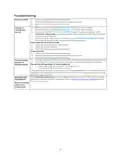
You can program four time periods each day, with different settings
for weekdays and weekends. We recommend using the presets
shown in the table at right; these presets are designed to reduce
your heating/cooling expenses.
WAKE: Set to the time you wake up and your desired temperature
during the morning until you leave for the day.
AWAY: Set to the time you leave home and your desired
temperature while you are away (usually an energy-saving
temperature).
HOME: Set to the time you return home and your desired evening
temperature until bedtime.
SLEEP: Set to your bedtime and your desired overnight
temperature (usually an energy-saving temperature).
Adjusting Program Schedules
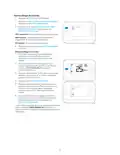
1
Press MENU. Then press or until SCHED is
displayed.
2
A square appears around ON or OFF in the display. If
you want to use a schedule, press or to select
ON. Press SELECT to edit the schedule or press
EXIT to exit the menu.
Hold
3
4
If editing the schedule, press SELECT to edit the day
or days flashing in the display.
The word Wake should be flashing. Press NEXT.
Press or to turn this schedule period on or off.
Selecting OFF will disable this schedule period.
Press NEXT.
5
If the schedule period was set to ON, the time will be
flashing. Press or to adjust the time for this
period. Press NEXT.
Hold
6
7
8
The Heat setpoint will be flashing. Press or to
adjust the Heat setpoint for this period. Press NEXT.
The Cool setpoint will be flashing. Press or to
adjust the Cool setpoint for this period. Press NEXT.
MCR39532
The display will show the next schedule period
flashing. Repeat steps 4 – 7 for the Away, Home and
Sleep schedule settings. After completing all
schedule settings for the day(s) selected, repeat
these steps for the other days.
9
Press the SAVE & EXIT button at upper left.
When editing an existing schedule, you can advance to
the setting you wish to change, edit that setting and
press the SAVE & EXIT button to save changes.
Depending on what type of schedule the thermostat was
set up for, days may be grouped or set individually.
7

| General | Details |
|---|---|
| Name | Honeywell Home FocusPRO S200 Smart Thermostat User Manual |
| Make | Honeywell Home |
| Language | English |
| Filetype | PDF (Download) |
| File size | 1.29 MB |
 (1 votes, average: 5.00 out of 5)
 Loading...

Honeywell Home TH8320R1003-Uv VisionPRO 8000 with RedLINK Multistage Thermostat Installation Guide

Honeywell Home TH2110DH 1 Cool Programmable Digital Thermostat Installation Guide

Honeywell Home DT4R Wireless Room Thermostat User Guide

Honeywell Home N100 Series Non Programmable Thermostat User Guide

Honeywell Home X1N Non Programmable Thermostat Installation Guide

Honeywell Home DT4M Wired Room Thermostat User Manual

Honeywell Home T834 Series Thermostat Owner’s Manual

Honeywell Home M38794 T10 and T10 plus Pro Smart Thermostat with RedLINK Installation Guide

Honeywell Home DT4 Channel Wired Room Thermostat Instruction Manual

Honeywell Home T10 Smart Home Thermostat Instructions


BOSCH RT_II_230V Room Thermostat Instructions

DAIKIN One Lite Smart Thermostat User Guide

PELICAN TC3 Commercial Connected Thermostat Installation Guide

EPH CONTROLS 20221026 RFRA – RF Room Thermostat Instruction Manual

ENGO CONTROLS E25-BATW Zig Bee 868MHz Smart Thermostat User Guide

GENERAL LIFE Senna 330S RF Wireless Room Thermostat User Manual

BEOK CONTROLS TFT-LCD Heating Thermostat Instruction Manual

VILPE WIVE 100 Intake Vent Plus Thermostat Installation Guide

EPH CONTROLS RFRB RF Room Cylinder Thermostat Instruction Manual

heatit Z-Temp2 Wireless Thermostat Instruction Manual