
Home > ENGO CONTROLS > ENGO CONTROLS E25-BATW Zig Bee 868MHz Smart Thermostat User Guide
ENGO CONTROLS E25-BATW Zig Bee 868MHz Smart Thermostat User Guide
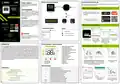


Wireless communication diagram
Installation thermostat in the app
25
Product Compliance
This product complies with the following EU
Directives: 2014/30/EU, 2014/35/EU, 2014/53/
EU, 2011/65/EU
Make sure your router is within range of your smartphone. Make sure you are connected to the Internet.
This will reduce the pairing time of the device.
ZigBee/868MHz Smart Thermostat
ZigBee 3.0
WI-FI 2.4GHz
STEP 1 - DOWNLOAD ENGO SMART APP
SAFETY INFORMATION:
Powered By
Download the ENGO Smart app from Google
Play or Apple App Store and install it on your
smartphone.
Gateway
Use in accordance with national and EU
regulations. Use the device only as intended,
keeping it in a dry condition. The product is for
indoor use only. Please read the entire manual,
before installation or use.
Thermostat
E25-BATW
E25-BATB
ZigBee 3.0
GET IT ON
Quick Guide
Installation
Available on the
Installation must be performed by a qualified
person with appropriate electrical qualifications,
in accordance with the standards and regulations
in force in a given country and in the EU.
The manufacturer is not responsible for non
compliance with the instructions.
or
or
Works with
Powered By
Module*
Relay*
Control box*
STEP 2 - REGISTER THE NEW ACCOUNT
GET IT ON
Ver. 2.2
Release date: VII 2024
Soft:
To register a new account, please follow the steps below:
Available on the
Connection description
Legend:
ZigBee: v1.0.3
MCU v0.2.3
3
1
2
4
ZigBee 3.0
Battery power supply
Battery thermostat
Connection with ZigBee 3.0 network
Connection with WiFi 2.4GHz network
Producer:
Engo Controls sp. z o. o. sp. k.
Rolna 4 St.
ATTENTION:
2xAA
For the entire installation, there may be
additional protection requirements, which the
installer is responsible for.
43-262 Kobielice
Poland
Click„Register”
to create new account.
Enter your e-mail
address to which the
verification code will Remember that you only
be sent.
Enter the verification code Then set the login
received in the email. password.
Products sold separately
have 60 seconds to enter
the code!
INTRODUCTION:
LCD Icon Description + Button Description
Internet controlled thermostat with surface-mounted design (battery-powered 2xAA). The product is based
on a ZigBee/868MHz wireless communication technology. It is designed for radiator or floor heating. It
works with electronic wireless heads. It can control up to 6 radiator heads in one room. Thermostat sends
temperature measurements to the heads for better control accuracy - it will ensure also comfort and savings.
A unique feature of this thermostat is the ability to control devices WIRELESSLY (ENGO binding function). The
"ENGO binding" function makes thermostat to communicate directly with receivers, e.g. a wireless control
box or relay module (devices with "BIND" function). ZigBee binding can only be performed using the Internet
gateway (sold separately). If thermostat is used with an internet gateway connected to the internet, it has
the the ability to be controled wirelessly via the ENGO Smart mobile app. When added to the mobile app,
thermostat gets additional functions, e.g. time schedules or push notifications. Thermostat has also a key
lock function, possibility of setting a minimum and maximum temperature setpoint limits and the ability to
operate in heating or cooling mode.
STEP 3 - CONNECT THE THERMOSTAT TO ZigBee
1
2
3
4
5
6
7
8
1. ZigBee network connection indicator
2. Receiver binding indicator
3. Current/Setpoint temperature
4. Heating indicator (icon is animating when
there is heating demand)
5. Cooling indicator (icon is animating when
there is cooling demand)
6. Schedule mode icon
7. Temporary override mode
8. Frost protection mode
9. Temperature unit
10.Settings icon / temperature settings
11. Settings icon
12. Button lock
1
2
10
11
SET
9
12
13
1
2
3
Make sure ZigBee Gateway has been added to the Engo
Smart app. Press and hold the – and + buttons on the
thermostat until the display shows„PA”. Then release the keys.
The pairing mode will be started up.
Thermostat counts the time
back (180s).
1. ”Down”Button –
2. ”OK”Button OK
3. “Up”Button +
13. Battery indicator
Button description
3
4
5
Technical data
+
–
Change the parameter value up
Change the parameter value down
Power supply 2xAA battery
Temp. setpoint range 5,0°C to 45,0°C
Display temp. Accuracy 0,5°C
Manual/Schedule mode - short button press (Online mode)
Enther the installer parameters- hold 3 seconds
Turn OFF/ON thermostat - hold 5 seconds
TPI
Control algorithm
Enter the pairing mode - hold 5 seconds
Hysteresis (±0.1°C to ±2°C)
+ & –
Enter Sync / Binding mode - hold 5 seconds
Factory reset - hold until the FA message appears
Lock/Unlock thermostat keys - hold 3 seconds
Heating/Cooling mode change - hold 3seconds
ZigBee 3.0
Communication
Enter the gateway interface.
In„Zigbee devices list”
go„Add devices”.
Wait for the message "End"
to appear on the thermostat
screen.
RF 868MHz
+ &
Dimensions [mm] 80 x 80 x 23
– &


| General | Details |
|---|---|
| Name | ENGO CONTROLS E25-BATW Zig Bee 868MHz Smart Thermostat User Guide |
| Make | ENGO CONTROLS |
| Language | English |
| Filetype | PDF (Download) |
| File size | 0.39 MB |
 (1 votes, average: 5.00 out of 5)
 Loading...

ENGO Controls EONE230W Internet Controlled Thermostat User Guide

ENGO CONTROLS EFAN-230W Fan Coil Thermostat User Guide

ENGO CONTROLS FAN-24W 24V Fan Coil Thermostat User Guide

ENGO CONTROLS EASY230W Non-Programmable Wired Thermostat User Guide

ENGO CONTROLS EONE230 Internet Controlled Thermostat User Guide

ENGO CONTROLS EONEBATW, EONEBATB Internet Controlled Thermostat User Manual

ENGO Controls E901WIFI Internet Wireless Thermostat User Guide

ENGO CONTROLS EONE-BATW, EONE-BATB Internet Controlled Thermostat User Guide

ENGO CONTROLS EFAN-24W Fan Coil Thermostat User Guide

ENGO CONTROLS EFAN-230W WIFI 230V Fan Coil Thermostat User Guide

ENGO CONTROLS E25-BATW Zig Bee 868MHz Smart Thermostat User Guide Overview
Summary of Contents
- Page 1: Wireless communication diagram Product compliance: This product complies with the following EU Directives: 2014/30/EU, 2014/35/EU, 2014/53/EU, 2011/65/EU. Make sure your router is within range of your smartphone. Make sure you are connected to the Internet. Installation must be performed by a qualified person with appropriate electrical qualifications, in accordance with the standards and regulations in force in a given country and in the EU. Internet controlled thermostat with surface-mounted design (battery-powered 2xAA). The product is based on ZigBee/868MHz wireless communication technology. The thermostat can control up to 6 radiator heads in one room and sends temperature measurements for better control accuracy. The ENGO binding function allows the thermostat to communicate directly with receivers. If used with an internet gateway, the thermostat can be controlled wirelessly via the ENGO Smart mobile app. Thermostat features include time schedules, push notifications, key lock function, and temperature setpoint limits. Power supply: 2xAA battery. Temperature setpoint range: 5.0°C to 45.0°C. Display temperature accuracy: 0.5°C. Enter the pairing mode by pressing and holding specific buttons on the thermostat.
- Page 2: Installer parameters Binding thermostat with the wireless control box Make sure that the control box and thermostat are in the same ZigBee network and the POWER LED lights up blue. In order to correctly link thermostat with the control box, first select the zone in the control box with the SELECT button. The LED will flash 3 times for the selected zone. Confirm your selection by clicking the PAIR button. An internet gateway is not mandatory to synchronize thermostat with head. If the thermostat indicates wrong temperature, you can correct it by max 3.0°C. Minimum heating/cooling temperature that can be set is 5°C - 45°C. Maximum heating/cooling temperature that can be set is 5°C - 45°C. If the binding process fails, it must be repeated taking into account the distances between devices. To enter installer parameters press and hold the button for 3 seconds.

Aprilaire S86N MU Multi Stage Universal Thermostat Instruction Manual
LUX PSP511Ca Programmable Thermostat Instruction Manual

Hunter 44110 Set And Save Programmable Thermostat Owner’s Manual

Dimplex X3D Wireless Programmable Thermostat Instruction Manual

ATAG One Zone Thermostat User Manual

Honeywell Home T6 Pro Smart Programmable Thermostat User Guide

BEOK TDS75 Touch Screen Thermostat User Manual

Simx UT-M1 Ultecon Thermostat Instruction Manual

TELUS Battery for Smart Thermostat Instructions

KOnighaus Infrarot Smart Thermostat User Guide