
EUROSTER 4040 Smart Programmable Thermostat User Manual



EUROSTER 4040 Smart – INSTALLATION AND OPERATION MANUAL 7
•
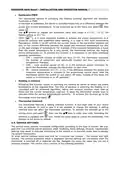
Hysteresis/PWM
Two operational options of activating the heating (cooling) algorithm are available:
hysteresis or PWM.
In the case of hysteresis, the device is activated based only on a difference between the
preset and current temperature. To set hysteresis go to the menu and select
, then
select
Use
.
buttons to change the hysteresis value (the range is 0.2 °C... 10 °C; the
factory setting is: 0.2 °C).
PWM (
), is a more advanced method to achieve the preset temperature. It is
suited for systems with underfloor water heating. It is used to limit room temperature
fluctuations. Unlike in on/off controls the current status of the transmitter depends not
only on the current difference between the preset and measured temperature but also
on the past changes of temperature. For example, if the measured temperature is lower
than the preset temperature for a long period, the thermostat switches the heating
device permanently on. To activate this function it is necessary to set three additional
operation parameters:
✓ CPH – maximum number of cycles per hour (3-10). The thermostat calculates
the number of switch-ons and switch-offs (cycles) per hour (according to
temperature changes).
✓ CON – cycle duration period (2-10). It is the minimum period (minutes) for
which the thermostat switches the transmitter on each time.
✓ PB – control bandwidth (0.5 °C...3 °C). If the difference between the preset and
measured temperature is included in the proportional control band, then the
thermostat selects the switch-on and switch-off times. Outside of this band, the
output is in continuous on or off operation.
•
•
Heating in advance
Activating this function results in switching the heating on earlier to obtain the preset
temperature at the required time. The time of advance in switching the heating on is
calculated with an advanced algorithm, taking into account previous room heat-up
times and the current temperature read-out. It takes the thermostat several days to
calculate times for various temperatures correctly. To activate this function go to the
thermostat menu and select
.
Thermostat interlock
The thermostat features a setting interlock function. A four-digit code of your choice
may be entered. In such a case it is not possible to change the settings. A setting
interlock does not affect the thermostat operation. To activate the interlock go to the
setting menu and select
, then use the
keys to enter your code. Activating the
interlock is signaled with
icon. Follow the same steps to unlock the thermostat. This
function is not active by default.
6.9. SERVICE SETTINGS
The service menu permits thermostat configuration according to the type of system. We sug-
gest that you exercise special prudence when modifying these settings, because inappropriate
settings may result in improper functioning of the system or, in extreme cases, lead to damag-
ing system components.
To enter service settings press and hold for 5 seconds two buttons – the central and right
buttons. The window presented below is displayed. Service settings are unavailable when the
thermostat is switched off or batteries are flat. Navigate the menu the same way you did in
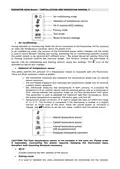
previous windows. The service menu consists of the following elements:

| General | Details |
|---|---|
| Name | EUROSTER 4040 Smart Programmable Thermostat User Manual |
| Make | EUROSTER |
| Language | English |
| Filetype | PDF (Download) |
| File size | 0.33 MB |
 (1 votes, average: 5.00 out of 5)
 Loading...

EUROSTER 2006TXRX Wireless Programmable Thermostat Installation Guide

EUROSTER 2026TXRX Air Conditioning Thermostat Instruction Manual


ecoer EST02 Smart Wi-Fi Thermostat User Guide

SmartLife ZBHTR20WT Zigbee Radiator Thermostat Installation Guide

MI-HEAT WT8 WiFi Smart Thermostat User Manual

EMOS P56201UF Floor Heating Thermostat Instruction Manual

ENSTO ECO16BTD Floor Heating Thermostat User Guide

amazon basics B07W85DJQV 3 Heat ECO Setting 2 Fans Speed Thermostat Instruction Manual

Smart Temp SMT-850 Halo Thermostat User Guide

SALUS Thermostat RT520 User Manual

Carrier ecobee3 Lite Smart Thermostat User Manual

ALARM ADC-T25 Smart Thermostat Installation Guide