
EUROSTER 4040 Smart Programmable Thermostat User Manual



| General | Details |
|---|---|
| Name | EUROSTER 4040 Smart Programmable Thermostat User Manual |
| Make | EUROSTER |
| Language | English |
| Filetype | PDF (Download) |
| File size | 0.33 MB |
 (1 votes, average: 5.00 out of 5)
 Loading...


Euroster 4040 Manual: Questions and Answers
Euroster 4040 specifications
| Power supply | 3 V (2 pieces of alkaline AAA batteries) / receiver – |
| Maximum load | 5 A 230 V 50 Hz |
| Setpoint range | +5 °C...+35 °C |
| Operating temperature | +5 °C...+40 °C |
| Storage temperature | -10 °C...+50 °C |
| Weight | Thermostat without batteries – 115 g |
| Warranty | 2 years |
Can the Euroster 4040 control air-conditioning systems?
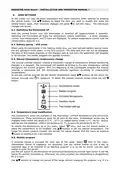
Yes. The thermostat controls electrical equipment, floor heating, and air-conditioning systems. User Manual, p. 1
What do the symbols on the Euroster 4040 display mean?
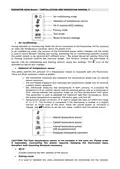
The display shows current temperature, clock, preset temperature, displayed information, date and day of the week, and current program symbol.
| Display Element | Meaning |
|---|---|
| Current temperature | Room temperature now |
| Preset temperature | Target temperature set |
| Current program symbol | Active scheduling mode |
| Clock, date and day | Time and calendar |
How do I install batteries in the Euroster 4040?
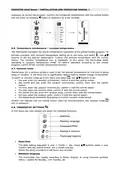
Use only alkaline AAA batteries, observing correct polarity as marked in the compartment. Then snap the thermostat onto the base.
- Place batteries in the thermostat while observing the installation markings for correct polarity
- Install (snap) the thermostat onto the base User Manual, p. 3
What does the operation mode switch do in heating mode?
In heating mode, the switch activates battery-saving ECO mode. In cooling mode, it toggles between heating and cooling operation. User Manual, p. 2
What do the buttons on Euroster 4040 control?
Use arrow buttons to adjust values. Press the central button to confirm entries. Press or hold the side button to exit menus. User Manual, p. 6
Setting the date and time in Euroster 4040 thermostat: what's the correct sequence?
Go to thermostat settings. Select date/time. Enter year, month, day in sequence using arrow buttons, confirming each with the central button. Then set hours and minutes the same way. User Manual, p. 6
What is the temperature adjustment range for the Euroster 4040?
+5 °C to +35 °C. User Manual, p. 11
How do I restore the Euroster 4040 after the batteries run out and communication is lost?
Replace the discharged batteries in the thermostat. The receiver will switch the system off and automatically resume operation when communication is re-established. User Manual, p. 10
How can I tell if the Euroster 4040 receiver has a strong radio signal?
Three green LED flashes confirm very strong connection, two flashes indicate good connection, and one flash means sufficient connection. The signal is shown with each confirmation of transmitter reception. User Manual, p. 10
How do I turn off the Euroster 4040 thermostat?
Hold the central button for approximately 5 seconds until it switches off. User Manual, p. 5
How long does the thermostat take to respond to app changes in ECO mode?
20 minutes. User Manual, p. 5
Can I manually override the temperature on the Euroster 4040 without changing the program?
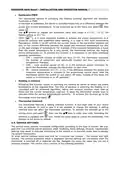
Yes. Set the desired temperature using the buttons, the manual override icon appears. The thermostat uses this temperature for the current program only, then returns to programmed settings when the next program begins. User Manual, p. 5
Euroster 4040 compared with other Euroster thermostats
| Specification | Euroster 4040 | Euroster 2006TXRX | Euroster 2026TXRX Air Conditioning |
|---|---|---|---|
| Power supply | 3 V (2 pieces of alkaline AAA batteries) / receiver – | 3 V (2 pieces of alkaline AA batteries) / | 3 V (2 pieces of alkaline AA batteries) |
| Maximum load | 5 A 230 V 50 Hz | 5 A 230 V 50 Hz | 5 A 230 V 50 Hz |
| Setpoint range | +5 °C...+35 °C | +5 °C...+35 °C | +5 °C...+45 °C |
| Operating temperature | +5 °C...+40 °C | +5 °C...+40 °C | +5 °C...+40 °C |
| Storage temperature | -10 °C...+50 °C | -10 °C...+45 °C | -10 °C...+45 °C |
| Weight | Thermostat without batteries – 115 g | thermostat weight without batteries – 115 g | Thermostat without batteries – 171 g |
| Warranty | 2 years | 2 years | 2 years |


