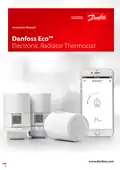
Danfoss Eco Electronic Radiator Thermostat Instruction Manual
| General | Details |
|---|---|
| Name | Danfoss Eco Electronic Radiator Thermostat Instruction Manual |
| Make | Danfoss |
| Language | English |
| Filetype | PDF (Download) |
| File size | 2.53 MB |

Danfoss RET-MD Electronic Intelligent Dial Setting Thermostat Installation Guide
Danfoss VICUQ24M Icon Programmable II Room Thermostat Installation Guide

Danfoss MBC 8000, MBC 8100 Heavy Duty Thermostat Installation Guide

Danfoss UT 72-UT 73 Universal Thermostat Installation Guide

Danfoss ECtemp 530 Electronic Thermostat Installation Guide

Danfoss 014G0251 Eco Radiator Thermostat User Guide

Danfoss 014G0013 Z Wave Radiator Thermostat Installation Guide

Danfoss RET230P Electronic Thermostat Instruction Manual

Danfoss TP7000 Range Electronic 7 Day Programmable Room Thermostat Installation Guide

Danfoss RET1000 Series Electronic Thermostat User Guide

Danfoss Eco Electronic Radiator Thermostat Instruction Manual Overview
Summary of Contents
- Page 1: Instruction manual for Danfoss Eco™ electronic radiator thermostat.
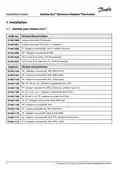
- Page 2: Installation guide for Danfoss Eco™ electronic radiator thermostat. Identify your Danfoss Eco™. In the package. Overview of valve adapters. Installing the right adapter. Inserting the batteries. Mounting the Danfoss Eco™. Download Danfoss Eco™ app. Pairing Danfoss Eco™. Automatic adjustments. Removing Danfoss Eco™. Resetting Danfoss Eco™ to default settings. Technical specifications.
- Page 3: Installation guide for Danfoss Eco™ electronic radiator thermostat. Display screen features and functions. Red illuminating ring functionality. Display rotation options. Manual mode explanation. Temperature and programme settings overview. Creating a personalized schedule. Vacation settings and management. Additional settings via the Danfoss Eco™ app. Safety precautions and disposal instructions.
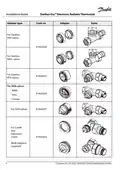
- Page 4: Installation guide for Danfoss Eco™ electronic radiator thermostat includes various adapters for different regions. Adapters included vary by region, such as RA, M30, and others. Specific code numbers and version characteristics are listed for each adapter type. The guide outlines the installation process and identifies the necessary components. Different countries have specific adapter requirements, including combinations of RA, M30, and others. The document provides a comprehensive list of adapter codes for various models. It includes information on premounted adapters for specific UK valve types. Adapters are tailored for compatibility with various heating systems across different regions. The installation guide is essential for proper setup and functionality of the thermostat. The document is published by Danfoss with a version date of January 2022.
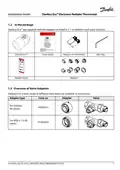
- Page 5: Installation guide for Danfoss Eco™ electronic radiator thermostat includes essential components and adapter selection. The package contains Danfoss Eco™ quick guide, requires 2x AA batteries, and includes an Allen key. Adapters for various valve types are available as accessories. Adapter types and their corresponding code numbers are provided for different valve specifications. Specific adapters are designed for Danfoss RA valves and M30 x 1.5 (K) valves. An overview of valve adapters is included to assist with installation. The document outlines the necessary components for proper installation. Adapter selection is crucial for compatibility with different radiator valves. The guide provides detailed information on adapter options available for the thermostat. Danfoss Eco™ is designed for efficient radiator temperature control.
- Page 6: Installation guide for Danfoss Eco™ electronic radiator thermostat includes various adapter types. The document specifies adapter codes for different valve types, including RAV, RAVL, RTD, M28, Herz, Comap, Orkli, Caleffi, and Giacomini valves. Both adaptors are supplied for certain models.
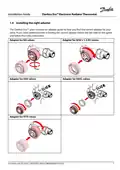
- Page 7: Installation guide for Danfoss Eco™ electronic radiator thermostat includes instructions for installing the right adapter. The package contains an adapter guide to help find the correct adapter for your valve. Additional help can be accessed via a QR code on the guide for video instructions. Adapters are available for various valve types including RA, M30 x 1.5 (K), RAV, RAVL, and RTD valves.
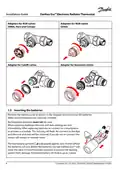
- Page 8: Installation guide for Danfoss Eco™ electronic radiator thermostat includes adapters for various valve types. Inserting the batteries involves removing the battery cover and inserting two AA batteries, ensuring correct orientation. Rechargeable batteries must not be used. Replacing batteries will result in the loss of time and date settings. After replacing batteries, re-connect to a smartphone to activate a schedule. The low battery symbol appears approximately one month before batteries run out. Danfoss Eco™ will leave the valve in frost protection position to prevent damage to the heating system. Estimated battery life is up to two years.
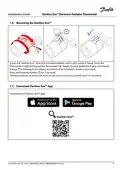
- Page 9: Installation guide for Danfoss Eco™ electronic radiator thermostat includes important steps for mounting and app download. To mount the Danfoss Eco™, screw it onto the mounted adapter until a click sound is heard. Adjust the display to your preferred orientation after tightening the thermostat. A flashing large M indicates that installation mode is activated. Press and hold the button for 3 seconds to proceed. The temperature set point will display on the screen once the thermostat is mounted. Download the Danfoss Eco™ app for additional features.
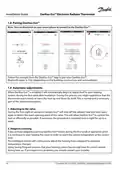
- Page 10: Installation guide for Danfoss Eco™ electronic radiator thermostat includes pairing instructions and automatic adjustments. To pair the Danfoss Eco™, turn on Bluetooth on your smartphone and follow the prompts from the Danfoss Eco™ app. Bluetooth range is approximately 10 meters, depending on building construction and surroundings. The thermostat will automatically adjust to your heating system during the first week after installation. During this adjustment period, the thermostat may react slowly or adjust the heat on its own, which is normal. On the first night, the Danfoss Eco™ will shut off the radiator heat to detect the valve's exact opening point for efficient control. This procedure may be repeated nightly for up to a week if necessary. Activating adaptive learning allows the thermostat to learn when to start heating to reach the desired temperature on time. The intelligent control will adjust heating times based on seasonal temperature changes. Using the saving program requires that the heating system can provide enough heat for a short period during the heat-up phase.
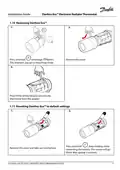
- Page 11: Installation guide for Danfoss Eco™ electronic radiator thermostat includes instructions for removing and resetting the device. To remove the thermostat, press and hold until the large M flashes, indicating mounting mode. Remove the cover and press firmly on the tab to unscrew the thermostat from the adapter. To reset the Danfoss Eco™ to default settings, press and hold while reinserting the battery. The screen will go blank after approximately 3 seconds while holding the button. Remove the cover and take out one battery to complete the reset process.
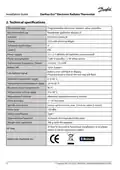
- Page 12: Installation guide for Danfoss Eco™ electronic radiator thermostat. Technical specifications include thermostat type, recommended use, and actuator details. The device is a programmable electronic radiator valve controller intended for residential use. It features an LCD display with white backlight. Power supply requires 2 x 1.5 V alkaline AA batteries, which are not included. The thermostat has a standby power consumption of 3 μW and 1.2 W when active. Battery life can last up to 2 years, with a low battery signal indicated by a flashing icon. The ambient temperature range for operation is 0 to 40 °C, while the transportation temperature range is -20 to 65 °C. The maximum water temperature is 90 °C, and the temperature setting range is from 4 to 28 °C. The device measures temperature every minute and has a clock accuracy of +/- 10 min/year.
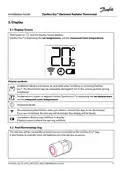
- Page 13: Installation guide for Danfoss Eco™ electronic radiator thermostat includes important information about the display screen and symbols. The display shows the set temperature, not the measured room temperature. Installation mode must be activated during installation or removal to avoid damage. Temperature is displayed in degrees Celsius. The antenna symbol indicates the need to connect the app to the thermostat. When connected, the red ring illuminates while the display remains blank. A flashing battery icon indicates low battery, and a flashing red ring signals critical battery levels. The red illuminating ring remains on when connected to the Danfoss Eco™ app. Flashing red ring also indicates critically low battery power.
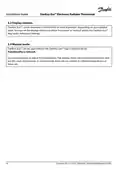
- Page 14: Installation guide for Danfoss Eco™ electronic radiator thermostat. Danfoss Eco™ can be mounted in a horizontal or vertical position. Display rotation can be set to either ‘horizontal’ or ‘vertical’ in the Danfoss Eco™ App under advanced settings. Danfoss Eco™ can be used in manual mode without the app. Functionality is reduced in manual mode. Use the handwheel to adjust the temperature. The display shows the required temperature, not the room temperature. In manual mode, there are no comfort or setback temperatures or times set.
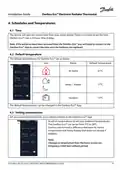
- Page 15: Installation guide for Danfoss Eco™ electronic radiator thermostat includes schedules and temperatures. The device automatically takes the correct time from your smartphone and uses a 24-hour time display. If the batteries are removed, reconnect to the Danfoss Eco™ app to correct the time after replacement. Default temperatures for Danfoss Eco™ are 21°C for 'At Home', 17°C for 'Away/Asleep', and 15°C for 'Vacation'. Default temperatures can be changed in the Danfoss Eco™ app. Users can set their own temperatures for setback periods in the app, ranging from 5°C to 28°C. It is recommended that the difference between 'At Home' temperature and 'Away/Asleep' does not exceed 4 degrees. Changes in temperature from the home screen are temporary until the next setback period.
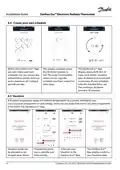
- Page 16: Installation guide for Danfoss Eco™ electronic radiator thermostat includes creating a personalized schedule within the Danfoss Eco™ app. Users can set setback times within 24 hours and copy schedules to other days. The weekly schedule displays 'At Home' periods in red, with a minimum duration of 30 minutes. A vacation program maintains a setback temperature while away from home, helping to save energy. The vacation program can be set up in advance or activated immediately. Planned vacations utilize a calendar and time setting within the app. The app confirms the vacation date once scheduled.
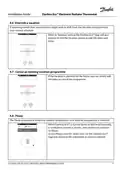
- Page 17: Installation guide for Danfoss Eco™ electronic radiator thermostat includes sections on managing vacation settings. Users can shift from the vacation program to the normal schedule if returning earlier than expected. The Danfoss Eco™ app provides options to end the vacation period or edit dates and times while in vacation setting. To cancel an existing vacation program, users can edit the dates or cancel the program if it is planned for the future. The pause program maintains the setback temperature until another program is selected. When the thermostat is manually turned down to the minimum level, a notification banner appears, and the center icon switches to 'Pause'. Exiting the pause mode can be done by clicking the center icon on the Danfoss Eco™ app to return to the scheduled or manual setpoint.
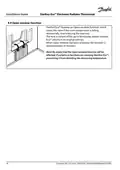
- Page 18: Installation guide for Danfoss Eco™ electronic radiator thermostat includes an open window function. The open window function closes the valve if the room temperature falls dramatically, reducing heat loss. Heat is turned off for up to 30 minutes before returning to original settings. When activated, the open window function is quarantined for 45 minutes. The function may be affected if curtains or furniture cover the thermostat, preventing it from detecting temperature changes.
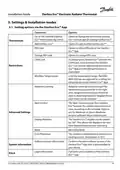
- Page 19: Installation guide for Danfoss Eco™ electronic radiator thermostat includes settings and installation modes. The Danfoss Eco™ app allows for various settings options. Users can view a list of installed Danfoss Eco™ thermostats by name. There is an option to change the name or un-pair an existing Danfoss Eco™ thermostat. A PIN code can be added for security purposes. Child lock can be activated to restrict manual adjustments. Min/Max temperature settings can be adjusted through the app. Adaptive learning helps achieve the desired temperature efficiently. Heat control options include moderate or quick settings for comfort. The display can be rotated for better visibility in different mounting orientations.
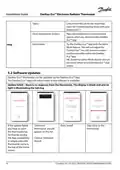
- Page 20: Installation guide for Danfoss Eco™ electronic radiator thermostat includes troubleshooting topics and links to the FAQ site. Demo mode allows users to experience the introduction screens of the Danfoss Eco™ app without adjusting the thermostat. To exit demo mode, double click on the word ‘Demo’ on the app screen. Software updates for the Danfoss Eco™ thermostat can be performed via the app, which will notify users when new software is available. If an update fails, the thermostat may show a blank display with no light illuminating the red ring. To resolve a failed update, users should open the thermostat list by closing the app completely or pressing the thermostat name on the home screen. An ‘Unknown thermostat’ should appear on the list after a failed update. Users should stay close to the thermostat and choose ‘Unknown device’ to proceed with the installation.
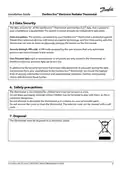
- Page 21: Installation guide for Danfoss Eco™ electronic radiator thermostat. Data security for the Danfoss Eco™ thermostat and app is guaranteed and tested annually by independent specialists. The wireless connection is protected with the latest encryption technology, and pairing requires physical interaction with the thermostat. A user-assigned PIN code ensures that only authorized persons can make changes to the system. User personal data is stored only in the thermostat and can only be accessed by the personal app. Danfoss implements technical and organizational measures to ensure data protection during transmission. The thermostat is not intended for children and should not be used as a toy. Packaging materials should be kept away from children to prevent danger. Do not attempt to dismantle the thermostat as it contains no user-serviceable parts. The thermostat must be disposed of as electronic waste.
- Page 22: Installation guide for Danfoss Eco™ electronic radiator thermostat.