
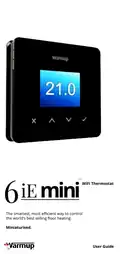
Warmup 6iE mini WiFi Thermostat User Guide


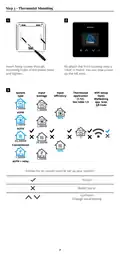
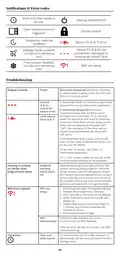




Notifications & Error codes
Date and time needs to
be set.
Heating switched OFF
Display locked
Open window function
triggered.
Temporary override
enabled
2
Sensor P2 (6 & 7) error
Sensor P1 (5 & 6) not
connected / damaged or
Internal air sensor fault
Holiday mode enabled.
(Configured in MyHeating
App)
- - -
Frost protect enabled.
(Configured in MyHeating
App)
WiFi not setup
!
Troubleshooting
Display is blank
Power
(Electrician Required) Electrician required
to verify power is going to the 6iE mini and
that it is correctly wired.
Control
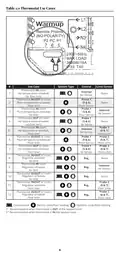
1. Please see Table 1.0 and ensure you have
(5 & 6) /
selected the correct thermostat application.
---
Interal Air
sensor error
2. (Electrician Required) Electrician
required to verify that the floor sensor
has been wired correctly. If it is correctly
wired the electrician will need to check the
resistance of the floor sensor using a multi
meter. For temperatures between 20°C
- 30°C the resistance of the floor sensor
should measure between 8K ohms and
12K ohms.
Limit Sensor
Error (6 & 7)
2
If the electrician finds a fault, and the 6iE
mini is in the room to be heated then it can
be set into “Air Mode”.
To set into “Air Mode”, see Table 1.0
Thermostat application.
If “---” still remains when set into air mode
the thermostat will have to be replaced.
Heating is coming
on earlier than
programmed times
Adaptive
learning
(Early start)
On
Adaptive learning (Early start) will use the
historic heating/cooling rates for the time
of day, historic external temperatures and
the forecast external temperatures, to work
out the heating start time in order to reach
the comfort time at the start of the comfort
period. It will only work in Program Mode.
WiFi Error Symbol
WiFi not
setup
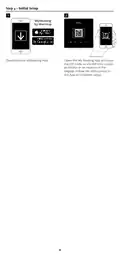
1. Download and open the MyHeating App
2. Remove thermostat from the wall
3. Scan QR code on the back of the display
4. Place thermostat back on the wall and
power-up
!
5. Thermostat will be in pairing mode for
1 minute. App should automatically
connect to phone
6. Follow instructions in App
WiFi
Follow the step above to try and to
disconnected re-connect to the WiFi Network.
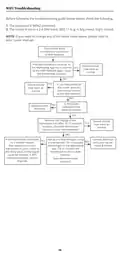
If the 6iE mini still fails to connect, see WiFi
Troubleshooting.
Clock Icon
Time and
Date not set
Connect the 6iE mini to a WiFi network or
alternatively set the time and date from the
settings menu.
15

| General | Details |
|---|---|
| Name | Warmup 6iE mini WiFi Thermostat User Guide |
| Make | Warmup |
| Language | English |
| Filetype | PDF (Download) |
| File size | 0.73 MB |
 (1 votes, average: 5.00 out of 5)
 Loading...

warmup RFT-P Programmable Radiant Floor Thermostat User Manual

Warmup 3iE Energy Monitoring Thermostat Instruction Manual


GENERAL LIFE HT250S Digital Room Thermostat User Manual

Honeywell Home FocusPRO N100 Series Non Programmable Thermostat Installation Guide

DEVI 330 Electronic Thermostat Installation Guide

Honeywell Lyric Thermostat THP2400A1019 Installation Guide

HIVE Cheap Smart Thermostat User Guide

GENERAL LIFE 230S RF Digital Room Thermostat User Manual

Meross MTS960 Smart Wi-Fi Socket Thermostat Instruction Manual

Honeywell Home S200 Series FocusPRO Smart Thermostat User Guide

Honeywell Home X1N Non Programmable Thermostat Installation Guide

BEOK TGP508 WiFi Touch Screen Thermostat User Manual