
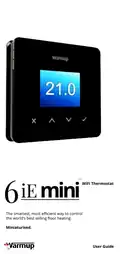
Warmup 6iE mini WiFi Thermostat User Guide


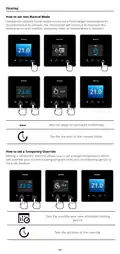



Heating
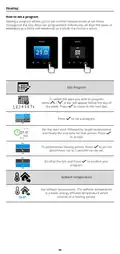
How to set a program
Setting a program allows you to set comfort temperatures at set times
throughout the day. Days can programmed individually, all days the same or
weekdays as a block and weekends as a block, the choice is yours.
Edit Program
To select the days you wish to program
7
press
/
. A bar will appear below the day of
the week. Press
to move to the next day.
1 2 3 4 5 6 7
07:00AM
21.0
21.0
09:00AM
04:30PM
Press
to set a program.
09:00PM
07:00
Set the start time, followed by target temperature
and finally the end time for that period. Press
to accept.
21.0°
09:00
To add/remove heating period, Press
to on the
+
+
plus/minus. Up to 5 periods can be set.
Scroll to the tick and Press
program.
to confirm your
Setback temperature
Set setback temperature. The setback temperature
is a lower energy efficient temperature when
outside of a heating period.
16.0°
10

| General | Details |
|---|---|
| Name | Warmup 6iE mini WiFi Thermostat User Guide |
| Make | Warmup |
| Language | English |
| Filetype | PDF (Download) |
| File size | 0.73 MB |
 (1 votes, average: 5.00 out of 5)
 Loading...

warmup RFT-P Programmable Radiant Floor Thermostat User Manual

Warmup 3iE Energy Monitoring Thermostat Instruction Manual


Wengart WG603 Home Smart Thermostat User Guide

STELPRO STCP MULTIPLE PROGRAMMING ELECTRONIC THERMOSTAT User Guide

Roth IR SL Room Thermostat Owner’s Manual

EPH CONTROLS CRT2 Room Thermostat Instruction Manual

GENERAL Life HT220S Digital Room Thermostat User Manual

Midea KJR-29B-BK-E Wireless Thermostat Instruction Manual

BEOK BOT-T9N-WIFI Desktop Type RF Smart Thermostat for Wall-Hung Boiler User Manual

SALUS RT310i Internet Thermostat Installation Guide

vtech T961NN50 Wired Thermostat User Guide

Science Equip CH1920-001 Magnetic Stirrer Hot Plate Thermostat Instructions