
Home > thermotouch > thermotouch 5235W Wi-Fi Programmable Thermostat Instructions
thermotouch 5235W Wi-Fi Programmable Thermostat Instructions






Heating Schedule 2/3
An event is a scheduled time of day when the thermostat automatically
changes the temperature setting.
You can choose between a four or six event schedule.
8
Choose the setting that best fits your daily rhythm.
With a four event schedule, you can set four different events during work days
and two different events during home days.
– Perfect if your day is as follows: You get up in the morning, you go to
work, you return home and you go to sleep.
9
With a six event schedule, you can set six different events during work days
and two different events during home days.
– Perfect if your day is as follows: You get up in the morning, you go to
work, you return home for lunch, you go back to work, you return
home and finally you go to sleep.
10
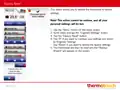
8. Tap the “Events per Day” button.
9. On the confirmation screen tap the “Right Arrow” button.
10. Tap the button with the number of events per day you wish to use.
Confirm with “”.
PAGE 26

| General | Details |
|---|---|
| Name | thermotouch 5235W Wi-Fi Programmable Thermostat Instructions |
| Make | thermotouch |
| Language | English |
| Filetype | PDF (Download) |
| File size | 0.98 MB |
 (1 votes, average: 5.00 out of 5)
 Loading...


SIEMENS RDF660MB Flush Mount Room Thermostat Instruction Manual

Goldair GEPH213 EcoPanel Heater with Thermostat Instruction Manual

AIRZONE AZS62THINKRB, AZS62THINKRN Wireless Think Thermostat Instruction Manual

Danfoss living eco Intelligent Radiator Thermostat User Guide

hansgrohe 24240XXX Shower Column Including Thermostat Instruction Manual

TIMEGUARD TRT05 Plug In Thermostat Instruction Manual

tecnoswitch Raffaello 230 TE215VU Electronic Recessed Thermostat User Guide

Danfoss RT 103 Thermostat Installation Guide

HEATIT 54 305 41 WiFi6 Thermostat Installation Guide

VIMAR 02952 Well-Contact Plus Electronic Touchscreen Thermostat Instruction Manual