Home > thermotouch > thermotouch 5235W Wi-Fi Programmable Thermostat Instructions
×
- 1. Wi-fi Enabled Thermostat (Simplified Instruction Version)
- 2. Introduction (Thermostat Features → Heating Schedule → User Settings → Adaptive Function → Remote Control → Preset Heating Schedule)
- 3. Installation Guide (General Operation → Icons → Language → Open Window → Display Brightness → Energy Tariff)
- 4. Introduction (Adaptive Function → Heating Schedule → Before You Start → Installing Your Thermostat → Operating Modes → Troubleshooting)
- 5. Before You Start (Your Thermostat Should Be)
- 6. Installing Your Thermostat (Switch Off Main Power → Caution)
- 7. Installing Your Thermostat (Installation Location)
- 8. Installing Your Thermostat (Maximum Distance)
- 9. Installing Your Thermostat (Wiring Diagram)
- 10. Installing Your Thermostat (Fix Mounting Plate)
- 11. Installing Your Thermostat (Switching On Your System)
- 12. Startup Wizard (Region → Language → Date)
- 13. Time Set The Current Time. (Floor Type Choose Between: → Heating Schedule → Factory Settings)
- 14. Operating Modes (Scheduled Operation → Frost Protect → Manual → Comfort → Eco → Boost)
- 15. Scheduled Operation (Heating Schedule → Manual Override → Operating Modes → Home Screen Functions)
- 16. Manual (Manual Override → Using Manual → Manual Home Screen)
- 17. Comfort Mode
- 18. Comfort Home Screen (Indication Of Comfort Mode → Icon Indicating The Current Operating Mode → Current Target/setpoint Temperature → Time At Which The Thermostat Will Return To Scheduled Operation → Tap Here To Quit Comfort Mode And Return To Scheduled Operation)
- 19. Boost Mode (Accessing Boost Mode → Returning To Scheduled Operation → Boost Home Screen)
- 20. Frost Protection (Frost Protection Mode → Frost Protection Home Screen)
- 21. Holiday Mode (Setting Dates → Activating Holiday Mode → Confirmation Screen → Active Holiday Period)
- 22. Holiday Home Screen (Indication Of Holiday Mode → Icon Indicating The Current Operating Mode → The Date On Which The Thermostat Entered Holiday Mode → Tap Here To Quit Holiday Mode And Return To Scheduled Operation)
- 23. Eco Function (User Settings/eco Function → Eco Function Home Screen)
- 24. Adaptive Function
- 25. Heating Schedule (Preset Schedule → Week Type → Work Days/home Days → All Days Are Different)
- 26. Heating Schedule (Event Scheduling Options → Four Event Schedule → Six Event Schedule)
- 27. Heating Schedule (Event Schedule → Target Temperature → Start Time → Confirmation Screen)
- 28. Child Lock (Unlocking The Child Lock)
- 29. Date
- 30. Time
- 31. Sensor Application (Floor (default) → Room/floor Limit (advanced) → Room)
- 32. Factory Reset
- 33. Wi-fi Connection (Connect To App → Automatic Setup → Manual Setup)
- 34. Wi-fi Connection (Manual Connection → Entering The Network Name (ssid) → Entering The Network Key (password))
- 35. Wi-fi Connection (Tips On Using The Keyboard)
- 36. Wi-fi Connection (Troubleshooting)
- 37. Connect To App (Wifi Connection)
- 38. Connect To App (Name Your Thermostat → Heating Zone → Confirmation Process → Wireless Connection)
- 39. Using The App (Adding Additional Thermostats)
- 40. Using The App (Controlling Your Thermostat → Operating Modes)
- 41. Using The App (Setting Up Your Schedule)
- 42. Using The App (Setting Up Your Schedule Continued)
- 43. Using The App (Setting Holiday Mode)
- 44. Using The App (Thermostat Information → Energy Usage)
- 45. Using The App (Adding Multiple Users To The Thermostat)
- 46. Troubleshooting (Error Messages)
- 47. Technical Information (Wiring Diagram → Box Contents → Technical Data → Warranty → Ip Rating → Display)
- 48. Service & Support (Thermogroup → Technical Line)
×
thermotouch 5235W Wi-Fi Programmable Thermostat Instructions
Table of Contents
Introduction
02
05
06
09
12
14
15
16
17
19
20
21
23
Adaptive Function
Heating Schedule
Child Lock
24
25
28
29
30
31
32
33
37
39
46
47
Before you start
Installing your thermostat
Wiring Diagram
Startup Wizard
Operating Modes
Scheduled Operation
Manual
Date
Time
Sensor Application
Factory Reset
Wi-Fi Connection
Connect to app
Using the app
Troubleshooting
Technical Information
Comfort
Boost
Frost Protection
Holiday
Eco Function
PAGE 04
| General | Details |
|---|---|
| Name | thermotouch 5235W Wi-Fi Programmable Thermostat Instructions |
| Make | thermotouch |
| Language | English |
| Filetype | PDF (Download) |
| File size | 0.98 MB |


heatit Z-Temp2 Wireless Thermostat Instruction Manual

Dimplex DWT431W Non-Programmable Thermostat 4000W Owner’s Manual

Honeywell RTH9590 Wi-Fi Color Touchscreen Programmable Thermostat User Guide

sygonix 2522212 Installable Thermostat Instruction Manual

Wengart TP808-3 7 Day Programmable Thermostat User Manual

HTS HY02TP Programmable Plug In Thermostat User Manual

tekmar TEK564 Invita WiFi Thermostat User Manual

DEVI 330 Electronic Thermostat Installation Guide

ELEKTROBOCK PT02 Electronic Pipe Thermostat Instruction Manual

HIVE HAH2INSTAMZ-01 Active Heating Thermostat User Guide
Table of Contents
- 1. Wi-fi Enabled Thermostat - Simplified Instruction Version →
- 2. Introduction - Thermostat Features →
- 3. Installation Guide - General Operation →
- 4. Introduction - Adaptive Function →
- 5. Before You Start - Your Thermostat Should Be →
- 6. Installing Your Thermostat - Switch Off Main Power →
- 7. Installing Your Thermostat - Installation Location →
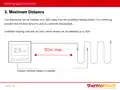
- 8. Installing Your Thermostat - Maximum Distance →
- 9. Installing Your Thermostat - Wiring Diagram →
- 10. Installing Your Thermostat - Fix Mounting Plate →
- 11. Installing Your Thermostat - Switching On Your System →
- 12. Startup Wizard - Region →
- 13. Time Set The Current Time. - Floor Type Choose Between: →
- 14. Operating Modes - Scheduled Operation →
- 15. Scheduled Operation - Heating Schedule →
- 16. Manual - Manual Override →
- 17. Comfort Mode →
- 18. Comfort Home Screen - Indication Of Comfort Mode →
- 19. Boost Mode - Accessing Boost Mode →
- 20. Frost Protection - Frost Protection Mode →
- 21. Holiday Mode - Setting Dates →
- 22. Holiday Home Screen - Indication Of Holiday Mode →
- 23. Eco Function - User Settings/eco Function →
- 24. Adaptive Function →
- 25. Heating Schedule - Preset Schedule →
- 26. Heating Schedule - Event Scheduling Options →
- 27. Heating Schedule - Event Schedule →
- 28. Child Lock - Unlocking The Child Lock →
- 29. Date →
- 30. Time →
- 31. Sensor Application - Floor (default) →
- 32. Factory Reset →
- 33. Wi-fi Connection - Connect To App →
- 34. Wi-fi Connection - Manual Connection →
- 35. Wi-fi Connection - Tips On Using The Keyboard →
- 36. Wi-fi Connection - Troubleshooting →
- 37. Connect To App - Wifi Connection →
- 38. Connect To App - Name Your Thermostat →
- 39. Using The App - Adding Additional Thermostats →
- 40. Using The App - Controlling Your Thermostat →
- 41. Using The App - Setting Up Your Schedule →
- 42. Using The App - Setting Up Your Schedule Continued →
- 43. Using The App - Setting Holiday Mode →
- 44. Using The App - Thermostat Information →
- 45. Using The App - Adding Multiple Users To The Thermostat →
- 46. Troubleshooting - Error Messages →
- 47. Technical Information - Wiring Diagram →
- 48. Service & Support - Thermogroup →