
Home > thermotouch > thermotouch 5235W Wi-Fi Programmable Thermostat Instructions
thermotouch 5235W Wi-Fi Programmable Thermostat Instructions






Time
1
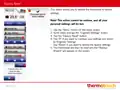
This option allows you to change the time, which is used by the thermostat to
control heating schedule events during Scheduled Operation.
1. Tap the “Menu” button on the home screen.
2. Then tap the “User Settings” button to access the various user settings.
3. Scroll down and tap the “Time” button.
4. Tap the parameter you want to change.
5. Tap the “Up Arrow” or “Down Arrow” button to set the hours and minutes.
6. Confirm each setting with “”.
2
7. Tap the “Left Arrow” button to return to “User Settings”.
3
4
7
PAGE 30

| General | Details |
|---|---|
| Name | thermotouch 5235W Wi-Fi Programmable Thermostat Instructions |
| Make | thermotouch |
| Language | English |
| Filetype | PDF (Download) |
| File size | 0.98 MB |
 (1 votes, average: 5.00 out of 5)
 Loading...


iO HVAC CONTROLS Z-2000-T Thermostat Instruction Manual

ESi ESRTP4RFW Programmable Room Thermostat Installation Guide

Honeywell ATC928 Evohome Connected Multi Zone Room Thermostat Installation Guide

ideal HEATING HALO LITE Room Thermostat User Guide

SALUS AT10F Wireless Contact Thermostat User Manual

Danfoss living eco Intelligent Radiator Thermostat User Guide

tado Wired and Wireless Smart Thermostat User Guide

GENERAL LIFE FC220 Digital Fan Coil Thermostat User Manual

SALUS WQ610RF Wireless Slim Programmable Thermostat Installation Guide

TRANE SC360 Link System Controller and Smart Thermostat Instructions