
Home > thermotouch > thermotouch 5235W Wi-Fi Programmable Thermostat Instructions
thermotouch 5235W Wi-Fi Programmable Thermostat Instructions




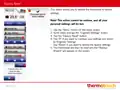


Startup Wizard 1/2
When the system has been installed and turned on for the first time, or
after you have performed a factory reset, you must set the region,
Language, Date, Time and Floor Type. Refer to pages 42 - 48.
The thermostat will automatically guide you through the process.
1. Region – set the time region in which the thermostat is located.
Tap the time region you are in.
Confirm with “”
2. Language – set the language to be used on the thermostat display.
Tap the language you prefer. Confirm with “”.
3. Date – set the current date.
Tap the parameter you want to change.
The selected parameter will enlarge and be underlined in black.
Use the “Up Arrow” or “Down Arrow” button to set the day, month
and year.
Confirm the date with the “Right Arrow”.
PAGE 12

| General | Details |
|---|---|
| Name | thermotouch 5235W Wi-Fi Programmable Thermostat Instructions |
| Make | thermotouch |
| Language | English |
| Filetype | PDF (Download) |
| File size | 0.98 MB |
 (1 votes, average: 5.00 out of 5)
 Loading...


EUROTRONIC Programmable Energy-Saving Radiator Thermostat User Manual

Honeywell RCH9310 Lyric Round WiFi Thermostat User Guide

Centrometal TU-DT-2024-ENG Thermostat Instruction Manual

OUIETwarmth UTN4-4999 Nonprogrammable Thermostat Instruction Manual

LUX TH10 Heating Only Mercury FREE Manual Thermostat Instruction Manual

ESi Controls ESRTERFW Wireless Digital Room Thermostat Installation Guide

legrand WZ3TSTATH Thermostat Instruction Manual

shadow-caster SCM-Series Thermostat Instruction Manual

GENERAL LIFE MITRA 220 Smart Room Thermostat User Manual

GENERAL LIFE SOLARA 300S Digital Room Thermostat User Manual