
Home > TECH CONTROLLERS > TECH CONTROLLERS EU-T-4.1n, EU-T-4.2n Wireless Thermostat User Manual
TECH CONTROLLERS EU-T-4.1n, EU-T-4.2n Wireless Thermostat User Manual






TECH
NOTE
In case of no communication (e.g. due to discharged battery), the receiver automatically disables the heating
device after 15 minutes.
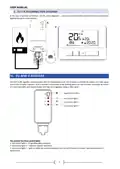
Registration of the EU-MW-3 receiver:
1. Press the registration button on the EU-MW-3 receiver.
2. In order to register the relays, select the "Reg" function in the Menu of the regulator, press and hold the buttons
„+/-”simultaneously. The message "Scs" means that the registration was successful while a registration error is
signalled with the message "Err". In both cases the registration can be continued by pressing any button (except
EXIT).
The number of registered relays is displayed on the screen. If the regulator has 6 registered relays (maximum
number), it is possible to unregister them and the "Del" message is displayed. Using one of the buttons
select the appropriate option "yes" or "no" depending on whether you want to unregister the relay or not.
V. FIRST START-UP
In order for the regulator to operate correctly, follow these steps when starting the device for the first time:
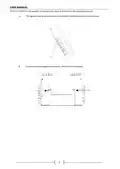
1. Insert the batteries - in order to do it, remove the back cover.
2. Connect the two-core cable to appropriate sockets in the regulator or the receiver.
VI. HOW TO USE THE REGULATOR
1. PRINCIPLE OF OPERATION
The EU-T-4.1N/EU-T-4.2N room regulator is designed to maintain the pre-set room temperature by sending a signal to
the heating device (contact opening) when the pre- set room temperature has been reached. After receiving such a signal,
the heating device is disabled (if it is connected to a CH boiler controller, the CH boiler switches to sustain mode after
receiving the signal).
2. OPERATION MODES
The room regulator may operate in one of the following operation modes:
•
Day/night mode
In this mode the pre-set temperature value depends on the current time of the day. The user may set different
temperature values for the daytime and nighttime (comfort temperature and economical temperature) as well as define
the exact time of entering day mode and night mode.
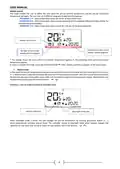
In order to activate this mode, press one of the buttons
until day/night mode icon appears on the main screen.
Day/night mode icon
8

| General | Details |
|---|---|
| Name | TECH CONTROLLERS EU-T-4.1n, EU-T-4.2n Wireless Thermostat User Manual |
| Make | TECH CONTROLLERS |
| Language | English |
| Filetype | PDF (Download) |
| File size | 0.53 MB |
 (1 votes, average: 5.00 out of 5)
 Loading...

TECH CONTROLLERS EU-R-8b PLUS Wireless Two Position Room Thermostat User Manual

TECH CONTROLLERS EU-R-12b Wireless Room Thermostat User Manual

TECH CONTROLLERS EU-T-4.1n Wireless Thermostat User Manual


GENERALLIFE MITRA 230S RF Wireless Room Thermostat User Manual

Honeywell RLV4305 Programmable Thermostat Owner’s Manual

Honeywell T6 Pro Programmable Thermostat Instruction Manual

GENERAL LIFE MITRA 220 Smart Room Thermostat User Manual

NT NetX X-Series Thermostat Installation Guide

COMPUTHERM Q20 Programmable Digital Room Thermostat Instruction Manual

EONEBATW-B ZigBee Smart Thermostat User Guide

FantiniCosmi CH143E 230V Flush Mounting Weekly Programmable Thermostat User Manual

JBM 54342 Parts Cleaner Machine with Thermostat Instruction Manual

GENERAL LIFE HT220S RF Digital Room Thermostat User Manual