Home > TECH CONTROLLERS > TECH CONTROLLERS EU-T-4.1n, EU-T-4.2n Wireless Thermostat User Manual
×
- 1. User Manual
- 2. Safety (Device Description → How To Install The Controller → First Start-up → How To Use The Regulator → Technical Data)
- 3. Safety (Warning → Environmental Protection)
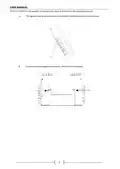
- 4. Device Description (How To Install The Controller)
- 5. User Manual (The Eu-t-4.1n/eu-t-4.2n Regulator May Be Put In Any Place Or Used As A Wall-mountable Panel.)
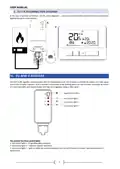
- 6. Tech (Connection Diagram → If Pump Manufacturer Requires An External Main Switch, Power Supply Fuse Or Additional Residual Current Device Selective For Distorted Currents It Is Recomemnded Not To Connect Pumps Directly To Pump Control Outputs.)
- 7. Eu-t-4.2n (Connection Diagram → Receiver)
- 8. Tech (Note → First Start-up → How To Use The Regulator → Principle Of Operation → Operation Modes)
- 9. Weekly Control (Manual Mode)
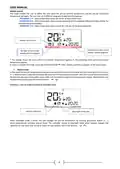
- 10. Example 2 - Manual Mode Activation In Weekly Control Mode (Main Screen View And Description)
- 11. Day Of The Week (An Icon Informing About Current Economical Temperature → An Icon Informing About Current Comfort Temperature → Pre-set Room Temperature → Current Operation Mode → Current Room Temperature → Parameter Icons)
- 12. Parameter Icons (Clock Settings → Weekly Control Settings → Comfort Temperature → Economical Temperature → Service Menu → Controller Functions)
- 13. Clock (Day → Night → Button Lock → Optimum Start)
- 14. Activating Optimum Start Function (Automatic Manual Mode → Weekly Program → How To Change Weekly Program Number → How To Configure Particular Weekly Programs → Step 1 - Choose The Program To Be Edited → Step 2 - Select Days Of The Week)
- 15. User Manual (Editing Parameters For Monday → Step 3 - Assigning Comfort Or Economical Temperature To Particular Hours → 10. Pre-set Comfort Temperature → 11. Pre-set Economical Temperature → 12. Pre-set Temperature Hysteresis)
- 16. Temperature Sensor Calibration (Registration → Service Menu → Heating Heat/cooling Cool Mode → How To Edit The Minimum (t1) And Maximum (t2) Pre-set Temperature → Optimum Start Calibration → Def Factory Settings)
- 17. Technical Data (Power Supply → Room Temp. Adjustment Range → Measurement Error → Operation Frequency → Operation Temperature → Maximum Power Consumption)
- 18. Eu Declaration Of Conformity (Compliance Assessment)
- 19.
- 20.
×
TECH CONTROLLERS EU-T-4.1n, EU-T-4.2n Wireless Thermostat User Manual
| General | Details |
|---|---|
| Name | TECH CONTROLLERS EU-T-4.1n, EU-T-4.2n Wireless Thermostat User Manual |
| Make | TECH CONTROLLERS |
| Language | English |
| Filetype | PDF (Download) |
| File size | 0.53 MB |

TECH CONTROLLERS EU-R-8b PLUS Wireless Two Position Room Thermostat User Manual

TECH CONTROLLERS EU-R-12b Wireless Room Thermostat User Manual

TECH CONTROLLERS EU-T-4.1n Wireless Thermostat User Manual


GENERAL LIFE SENNA 300S RF Wireless Room Thermostat User Manual

tekmar IOM-T-560 Programmable Thermostat Instruction Manual

Honeywell TH1320U4002 Non Programmable Thermostat User Guide

HEATIT 54 305 41 WiFi6 Thermostat Installation Guide

Honeywell TH3110D1008 Non Programmable Digital Thermostat Instruction Manual

SALUS RT10 Electronic Room Thermostat Instruction Manual

COOKING PERFORMANCE GROUP 351030208 Retrofit Thermostat Instructions

Carrier 53DFS250-SL Programmable Digital Thermostat Owner’s Manual

EPH CONTROLS 2023-03-10 RFR-RF Room Thermostat Instruction Manual

Roth Basicline 230T Programmable Clock Thermostat Instruction Manual
Table of Contents
- 1. User Manual →
- 2. Safety - Device Description →
- 3. Safety - Warning →
- 4. Device Description - How To Install The Controller →
- 5. User Manual - The Eu-t-4.1n/eu-t-4.2n Regulator May Be Put I... →
- 6. Tech - Connection Diagram →
- 7. Eu-t-4.2n - Connection Diagram →
- 8. Tech - Note →
- 9. Weekly Control - Manual Mode →
- 10. Example 2 - Manual Mode Activation In Weekly Control Mode - ... →
- 11. Day Of The Week - An Icon Informing About Current Economical... →
- 12. Parameter Icons - Clock Settings →
- 13. Clock - Day →
- 14. Activating Optimum Start Function - Automatic Manual Mode →
- 15. User Manual - Editing Parameters For Monday →
- 16. Temperature Sensor Calibration - Registration →
- 17. Technical Data - Power Supply →
- 18. Eu Declaration Of Conformity - Compliance Assessment →
- 19. Page 19 →
- 20. Page 20 →