
Home > TECH CONTROLLERS > TECH CONTROLLERS EU-T-4.1n, EU-T-4.2n Wireless Thermostat User Manual
TECH CONTROLLERS EU-T-4.1n, EU-T-4.2n Wireless Thermostat User Manual






USER MANUAL
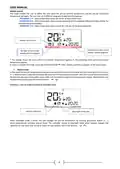
1
2
3
10
10
9
4
7
6
5
8
1. Day of the week
2. An icon informing about current economical temperature (resulting from weekly control or day/night mode
settings).
3. An icon informing about current comfort temperature (resulting from weekly control or day/night mode
settings).
4. Pre-set room temperature
5. Time
6. Buttery level
7. An icon informing about room cooling/heating. The animation differs depending on the selected operation
mode:
•
Heating mode – the icon flashes when the pre-set temperature has not been reached; it is steady when the
pre-set temperature has been reached.
•
Cooling mode – the icon rotates when the temperature is above the pre-set value; it is steady when the pre-
set temperature has been reached.
8. Current operation mode:
a. Weekly
b. Manual
c. Day/night
9. Current room temperature
10. Parameter icons (see: a table below)
11

| General | Details |
|---|---|
| Name | TECH CONTROLLERS EU-T-4.1n, EU-T-4.2n Wireless Thermostat User Manual |
| Make | TECH CONTROLLERS |
| Language | English |
| Filetype | PDF (Download) |
| File size | 0.53 MB |
 (1 votes, average: 5.00 out of 5)
 Loading...

TECH CONTROLLERS EU-R-8b PLUS Wireless Two Position Room Thermostat User Manual

TECH CONTROLLERS EU-R-12b Wireless Room Thermostat User Manual

TECH CONTROLLERS EU-T-4.1n Wireless Thermostat User Manual


SCHRACK TECHNIK EV103311 Analog Thermostat User Manual

PRO1 R250W Wireless System Thermostat Owner’s Manual

Micro-Air 359 Touchscreen Thermostat Instruction Manual

SUNDIRECT Smart2.0 SDUM23001 Battery Back-Up Wireless thermostat Instruction Manual

SALUS AT10F Wireless Contact Thermostat User Manual

SALUS BTR230 Room Thermostat User Guide

Danfoss Link Connect Thermostat User Guide

YOLINK YS4003-UC Smart Thermostat User Guide

devolo 09507 HomeControl Room Thermostat User Guide

Danfoss RAS-C2 Radiator Thermostat Installation Guide