
Home > TECH CONTROLLERS > TECH CONTROLLERS EU-T-4.1n, EU-T-4.2n Wireless Thermostat User Manual
TECH CONTROLLERS EU-T-4.1n, EU-T-4.2n Wireless Thermostat User Manual






TECH
Activating this function means that at the time of pre-programmed change of the
pre-set temperature from comfort to economical or the other way round, the current
room temperature is close to the desired value.
In order to configure this parameter, press one of the buttons
start setting panel appears on the screen.
Use + or - to activate or deactivate Optimum start function (ON/OFF). Press
until Optimum
to
confirm and move on to edit the next parameter or press and hold MENU to confirm
and return to the main screen view.
4.8. AUTOMATIC MANUAL MODE
This function enables manual mode control. If this function is active (ON), the
manual mode is disabled automatically when a pre-programmed change resulting
from the previous operation mode is introduced. If the function is disabled (OFF),
the manual mode remains active regardless of the pre-programmed changes
4.9. WEEKLY PROGRAM
This function is used to change the current weekly control program and edit the weekly programs.
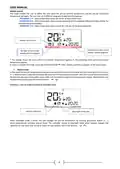
• How to change weekly program number
When weekly control is enabled (see: VII.2. Operation modes) the current program is
activated. In order to select the current program number, enter the menu and press
one of the buttons
or
until weekly program setting screen opens up.
By pressing and holding MENU button the user opens up the program selection
screen. Each time the user holds the MENU button, the program number changes.
When the desired number appears on the screen, press MENU – the controller returns
to the main screen view and the selected program number is set.
weekly program number
•
How to configure particular weekly programs
Weekly program allows the user to define the time when comfort temperature and
economical temperature will apply. Depending on the program number, the user may
set daily temperature values for all days of the week (programs 1÷3), for weekdays and
the weekend separately (programs 4÷6) and for each day of the week separately
(programs 7÷9).
In order to select the current program number, enter the menu and press one of the
buttons
or
until weekly program setting screen opens up.
STEP 1 - CHOOSE THE PROGRAM TO BE EDITED
By pressing and holding MENU button the user opens up the program editing screen. Each time the user press the
button, the program number changes. When the desired number appears on the screen, the user may start editing its
parameters.
weekly program number
STEP 2 - SELECT DAYS OF THE WEEK
If the user wants to edit programs 1÷3, there is no possibility of selecting particular days
of the week as the setting applies to each day.
If the user wants to edit programs 4÷6 , it is possible to edit the settings for weekdays and the weekend separately. Press
buttons
or
briefly in order to select.
14

| General | Details |
|---|---|
| Name | TECH CONTROLLERS EU-T-4.1n, EU-T-4.2n Wireless Thermostat User Manual |
| Make | TECH CONTROLLERS |
| Language | English |
| Filetype | PDF (Download) |
| File size | 0.53 MB |
 (1 votes, average: 5.00 out of 5)
 Loading...

TECH CONTROLLERS EU-R-8b PLUS Wireless Two Position Room Thermostat User Manual

TECH CONTROLLERS EU-R-12b Wireless Room Thermostat User Manual

TECH CONTROLLERS EU-T-4.1n Wireless Thermostat User Manual


CLIMATE MC-LR-THERMOS Wireless Thermostat User Manual

DEVI 316 Electronic Thermostat Installation Guide

MClimate MC-LW-V02 Smart Radiator Thermostat User Manual

DIMPLEX ML2TA 2KW Convector Heater With Thermostat Instruction Manual

Beca BAC-9000 Smart Knob Thermostat User Guide

TROTEC BN35 Radio Thermostat Instruction Manual

EPH CDTP2 Room Thermostat Installation Guide

ETHERMA 3 set 2024 Smart Thermostat Instruction Manual

HERSCHEL 12860 T-BT Battery Powered Wireless Thermostat Instruction Manual

GENERAL HT300S Smart Room Thermostat User Manual