
SALUS Digital Room Thermostat RT310/RT310RF Installation Guide
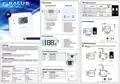


Change the Setpoint temperature
Sleep Mode
Installer Mode
When Sleep Mode is active all the thermostat functions will be paused.
3 sec.
3 sec.
3 sec.
3 sec.
Actual room temperature.
Press
to set the temperature.
or
,
Press three buttons at the same time
for 3 seconds.
Press
to change the parameter.
To change the parameter value
3 sec.
use
and
buttons.
To enter sleep mode,
press and hold
and for 5 seconds.
To exit sleep mode,
press any button.
dxx
Function
Parameter
value
Default
value
d01 Temperature display increments
d02 Temperature offset
0.1°C or 0.5°C
+/- 3.0°C
0.5°C
Actual room temperature.
0.0°C
5.0°C
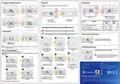
Pairing the RT310TX thermostat with the RXRT510 receiver
d03 Frost Protection setpoint temperature
5.0°C - 17.0°C
NOTE: IN THE RT310RF SET, THE THERMOSTAT IS FACTORY PAIRED WITH THE RECEIVER!
Frost Protection
If you want to pair the thermostat with the receiver again, make sure that the device is disconnected
from the power supply and the switches on the receiver are in the AUTO and ON positions.
Reset of the RT310 thermostat
1
3
2
Press the RESET button (you can use a paper clip),
the thermostat will reset and turn on automatically.
RESET
5 sec
Press , button to turn
On/Off frost protection.
The Frostpoint temperature can be reviewed by pressing the UP button once,
changed in Installer Mode.
but can only be
RT310TX thermostat reset
Connect the receiver to
the power supply and wait
for the red diode to glow
continuously.
Then set the switch to the
OFF position and quickly
move it to the ON position.
Red flashing LED will
confirm entering the pairing
mode.
Remove the batteries without pressing any button. Wait 2 minutes and
insert the batteries again. Your device will be restarted.
Heat / Cool mode selection*
The user can change the heating and cooling mode.
6
NOTE: In cooling mode, the thermostat reports a cooling demand with a 3-minute
delay.
5
TEST
/
PAIRING
4
When you want to change the batteries your device will use the
internal memory to backup your settings. You have 30 seconds
to change the batteries before losing your settings.
+
−
+
1
2
−
TEST
/
PAIRING
TEST / PAIRING
3 sec
TEST
/
PAIRING
TEST / PAIRING
5 sec
DISTRIBUTOR OF SALUS CONTROLS:
QL CONTROLS Sp. z o.o., Sp. k.
Rolna 4,
43-262 Kobielice,
Poland
Importer:
SALUS Controls Plc
Units 8-10 Northfield Business Park
Forge Way, Parkgate, Rotherham
S60 1SD, United Kingdom
Press and hold the TEST /
PAIRING button for 3 seconds.
The pairing process
takes up to 9 minutes.
When the red diode on the
receiver lights up
continuously, the devices
have been paired on a new
frequency.
When the thermostat switches to
cooling mode, the snowflake icon will
be displayed and the flame icon will
disappear.
To switch the thermostat to
cooling mode, press and hold the
snowflake button for 5 seconds.
8
7
2
1
TEST / PAIRING
TEST / PAIRING
TEST
/
PAIRING
TEST / PAIRING
5 sec
SALUS Controls is a member of the Computime Group.
The thermostat will return
to the main screen.
To complete the pairing
process press and hold the TEST
/ PAIRING button for 3 seconds.
To switch the thermostat to
heating mode, press and hold the
snowflake button for 5 seconds.
When the thermostat switches to
heating mode, the flame icon will be
displayed.
Maintaining a policy of continuous product development SALUS Controls plc reserve the right to
change specification, design and materials of products listed in this brochure without prior notice.
* Function available from software version v2.1

| General | Details |
|---|---|
| Name | SALUS Digital Room Thermostat RT310/RT310RF Installation Guide |
| Make | SALUS |
| Language | English |
| Filetype | PDF (Download) |
| File size | 0.26 MB |
 (1 votes, average: 5.00 out of 5)
 Loading...

SALUS IT800 WIFI Smart Thermostat Installation Guide

SALUS 091FLRF Wireless Room Thermostat User Guide

SALUS Thermostat Sensor TS600 User Guide

SALUS Thermostat and Smart Plug Installation Guide

SALUS Wired Digital Thermostat – Non-programmable HTRS230 User Manual

SALUS RT520 Radiator Thermostat User Guide

SALUS Programmable Wired Thermostat VS30W/VS30B Installation Guide

SALUS Wired Thermostat Installation Guide

SALUS RT310 Thermostat User Manual

SALUS Thermostat RT520 User Manual


FRICO TPT16, TPT16WF Thermostat Instruction Manual

DIGITEN WTC100ZJ1 Remote Control With Thermostat Owner’s Manual

RUUD EcoNet Smart Thermostat User Guide

GENERAL LIFE HT220 RF Wireless Room Thermostat User Manual

LUX DHP2120 Battery Powered Non Programmable Digital Heat Pump Thermostat Installation Guide

Honeywell DT4 Room Thermostat User Manual

ESi ESRTP4RFW Programmable Room Thermostat Installation Guide

EPH CONTROLS TRFPi2 COMBIPACK2 Programmable RF Thermostat Instruction Manual

alza WT410 Thermostat User Manual

Honeywell ADEMCO 4500 Thermostat User Guide