
DIGITEN WTC100ZJ1 Remote Control With Thermostat Owner’s Manual

















MANUALE UTENTE
TELECOMANDO CON TERMOSTATO
IT
EN FR DE ES NL PT
©2024 CADEL srl | All rights reserved - Tutti i diritti riservati
TELECOMANDO CON TERMOSTATO AMBIENTE


| General | Details |
|---|---|
| Name | DIGITEN WTC100ZJ1 Remote Control With Thermostat Owner’s Manual |
| Make | DIGITEN |
| Language | English |
| Filetype | PDF (Download) |
| File size | 0.34 MB |
 (1 votes, average: 5.00 out of 5)
 Loading...

DIGITEN WTC100 Wireless Programmable Thermostat User Manual

DIGITEN DTC-310 Electronic Temperature Controller Thermostat User Manual

DIGITEN DTC-101, DTC-151 Thermostat User Manual

DIGITEN WTC100ZJ1 Remote Control With Thermostat Owner’s Manual Overview
Summary of Contents
- Page 1: Manuale utente Telecomando con termostato Telecomando con termostato ambiente
- Page 2: Caratteristiche Configurazione del telecomando Menu del telecomando 1 Menu del telecomando 2 Telecomando 2024
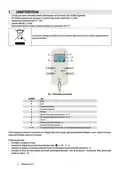
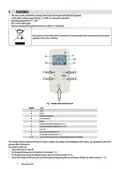
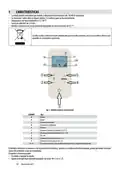
- Page 3: Caratteristiche La stufa può essere comandata tramite telecomando con termostato cod. 5024010 (optional). Per il funzionamento sono necessarie n.3 batterie tipo nichel cadmio AAA (1,5 Volt). Temperatura funzionamento 0°C / 50°C. Segnale radio BLE 2,4 GHz. Telecomando dotato di sonda ambiente integrata con risoluzione di 0,5°C. Le pile usate contengono metalli nocivi per l'ambiente, quindi devono essere smaltite separatamente in appositi contenitori. Il telecomando permette di comunicare con il display della stufa e grazie alla sonda ambiente integrata, riesce a gestire la temperatura dell’ambiente come un termostato. Il telecomando può accendere e spegnere la stufa. Impostare la temperatura desiderata premendo i tasti.
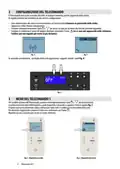
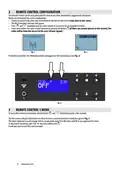
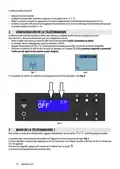
- Page 4: Configurazione del telecomando Il telecomando può essere associato alla stufa in qualsiasi momento, purché supportato dalla scheda. Dare alimentazione alla stufa e inserire le batterie nel telecomando. Apparirà la scritta «Nessun collegamento». Premere contemporaneamente i tasti per accedere alla lista dei terminali disponibili. Scegliere e confermare il nome del proprio terminale. Se associato correttamente, sul display della stufa appariranno i simboli. Menu del telecomando Per accedere al menu del telecomando, premere contemporaneamente i tasti. La prima schermata darà l’informazione a quale dispositivo è associato e a quanto è forte il segnale. Per dissociare l’apparecchio, premere il tasto e confermare con il tasto.
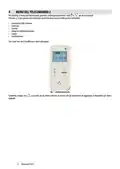
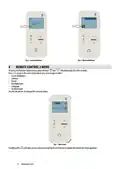
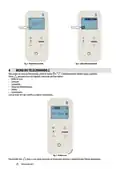
- Page 5: Menu del telecomando. Premere contemporaneamente i tasti per accedere al menu. Gestire le seguenti opzioni: luminosità dello schermo, contrasto, cicalino, tempo di retroilluminazione, lingua, accelerometro. Modificare i valori selezionati con i tasti. Schermata successiva per l'upgrade. Menù riservato al tecnico per aggiornare il dispositivo. Telecomando 2024.
- Page 6: Summary Features Remote control configuration Remote control 1 menu Remote control 2 menu
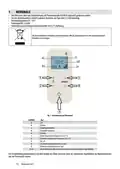
- Page 7: The stove can be controlled by remote control with thermostat code 5024010 (optional). 3 AAA nickel cadmium type batteries (1.5 Volt) are required for operation. Operating temperature 0°C / 50°C. BLE 2.4 GHz radio signal. Remote control with integrated room sensor with 0.5°C resolution. Used batteries contain metals which are harmful for the environment; they must therefore be disposed of separately in the special containers. The remote control communicates with the stove's display and, thanks to the integrated room sensor, can manage the room temperature like a thermostat. The remote control can switch the stove on and off. Set the desired temperature by pressing the increase or decrease buttons. Access the remote control menu by simultaneously pressing the power on and power off keys for a few seconds.
- Page 8: Remote control configuration can be done at any time if supported by the board. Instructions for correct configuration include switching on power to the stove and inserting batteries into the remote control. The 'No connection' message will appear initially. Press specific buttons simultaneously to access the list of available terminals. Select and confirm the name of your terminal by pressing the appropriate button. If correctly associated, specific symbols will appear on the stove display. To access the remote control menu, press designated keys simultaneously. The first screen will show which device is associated and the signal strength. The signal strength value changes based on proximity to the stove. To disconnect the device, press a specific key and confirm.
- Page 9: Remote control menu can be accessed by pressing specific keys simultaneously. Users can manage screen brightness and contrast in the menu. Additional settings include buzzer, backlight time, language, and accelerometer. Values can be changed using designated keys. There is a technician menu for device updates.
- Page 10: Caractéristiques Configuration de la télécommande Menu de la télécommande 1 Menu de la télécommande 2
- Page 11: Le poêle peut être commandé par une télécommande avec thermostat code 5024010 (en option). 3 piles AAA au nickel-cadmium (1,5 volt) sont nécessaires pour le fonctionnement. Température de fonctionnement 0 °C/50 °C. Signal radio BLE 2,4 GHz. Télécommande avec sonde d'ambiance intégrée avec une résolution de 0,5 °C. Les piles usées contiennent des métaux nocifs pour l'environnement et doivent donc être éliminées séparément dans des bacs prévus à cet effet. La télécommande permet de communiquer avec l'écran du poêle et, grâce à la sonde d'ambiance intégrée, peut gérer la température de la pièce comme un thermostat.
- Page 12: La télécommande permet d'allumer et éteindre le poêle. Configurer la température souhaitée en appuyant sur les touches. Régler la puissance souhaitée en appuyant sur la touche d'augmentation ou de diminution de la puissance. Accéder au menu de la télécommande en appuyant simultanément sur les touches d’allumage et de diminution de la puissance. La télécommande peut être associée au poêle à tout moment, à condition qu'elle soit prise en charge par la carte. Mettre le poêle sous tension et insérer les piles dans la télécommande. Appuyer simultanément sur les touches pour accéder à la liste des terminaux disponibles. Choisissez et confirmez le nom de votre terminal en appuyant sur le bouton. Pour accéder au menu de la télécommande, appuyer simultanément sur les touches. Pour dissocier l'appareil, appuyer sur la touche et confirmer avec la touche.
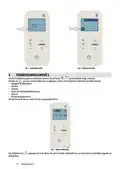
- Page 13: Menu de la télécommande Pour accéder au menu de la télécommande, appuyer simultanément sur les touches. Appuyer sur pour passer à la page-écran suivante où il est possible de gérer dans l'ordre les éléments suivants : Luminosité de l'écran Contraste Buzzer Durée du rétroéclairage Langue Accéléromètre Le défilement à l'aide de permet d'accéder à un menu réservé au technicien pour la mise à jour de l'appareil.
- Page 14: Inhalt Merkmale Konfiguration der Fernsteuerung Fernbedienungsmenü 1 Fernbedienungsmenü 2 Telecomando 2024
- Page 15: Der Ofen kann über eine Fernbedienung mit Thermostatcode 5024010 gesteuert werden. Für den Betrieb werden 3 Nickel-Cadmium-Batterien des Typs AAA benötigt. Betriebstemperatur 0°C / 50°C. Funksignal BLE 2,4 GHz. Fernbedienung mit integriertem Raumfühler mit 0,5°C Auflösung. Die leeren Batterien enthalten umweltschädliches Metall und sind in den dazu bestimmten Behältern zu entsorgen. Die Fernbedienung kommuniziert mit dem Display des Ofens und kann die Raumtemperatur steuern. Um das Menü aufzurufen, drücken Sie die Tasten 3 und 4 gleichzeitig für einige Sekunden. Erhöht die gewünschte Temperatur (5÷35 °C). Vermindert das Leistungsniveau von 5 auf 1.
- Page 16: Die Fernbedienung kann den Ofen ein- und ausschalten. Die gewünschte Temperatur kann durch Drücken von Tasten eingestellt werden. Die gewünschte Leistung kann eingestellt werden, indem die Taste zum Erhöhen oder Verringern der Leistung gedrückt wird. Das eigene Menü kann aufgerufen werden, indem die Ein- und Ausschalttaste gleichzeitig gedrückt wird. Die Fernbedienung kann jederzeit mit dem Ofen verbunden werden, sofern sie von der Karte unterstützt wird. Anweisungen zur korrekten Konfiguration sind verfügbar. Der Hinweis „Keine Verbindung erscheint, wenn der Ofen eingeschaltet ist und die Batterien eingelegt werden. Um das Fernbedienungsmenü aufzurufen, müssen bestimmte Tasten gleichzeitig gedrückt werden. Der erste Bildschirm im Menü zeigt an, welches Gerät verbunden ist und wie stark das Signal ist. Um die Verbindung zum Gerät zu trennen, muss eine bestimmte Taste gedrückt und bestätigt werden.
- Page 17: Fernbedienungsmenü Um das Fernbedienungsmenü aufzurufen, drücken Sie die Tasten gleichzeitig für einige Sekunden. Drücken Sie, um zum nächsten Bildschirm zu gelangen, in dem Sie die folgende Funktionen verwalten können: Helligkeit des Bildschirms Kontrast Summer Dauer der Hintergrundbeleuchtung Sprache Beschleunigungsmesser Mit den Tasten ändern Sie die ausgewählten Werte. Durch Blättern mit gelangen Sie in ein Menü, das dem Techniker vorbehalten ist.
- Page 18: Características Configuración del mando a distancia Menú del mando a distancia 1 Menú del mando a distancia 2
- Page 19: La estufa puede controlarse por mando a distancia con termostato cód. 5024010 (opcional). Se necesitan 3 pilas AAA de níquel cadmio (1,5 voltios) para su funcionamiento. Temperatura de funcionamiento 0 °C / 50 °C. Señal de radio BLE de 2,4 GHz. Mando a distancia con sonda ambiente integrada con una resolución de 0,5 °C. Las pilas usadas contienen metales perjudiciales para el medio ambiente, por lo que se deben eliminar por separado en contenedores oportunos. El mando a distancia se comunica con la pantalla de la estufa y, gracias a la sonda ambiente integrada, puede gestionar la temperatura del ambiente como un termostato. El mando a distancia puede encender y apagar la estufa. Ajuste la temperatura deseada pulsando las teclas. Para acceder al menú, pulse simultáneamente las teclas 3 y 4 durante unos segundos.
- Page 20: Ajuste la potencia deseada pulsando la tecla de aumento o disminución de la potencia. Acceda al menú del mando a distancia pulsando simultáneamente las teclas de encendido y disminución de la potencia. El mando a distancia puede asociarse a la estufa en cualquier momento, siempre que sea compatible con la tarjeta. Encienda la estufa e inserte las pilas en el mando a distancia. Aparecerá el texto «Sin conexión». Pulse simultáneamente las teclas para acceder a la lista de los terminales disponibles. Elige y confirma el nombre de tu terminal pulsando el botón. Si se asocia correctamente, aparecerán símbolos en la pantalla de la estufa. Para acceder al menú del mando a distancia, pulse simultáneamente las teclas. La primera pantalla dará información sobre qué dispositivo está asociado y la intensidad de la señal.
- Page 21: Menú del mando a distancia Para acceder al menú del mando a distancia, pulse simultáneamente durante unos segundos las teclas. Pulse para pasar a la siguiente pantalla donde podrá gestionar por orden: Brillo de la pantalla Contraste Zumbador Tiempo de retroiluminación Idioma Acelerómetro Con las teclas modifica los valores seleccionados. Desplazándose con se accederá a un menú reservado al técnico para actualizar el dispositivo para futuras actualizaciones.
- Page 22: Overzicht Kenmerken De afstandsbediening configureren Menu afstandsbediening 1 Menu afstandsbediening 2
- Page 23: De kachel kan bediend worden via de afstandsbediening met thermostaat codenr. 5024010 (optioneel). Voor de werking zijn 3x AAA nikkel-cadmiumbatterijen (1,5 Volt) vereist. Bedrijfstemperatuur 0 °C / 50 °C. BLE 2,4 GHz radiosignaal. Afstandsbediening met geïntegreerde omgevingssonde met 0,5 °C resolutie. De gebruikte batterijen bevatten metalen die schadelijk zijn voor het milieu, zij moeten daarom apart worden weggegooid in speciale containers. De afstandsbediening communiceert met het display van de kachel en kan dankzij de geïntegreerde omgevingssonde de kamertemperatuur regelen als een thermostaat.
- Page 24: Met de afstandsbediening kunt u de kachel aan- en uitzetten. U kunt de gewenste temperatuur instellen door op de juiste knop te drukken. Het gewenste vermogen kan worden ingesteld door op de knop voor verhogen of verlagen van het vermogen te drukken. De afstandsbediening kan op elk moment worden gekoppeld aan de kachel, op voorwaarde dat de kaart dit ondersteunt. Schakel de stroom naar de kachel in en plaats de batterijen in de afstandsbediening. Druk enkele seconden tegelijkertijd op de juiste knoppen om de configuratie te starten. Kies en bevestig de naam van uw terminal door op de knop te drukken. Het eerste scherm geeft informatie over welk apparaat is gekoppeld en hoe sterk het signaal is. Om de verbinding met het apparaat te verbreken, drukt u op de juiste knop en bevestigt u. Er wordt nu gezocht naar een nieuwe terminal.
- Page 25: MENU Om het menu van de afstandsbediening te openen, drukt u tegelijkertijd enkele seconden op de knoppen. Druk op om naar het volgende scherm te gaan waar u kunt beheren in volgorde: Helderheid scherm Contrast Zoemer Tijd achtergrondverlichting Taal Versnellingsmeter Met de en toetsen wijzigt u de geselecteerde waarden. Door te scrollen met gaat u naar een menu dat gereserveerd is voor de technicus om het apparaat bij te werken voor toekomstige upgrades.
- Page 26: Características Configuração do telecomando Menu do telecomando 1 Menu do telecomando 2 Telecomando 2024
- Page 27: Características A estufa pode ser comandada através de um telecomando com termóstato. São necessárias 3 pilhas AAA de níquel-cádmio para o funcionamento. Temperatura de funcionamento de 0°C a 50°C. Sinal de rádio BLE 2,4 GHz. Controlo remoto com sensor ambiente integrado com resolução de 0,5°C. As pilhas contêm metais prejudiciais ao ambiente e devem ser eliminadas separadamente. O telecomando comunica com o visor da estufa e pode gerir a temperatura ambiente como um termóstato.
- Page 28: O telecomando pode ligar e desligar a estufa. Definir a temperatura desejada premindo. Definir a potência pretendida premindo o botão de aumento ou diminuição da potência. Aceder ao menu do telecomando premindo simultaneamente os botões de ligar e desligar. O telecomando pode ser associado ao recuperador a qualquer momento. Instruções para uma configuração correta incluem acender a estufa e colocar as pilhas no telecomando. Aparecerá a escrita Nenhuma ligação. Escolha e confirme o nome do seu terminal premindo o botão. O primeiro ecrã fornece informações sobre o dispositivo associado e a intensidade do sinal. Para desligar o aparelho, prima o botão e confirme.
- Page 29: Menu do telecomando Para aceder ao menu do telecomando, prima os botões e e simultaneamente durante alguns segundos. Prima para passar ao ecrã seguinte, onde pode gerir por ordem: Brilho do ecrã Contraste Campainha Tempo de retroiluminação Idioma Acelerómetro Com as teclas e modifica os valores selecionados. Percorrendo com leva-o a um menu reservado ao técnico para atualizar o dispositivo para futuras atualizações.
- Page 30: Page 30
- Page 31: Page 31
- Page 32: Page 32

EXPERT4HOUSE BAC-9000 Smart Knob Thermostat User Guide

Danfoss DEVIreg 316 Electronic Thermostat Installation Guide

vtech T961NN50 Wired Thermostat User Guide

Honeywell T5 7-Day Smart Wi-Fi Thermostat Instructions

SALUS WQ610RF Wireless Slim Programmable Thermostat Installation Guide

legrand WZ3TSTATH Thermostat Instruction Manual

Rayotec PERGARP0DCN6YB3I Wi-Fi Thermostat Instruction Manual

ideal BOILERS Combi RF Wireless Boiler Thermostat User Guide

PECO T8168 Performance Pro Thermostat Installation Guide

Danfoss RET2001OT Digital Open Therm Room Thermostat User Guide