
PRO1 R250W Wireless System Thermostat Owner’s Manual


Technician Setup
Technician Setup
These steps must be done from the MAIN Thermostat in your
PROsync System. This thermostat has a technician setup menu for
easy installer configuration. To set up the thermostat for your
particular application:
Tech Setup Steps
LCD Will Show Adjustment Options
Default
This feature will bring in outside
Use the and buttons
to select ON/OFF.
Free Cooling
air for first stage cooling opera-
tions, if the outdoor temperature
is 5 (or more) degrees lower than
the setpoint temperature. This
setting can only be enabled if the
Cool system mode is enabled.
(Only displayed if
an outdoor remote
sensor is paired
to the equipment
module)
OFF
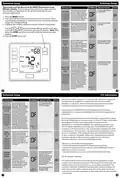
1. Press the MENU button.
2. Press and hold the technician setup button for 3 seconds. This 3
second delay is designed so that homeowners do not accidentally
access the installer settings.
FREE
COOLING
This setting provides the option to
select a terminal for Free Cooling
functions. The selected terminal
cannot be used for reversing valve
operations when the heat pump
setting is turned on.
Use the and buttons
to select O/B.
Free Cooling
Terminal
3. Configure the installer options as desired using the table below.
Use the
or
keys to change settings and the next step
(Fresh air mode and
free cooling can
be used together.
Free cooling cannot
be used with PTAC
mode, or three
or previous step key to move from one step to another. Note: Only
press the DONE key when you want to exit the technician setup
options.
O
O
FREE
4. Press the DONE key to exit.
COOLTERM
stages of heat.
When the outdoor temperature is
above the balance point,
the thermostat will energize only
the Y terminals in a call for heat.
When the outdoor temperature is
below the balance point,
Use the and buttons
to select OFF, 10, 15, 20, 25,
30, 35, 40, 45, 50 degrees.
Dual Fuel
Balance
Point
(Only displayed
if an outdoor
remote sensor
is paired to the
equipment
OF
OFF
the thermostat will energize only
the W terminals in a call for heat.
module, Heat
Pump is “ON”,
and Dual Fuel
Aux is “ON”)
BALANCE
POINT
Zone
Menu
Balance point with electric
auxiliary will optimize heat
pump usage. When the outdoor
temperature is above the AUX CUT
OUT selection, the thermostat
will only allow the Y terminal(s)
to energize and lock out the W2
terminal. When the outdoor
temperature falls below the
AUX CUT OUT selection and sits
above the AUX CUT IN selection,
the thermostat will allow the Y
terminal(s) and the W2 terminal
to energize. When the outdoor
temperature is below the AUX
CUT IN selection, the thermostat
will only energize the W2
Use the and buttons
to select 10, 15, 20, 25, 30,
35, 40, 45, 50 degrees.
Balance Point
Electric AUX
Cut In
(Only displayed if
an outdoor remote
sensor is paired
to the equipment
module, Heat
Pump is “ON”, and
Dual Fuel Aux is
“OF”)
OFF
terminal and lock out the Y
terminal(s).
BP AUX CUT
IN
5
6
Technician Setup
FCC Information
This device complies with part 15 of the FCC Rules. Operation is subject to
the following two conditions: (1) This device may not cause harmful
interference, and (2) this device must accept any interference received,
including interference that may cause undesired operation.
Tech Setup Steps
LCD Will Show Adjustment Options
Default
Use the and buttons
to select 10, 15, 20, 25, 30,
35, 40, 45, 50 degrees.
Balance point with electric
auxiliary will optimize heat
pump usage. When the outdoor
temperature is above the AUX CUT
OUT selection, the thermostat
to only allow the Y terminal(s)
will energize and lockout the W2
terminal. When the outdoor
temperature falls below the
AUX CUT OUT selection and sits
above the AUX CUT IN selection,
the thermostat will allow the Y
terminal(s) and the W2 terminal
to energize. When the outdoor
temperature is below the AUX
CUT IN selection, the thermostat
will only energize the W2 termi-
nal and lockout the Y terminal(s).
Balance Point
Electric AUX
Cut Out
Any changes or modifications not expressly approved by the party
responsible for compliance could void the user’s authority to operate this
equipment.
(Only displayed if
an outdoor remote
sensor is paired
to the equipment
module, Heat
Pump is “ON”, and
Dual Fuel Aux is
“OF”)
OFF
Note: This equipment has been tested and found to comply with the limits
for a Class B digital device, pursuant to part 15 of the FCC Rules. These limits
are designed to provide reasonable protection against harmful
interference in a residential installation. This equipment generates, uses
and can radiate radio frequency energy and, if not installed and used in
accordance with the instructions, may cause harmful interference to radio
communications. However, there is no guarantee that interference will not
occur in a installation. If this equipment does cause harmful interference
to radio or television reception, which can be determined by turning the
equipment off and on, the user is encouraged to try to correct the
interference by one or more of the following measures:
BP AUX CUT
OUT
Balance point run time will allow
the W2 auxiliary terminal to
energize even if the outdoor
temperature is above the selected
balance point temperature. If
enabled, the auxiliary will
energize for the current cycle
after the balance point run time
has expired.
Off, 15, 30, 45, 60, 75, 90
Balance
Point Run
Time
(Only displayed
if Dual Fuel
Balance Point or
Balance Point
Electric Aux
Cut In are set
to an outdoor
temperature.)
OFF
OFF
· Reorient or relocate the receiving antenna.
· Increase the separation between the equipment and receiver.
· Connect the equipment into an outlet on a circuit different from that to
which the receiver is connected.
BP RUN TIME
This feature will adjust the
indoor humidity as the outdoor
temperature changes. When OFF
is selected, the humidity setpoint
is controlled by the user.
Use the and buttons
to select OFF, ON 1 or ON 2.
When ON 1 or ON 2 is
selected and humidity level
is adjusted, the thermostat
will revert to the original
humidity level after four
hours. See Automatic
· Consult the dealer or an experienced radio/TV technician for help.
Automatic
Humidity
Adjusting
FCC RF Exposure Statement
When ON is selected,
(Only displayed if
an outdoor remote
sensor is paired
to the equipment
module and
The device shall be used in such a manner that the potential for human
contact normal operation is minimized. This equipment complies with FCC
radiation exposure limits set forth for an uncontrolled environment. This
equipment should be installed and operated with a minimum distance of
20cm between the radiator and your body. This device and its antenna(s)
must not be co-located or operating in conjunction with any other antenna
or transmitter.
the humidity setpoint will
fluctuate. When ON is selected,
the indoor humidity will adjust
automatically based on the
outdoor temperature.
Humidity Adjusting chart for
humidity ranges.
Humidity is set to
“ON”)
Please see the chart on page
30 on the 755WHO
installation manual.
AUTO
HUMIDITY
7
8

| General | Details |
|---|---|
| Name | PRO1 R250W Wireless System Thermostat Owner’s Manual |
| Make | PRO1 |
| Language | English |
| Filetype | PDF (Download) |
| File size | 0.19 MB |
 (1 votes, average: 5.00 out of 5)
 Loading...

PRO1 T751i Thermostat Installation Guide

PRO1 T731W Wireless PTAC Non-Programmable Thermostat Installation Guide

PRO1 T805 Non Programmable Thermostat Instruction Manual

PRO1 T701 Digital Non Programmable Thermostat Instruction Manual

PRO1 IAQ T721i Digital WIFI Programmable Thermostat User Manual

PRO1 T725 Thermostat User Guide

PRO1 T755 Heat 2 Cool Dual Fuel Thermostat User Manual

PRO1 T771 Programmable Electronic Thermostat Instructions


tecnoswitch EN60730-1 Electronic Recessed Thermostat User Guide

uponor D Plus RH T-247 BUS Smatrix Base Thermostat Instruction Manual

AFRISO RT 10 D 230 Room Thermostat Instruction Manual

neptronic STS3 Series Wall Thermostat Instruction Manual

LUTRON 653 Right Thermostat Control Datasheet

MechDoc QD-HVAC10 Programmable Thermostat Instruction Manual

Moes BHT-3000 Series Thermostat User Guide

Global Sources WT598 1T1 Smart Thermostat Instructions

550-13060 HVAC-Thermostat Niko Home Control Instructions

bticino SX Series Smart Thermostat Installation Guide