×
- 1. User Manual
- 2.
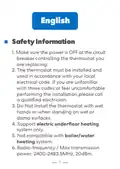
- 3. Safety Information
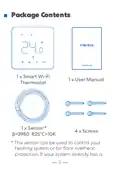
- 4. Package Contents (Smart Wi-fi Thermostat → User Manual → Sensor → Screws)
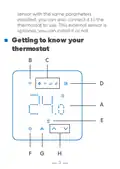
- 5. Getting To Know Your Thermostat
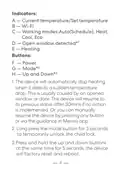
- 6. Indicators (Buttons)
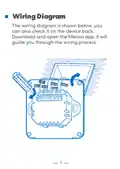
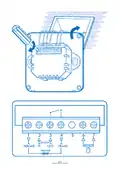
- 7. Wiring Diagram (Meross App Guide)
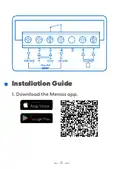
- 8. Installation Guide
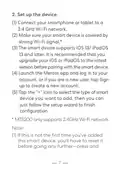
- 9. Set Up The Device (Connect Your Smartphone Or Tablet To A 2.4 Ghz Wi-fi Network → Make Sure Your Smart Device Is Covered By Strong Wi-fi Signal → The Smart Device Supports Ios 13/ Ipados 13 And Later → Launch The Meross App And Log In To Your Account → Tap The '+' Icon To Select The Type Of Smart Device You Want To Add)
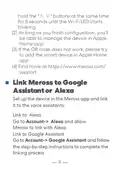
- 10. Link Meross To Google Assistant Or Alexa (Set Up The Device In The Meross App And Link It To The Voice Assistants → Link To Alexa → Link To Google Assistant)
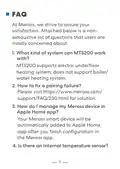
- 11. Faq (What Kind Of System Can Mts200 Work With? → How To Fix A Pairing Failure? → How Do I Manage My Meross Device In Apple Home App? → Is There An Internal Temperature Sensor?)
- 12. Yes, There Is An Internal And An External Sensor(optional).
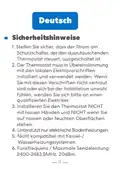
- 13. Sicherheitshinweise (Installation Des Thermostats → Kompatibilität)
- 14. Paketinhalt (Gebrauchsanweisung → Smart Wi-fi Thermostat → Sensor → Schrauben)
- 15. Kennen Sie Jetzt Ihren Thermostat Lernen
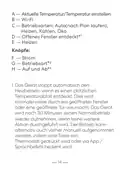
- 16. A Aktuelle Temperatur/temperatur Einstellen (B Wi-fi → C Betriebsarten: Auto(nach Plan Laufen), Heizen, Kühlen, Öko → D Offenes Fenster Entdeckt* → E Heizen → F Strom → G Betriebsart*)
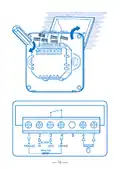
- 17. Kindersicherung Entsperren (Werkseinstellungen Zurücksetzen → Schaltplan → Meross-app Herunterladen)
- 18.
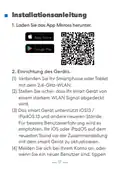
- 19. Installationsanleitung (Einrichtung Des Geräts → Verbinden → Melden Sie Sich Bei Ihrem Konto An)
- 20. Mts200 Unterstützt Nur 2,4-ghz-netzwerke. (Verbinden Mit Google Assistant Oder Alexa)
- 21. Richten Sie Das Gerät Zuerst In Der Meross-app Ein, Und Dann Können Sie Es Mit Sprachassistenten Verknüpfen.
- 22. Wie Behebe Ich Den Fehler Der Zusammenstellung? (Wie Könnte Ich Mein Meross-gerät In Apple Home App Verwalten? → Gibt Es Einen Inneren Temperatursensor?)
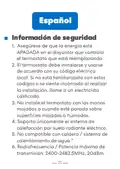
- 23. Información De Seguridad
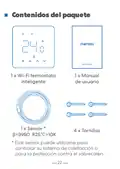
- 24. Contenidos Del Paquete (Wi-fi Termostato Inteligente → Manual De Usuario → Sensor → Tornillos)
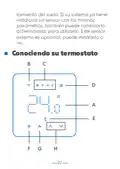
- 25. Conociendo Su Termostato
- 26. Indicadores (Botones → Calefacción)
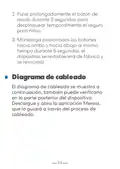
- 27. Pulse Prolongadamente El Botón De Modo Durante 3 Segundos Para Desbloquear Temporalmente El Seguro Para Niños.
- 28.
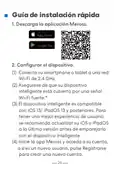
- 29. Guía De Instalación Rápida (Descarga La Aplicación Meross → Configurar El Dispositivo)
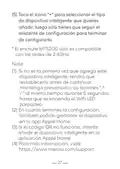
- 30. Toca El Icono '+' Para Seleccionar El Tipo De Dispositivo Inteligente (El Enchufe Mts200 Sólo Es Compatible Con Las Redes De 2.4ghz → Si No Es La Primera Vez Que Agrega Este Dispositivo Inteligente → En Cuanto Termines La Configuración → Si El Código Qr No Funciona → Para Más Información)
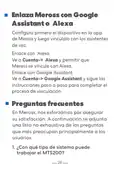
- 31. Enlaza Meross Con Google Assistant O Alexa (Configura Primero El Dispositivo En La App De Meross Y Luego Vincúlalo Con Los Asistentes De Voz. → Enlace Con Alexa → Enlace Con Google Assistant → Preguntas Frecuentes)
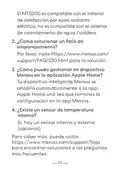
- 32. El Mts200 Es Compatible Con El Sistema De Calefacción Por Suelo Radiante Eléctrico, No Es Compatible Con El Sistema De Calentamiento De Agua…
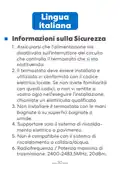
- 33. Informazioni Sulla Sicurezza (Assicurarsi Che L'alimentazione Sia Disattivata Sull'interruttore Del Circuito Che Controlla Il Termostato Che Si Sta Sostituendo. → Non Installare Il Termostato Con Le Mani Bagnate O Su Superfici Bagnate O Umide. → Supportare Solo Il Sistema Di Riscaldamento Elettrico A Pavimento. → Non È Compatibile Con Il Sistema Di Riscaldamento A Caldaia/acqua. → Radiofrequenza / Potenza Massima Di Trasmissione: 2400-2483,5mhz, 20dbm.)
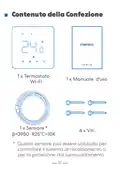
- 34. Contenuto Della Confezione (Wi-fi → Sensore)
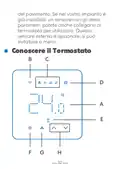
- 35. Conoscere Il Termostato
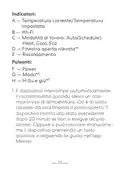
- 36. Indicatori (Pulsanti → Modalità Di Lavoro → Riscaldamento)
- 37. Premere A Lungo Il Pulsante Di Modalità (Schema Di Cablaggio)
- 38.
- 39. Guida D'installazione (Configura Il Dispositivo)
- 40. Registrati Per Creare Un Nuovo Account. (Toccare L'icona '+' Per Selezionare Il Tipo Di Dispositivo Intelligente Che Si Desidera Aggiungere, Quindi È Sufficiente Seguire La Procedura Guidata Di Installazione Per Completare La Configurazione.)
- 41. Collega Meross Ad Google (Collegamento Ad Alexa → Collegamento Ad Assistente Google → Domande Frequenti)
- 42. Come Risolvo Un Errore Di Accoppiamento? (Come Gestisco Il Mio Dispositivo Meross Nell'app Apple Home? → C'è Un Sensore Di Temperatura Interno?)
- 43. Information Sur La Sécurité (Assurez-vous → Compatible Uniquement Avec Les Systèmes De Chauffage Par Le Sol Électriques → Non Compatible Avec Le Système De Chauffage Par Chaudière/ À Eau → Radiofréquence / Puissance De Transmission Maximale)
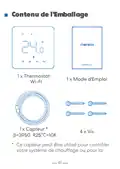
- 44. Contenu De L'emballage (Wi-fi → Capteur)
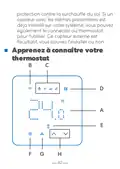
- 45. Apprenez À Connaître Votre Thermostat
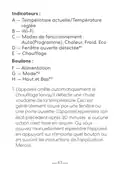
- 46. Indicateurs (Modes De Fonctionnement → Fenêtre Ouverte Détectée → Chauffage → Boutons)
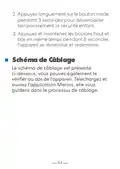
- 47. Appuyez Longuement Sur Le Bouton Mode (Schéma De Câblage)
- 48.
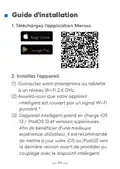
- 49. Guide D'installation (Téléchargez L'application Meross → Installez L'appareil)
- 50. Lancez L'application Meross Et Connectez-vous À Votre Compte (Ajout D'un Périphérique Intelligent → Configuration Du Thermostat Mts200 → Gestion De L'appareil Dans L'application Apple Home)
- 51. Relier Meross À Google Assistant Ou Alexa (Lier À Alexa → Lier À Google Assistant → Faq)
- 52. Questions Fréquentes (Compatibilité Du Système Mts200 → Réparation D'un Échec D'appairage → Gestion De L'appareil Meross Dans L'application Apple Home → Capteur De Température Interne)
- 53. Oui, Il Y A Un Capteur Interne Et Un Capteur Externe (en Option). Pour En Savoir Plus, Vous Pouvez Consulter Le Site Https://www.meross.com/…
- 54. Simple Device (Simplify Your Life → Email: Support@meross.com → Website: Www.meross.com → Manufacturer: Chengdu Meross Technology Co., Ltd. → Made In China → Indoor Use Only)
- 55. Package Contents (Getting To Know Your Thermostat → Safety Information → Wiring Diagram → Installation Guide → Link Meross To Google Assistant Or Alexa → Faq)
×
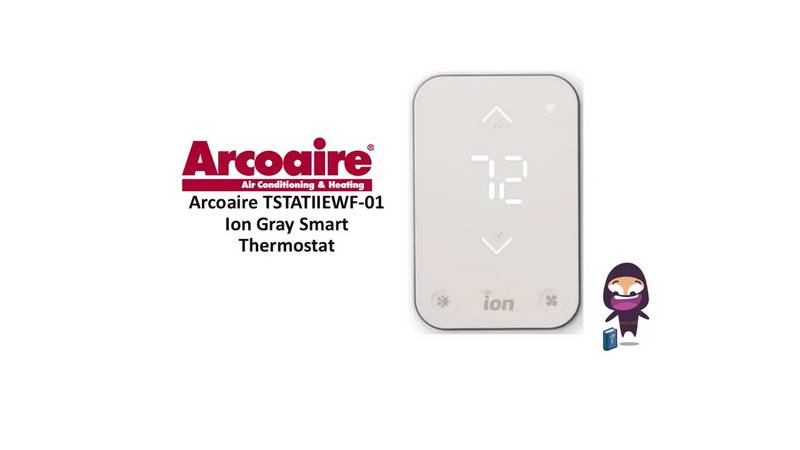
meross MTS200HK Smart Wi-Fi Thermostat User Manual

Enlaza Meross con Google
Assistant o Alexa
Configura primero el dispositivo en la app
de Meross y luego vincúlalo con los asistentes
de voz.
Enlace con Alexa
Ve a Cuenta-> Alexa y permitir que
Meross se vincule con Alexa.
Enlace con Google Assistant
Ve a Cuenta-> Google Assistant y sigue las
instrucciones paso a paso para completar el
proceso de vinculación.
Preguntas frecuentes
En Meross, nos esforzamos por asegurar
su satisfacción. A continuación se adjunta
una lista no exhaustiva de las preguntas
que más preocupan principalmente a los
usuarios.
1. ¿Con qué tipo de sistema puede
trabajar el MTS200?
28
| General | Details |
|---|---|
| Name | meross MTS200HK Smart Wi-Fi Thermostat User Manual |
| Make | Meross |
| Language | English |
| Filetype | PDF (Download) |
| File size | 1.44 MB |

meross T6R Wireless Smart Thermostat User Manual
Meross MTS200HK Smart Thermostat User Manual
Meross MTS960 Smart Wi-Fi Socket Thermostat Instruction Manual


Olympia BS-812-P Programmable Thermostat User Manual
SASWELL T11FHL Heated Floor Thermostat User Manual
SALUS CONTROLS HTR-RF Smart Home Dial Thermostat User Guide

Zehnder ComfoControl Ease Installation Guide

sinope TH1500ZB Smart Double Pole Thermostat Installation Guide

Danfoss KP 61 Thermostat

sinope TH1134ZB-HC Smart Line Voltage Thermostat Owner’s Manual

telethings teleRelays-2L Device Thermostat User Manual
Cielo Smart Thermostat Eco Owner’s Manual

GENERAL LIFE MITRA-261S Smart Room Thermostat User Manual
Table of Contents
- 1. User Manual →
- 2. Page 2 →
- 3. Safety Information →
- 4. Package Contents - Smart Wi-fi Thermostat →
- 5. Getting To Know Your Thermostat →
- 6. Indicators - Buttons →
- 7. Wiring Diagram - Meross App Guide →
- 8. Installation Guide →
- 9. Set Up The Device - Connect Your Smartphone Or Tablet To A 2... →
- 10. Link Meross To Google Assistant Or Alexa - Set Up The Device... →
- 11. Faq - What Kind Of System Can Mts200 Work With? →
- 12. Yes, There Is An Internal And An External Sensor(optional). →
- 13. Sicherheitshinweise - Installation Des Thermostats →
- 14. Paketinhalt - Gebrauchsanweisung →
- 15. Kennen Sie Jetzt Ihren Thermostat Lernen →
- 16. A Aktuelle Temperatur/temperatu... Einstellen - B Wi-fi →
- 17. Kindersicherung Entsperren - Werkseinstellungen Zurücksetzen →
- 18. Page 18 →
- 19. Installationsanleitu... - Einrichtung Des Geräts →
- 20. Mts200 Unterstützt Nur 2,4-ghz-netzwerke. - Verbinden Mit Go... →
- 21. Richten Sie Das Gerät Zuerst In Der Meross-app Ein, Und Dann... →
- 22. Wie Behebe Ich Den Fehler Der Zusammenstellung? - Wie Könnte... →
- 23. Información De Seguridad →
- 24. Contenidos Del Paquete - Wi-fi Termostato Inteligente →
- 25. Conociendo Su Termostato →
- 26. Indicadores - Botones →
- 27. Pulse Prolongadamente El Botón De Modo Durante 3 Segundos Pa... →
- 28. Page 28 →
- 29. Guía De Instalación Rápida - Descarga La Aplicación Meross →
- 30. Toca El Icono '+' Para Seleccionar El Tipo De Dispositivo In... →
- 31. Enlaza Meross Con Google Assistant O Alexa - Configura Prime... →
- 32. El Mts200 Es Compatible Con El Sistema De Calefacción Por Su... →
- 33. Informazioni Sulla Sicurezza - Assicurarsi Che L'alimentazio... →
- 34. Contenuto Della Confezione - Wi-fi →
- 35. Conoscere Il Termostato →
- 36. Indicatori - Pulsanti →
- 37. Premere A Lungo Il Pulsante Di Modalità - Schema Di Cablaggi... →
- 38. Page 38 →
- 39. Guida D'installazione - Configura Il Dispositivo →
- 40. Registrati Per Creare Un Nuovo Account. - Toccare L'icona '+... →
- 41. Collega Meross Ad Google - Collegamento Ad Alexa →
- 42. Come Risolvo Un Errore Di Accoppiamento? - Come Gestisco Il ... →
- 43. Information Sur La Sécurité - Assurez-vous →
- 44. Contenu De L'emballage - Wi-fi →
- 45. Apprenez À Connaître Votre Thermostat →
- 46. Indicateurs - Modes De Fonctionnement →
- 47. Appuyez Longuement Sur Le Bouton Mode - Schéma De Câblage →
- 48. Page 48 →
- 49. Guide D'installation - Téléchargez L'application Meross →
- 50. Lancez L'application Meross Et Connectez-vous À Votre Compte... →
- 51. Relier Meross À Google Assistant Ou Alexa - Lier À Alexa →
- 52. Questions Fréquentes - Compatibilité Du Système Mts200 →
- 53. Oui, Il Y A Un Capteur Interne Et Un Capteur Externe (en Opt... →
- 54. Simple Device - Simplify Your Life →
- 55. Package Contents - Getting To Know Your Thermostat →