×
- 1. User Manual
- 2.
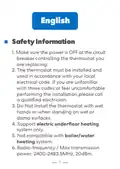
- 3. Safety Information
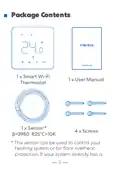
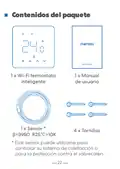
- 4. Package Contents (Smart Wi-fi Thermostat → User Manual → Sensor → Screws)
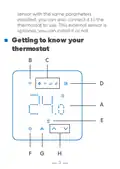
- 5. Getting To Know Your Thermostat
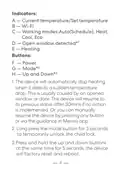
- 6. Indicators (Buttons)
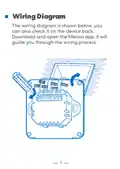
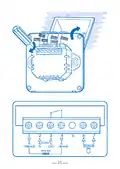
- 7. Wiring Diagram (Meross App Guide)
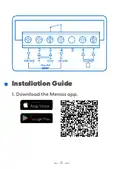
- 8. Installation Guide
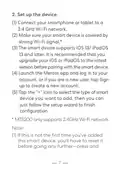
- 9. Set Up The Device (Connect Your Smartphone Or Tablet To A 2.4 Ghz Wi-fi Network → Make Sure Your Smart Device Is Covered By Strong Wi-fi Signal → The Smart Device Supports Ios 13/ Ipados 13 And Later → Launch The Meross App And Log In To Your Account → Tap The '+' Icon To Select The Type Of Smart Device You Want To Add)
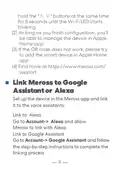
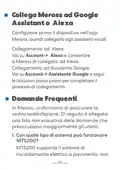
- 10. Link Meross To Google Assistant Or Alexa (Set Up The Device In The Meross App And Link It To The Voice Assistants → Link To Alexa → Link To Google Assistant)
- 11. Faq (What Kind Of System Can Mts200 Work With? → How To Fix A Pairing Failure? → How Do I Manage My Meross Device In Apple Home App? → Is There An Internal Temperature Sensor?)
- 12. Yes, There Is An Internal And An External Sensor(optional).
- 13. Sicherheitshinweise (Installation Des Thermostats → Kompatibilität)
- 14. Paketinhalt (Gebrauchsanweisung → Smart Wi-fi Thermostat → Sensor → Schrauben)
- 15. Kennen Sie Jetzt Ihren Thermostat Lernen
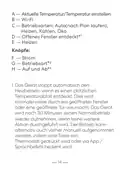
- 16. A Aktuelle Temperatur/temperatur Einstellen (B Wi-fi → C Betriebsarten: Auto(nach Plan Laufen), Heizen, Kühlen, Öko → D Offenes Fenster Entdeckt* → E Heizen → F Strom → G Betriebsart*)
- 17. Kindersicherung Entsperren (Werkseinstellungen Zurücksetzen → Schaltplan → Meross-app Herunterladen)
- 18.
- 19. Installationsanleitung (Einrichtung Des Geräts → Verbinden → Melden Sie Sich Bei Ihrem Konto An)
- 20. Mts200 Unterstützt Nur 2,4-ghz-netzwerke. (Verbinden Mit Google Assistant Oder Alexa)
- 21. Richten Sie Das Gerät Zuerst In Der Meross-app Ein, Und Dann Können Sie Es Mit Sprachassistenten Verknüpfen.
- 22. Wie Behebe Ich Den Fehler Der Zusammenstellung? (Wie Könnte Ich Mein Meross-gerät In Apple Home App Verwalten? → Gibt Es Einen Inneren Temperatursensor?)
- 23. Información De Seguridad
- 24. Contenidos Del Paquete (Wi-fi Termostato Inteligente → Manual De Usuario → Sensor → Tornillos)
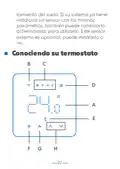
- 25. Conociendo Su Termostato
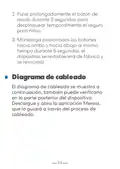
- 26. Indicadores (Botones → Calefacción)
- 27. Pulse Prolongadamente El Botón De Modo Durante 3 Segundos Para Desbloquear Temporalmente El Seguro Para Niños.
- 28.
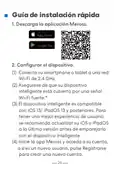
- 29. Guía De Instalación Rápida (Descarga La Aplicación Meross → Configurar El Dispositivo)
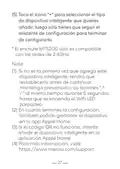
- 30. Toca El Icono '+' Para Seleccionar El Tipo De Dispositivo Inteligente (El Enchufe Mts200 Sólo Es Compatible Con Las Redes De 2.4ghz → Si No Es La Primera Vez Que Agrega Este Dispositivo Inteligente → En Cuanto Termines La Configuración → Si El Código Qr No Funciona → Para Más Información)
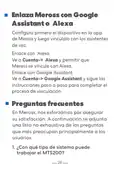
- 31. Enlaza Meross Con Google Assistant O Alexa (Configura Primero El Dispositivo En La App De Meross Y Luego Vincúlalo Con Los Asistentes De Voz. → Enlace Con Alexa → Enlace Con Google Assistant → Preguntas Frecuentes)
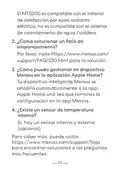
- 32. El Mts200 Es Compatible Con El Sistema De Calefacción Por Suelo Radiante Eléctrico, No Es Compatible Con El Sistema De Calentamiento De Agua…
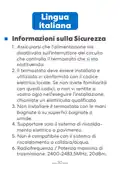
- 33. Informazioni Sulla Sicurezza (Assicurarsi Che L'alimentazione Sia Disattivata Sull'interruttore Del Circuito Che Controlla Il Termostato Che Si Sta Sostituendo. → Non Installare Il Termostato Con Le Mani Bagnate O Su Superfici Bagnate O Umide. → Supportare Solo Il Sistema Di Riscaldamento Elettrico A Pavimento. → Non È Compatibile Con Il Sistema Di Riscaldamento A Caldaia/acqua. → Radiofrequenza / Potenza Massima Di Trasmissione: 2400-2483,5mhz, 20dbm.)
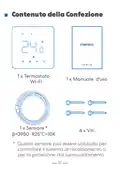
- 34. Contenuto Della Confezione (Wi-fi → Sensore)
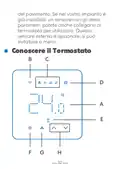
- 35. Conoscere Il Termostato
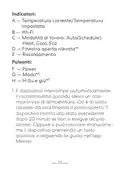
- 36. Indicatori (Pulsanti → Modalità Di Lavoro → Riscaldamento)
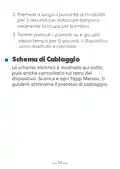
- 37. Premere A Lungo Il Pulsante Di Modalità (Schema Di Cablaggio)
- 38.
- 39. Guida D'installazione (Configura Il Dispositivo)
- 40. Registrati Per Creare Un Nuovo Account. (Toccare L'icona '+' Per Selezionare Il Tipo Di Dispositivo Intelligente Che Si Desidera Aggiungere, Quindi È Sufficiente Seguire La Procedura Guidata Di Installazione Per Completare La Configurazione.)
- 41. Collega Meross Ad Google (Collegamento Ad Alexa → Collegamento Ad Assistente Google → Domande Frequenti)
- 42. Come Risolvo Un Errore Di Accoppiamento? (Come Gestisco Il Mio Dispositivo Meross Nell'app Apple Home? → C'è Un Sensore Di Temperatura Interno?)
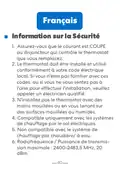
- 43. Information Sur La Sécurité (Assurez-vous → Compatible Uniquement Avec Les Systèmes De Chauffage Par Le Sol Électriques → Non Compatible Avec Le Système De Chauffage Par Chaudière/ À Eau → Radiofréquence / Puissance De Transmission Maximale)
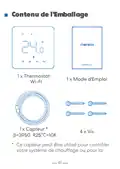
- 44. Contenu De L'emballage (Wi-fi → Capteur)
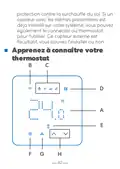
- 45. Apprenez À Connaître Votre Thermostat
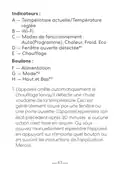
- 46. Indicateurs (Modes De Fonctionnement → Fenêtre Ouverte Détectée → Chauffage → Boutons)
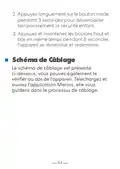
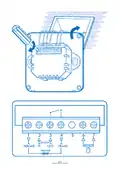
- 47. Appuyez Longuement Sur Le Bouton Mode (Schéma De Câblage)
- 48.
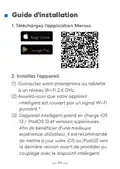
- 49. Guide D'installation (Téléchargez L'application Meross → Installez L'appareil)
- 50. Lancez L'application Meross Et Connectez-vous À Votre Compte (Ajout D'un Périphérique Intelligent → Configuration Du Thermostat Mts200 → Gestion De L'appareil Dans L'application Apple Home)
- 51. Relier Meross À Google Assistant Ou Alexa (Lier À Alexa → Lier À Google Assistant → Faq)
- 52. Questions Fréquentes (Compatibilité Du Système Mts200 → Réparation D'un Échec D'appairage → Gestion De L'appareil Meross Dans L'application Apple Home → Capteur De Température Interne)
- 53. Oui, Il Y A Un Capteur Interne Et Un Capteur Externe (en Option). Pour En Savoir Plus, Vous Pouvez Consulter Le Site Https://www.meross.com/…
- 54. Simple Device (Simplify Your Life → Email: Support@meross.com → Website: Www.meross.com → Manufacturer: Chengdu Meross Technology Co., Ltd. → Made In China → Indoor Use Only)
- 55. Package Contents (Getting To Know Your Thermostat → Safety Information → Wiring Diagram → Installation Guide → Link Meross To Google Assistant Or Alexa → Faq)
×
meross MTS200HK Smart Wi-Fi Thermostat User Manual

(3) Si le code QR ne fonctionne pas, essayez
d'ajouter l'appareil intelligent dans
l'application Apple Home.
(4) Pour en savoir plus, visitez
Relier Meross à Google
Assistant ou Alexa
Configurez d'abord l'appareil dans
l'application Meross, puis associez-le aux
assistants vocaux.
Lier à Alexa
Accédez à Compte-> Alexa et
autorisez Meross à se connecter à Alexa.
Lier à Google Assistant
Accédez à Compte-> Assistant Google et
suivez les instructions étape par étape pour
terminer le processus d'association.
FAQ
Chez Meross, nous nous efforçons
d'assurer votre satisfaction. Vous trouverez
48
| General | Details |
|---|---|
| Name | meross MTS200HK Smart Wi-Fi Thermostat User Manual |
| Make | Meross |
| Language | English |
| Filetype | PDF (Download) |
| File size | 1.44 MB |

meross T6R Wireless Smart Thermostat User Manual
Meross MTS200HK Smart Thermostat User Manual
Meross MTS960 Smart Wi-Fi Socket Thermostat Instruction Manual


BEOK TGW60 Wifi Heating Thermostat Instruction Manual

KALOR TECH 603H Thermostat Instruction Manual

Honeywell Home FocusPRO S200 Smart Thermostat User Manual
emos P5616OT Wireless Thermostat Instruction Manual

Klima SF300 Digital Thermostat Instruction Manual

Honeywell RTH230B Programmable Electronic Thermostat User Guide

Vine TJ-610E Smart Thermostat User Manual
Milesight WT201 Airteq Smart Thermostat User Guide

Orbegozo FDR 65 Litres Adjustable Thermostat Instruction Manual

Danfoss RMT-230 Room Thermostat Installation Guide
Table of Contents
- 1. User Manual →
- 2. Page 2 →
- 3. Safety Information →
- 4. Package Contents - Smart Wi-fi Thermostat →
- 5. Getting To Know Your Thermostat →
- 6. Indicators - Buttons →
- 7. Wiring Diagram - Meross App Guide →
- 8. Installation Guide →
- 9. Set Up The Device - Connect Your Smartphone Or Tablet To A 2... →
- 10. Link Meross To Google Assistant Or Alexa - Set Up The Device... →
- 11. Faq - What Kind Of System Can Mts200 Work With? →
- 12. Yes, There Is An Internal And An External Sensor(optional). →
- 13. Sicherheitshinweise - Installation Des Thermostats →
- 14. Paketinhalt - Gebrauchsanweisung →
- 15. Kennen Sie Jetzt Ihren Thermostat Lernen →
- 16. A Aktuelle Temperatur/temperatu... Einstellen - B Wi-fi →
- 17. Kindersicherung Entsperren - Werkseinstellungen Zurücksetzen →
- 18. Page 18 →
- 19. Installationsanleitu... - Einrichtung Des Geräts →
- 20. Mts200 Unterstützt Nur 2,4-ghz-netzwerke. - Verbinden Mit Go... →
- 21. Richten Sie Das Gerät Zuerst In Der Meross-app Ein, Und Dann... →
- 22. Wie Behebe Ich Den Fehler Der Zusammenstellung? - Wie Könnte... →
- 23. Información De Seguridad →
- 24. Contenidos Del Paquete - Wi-fi Termostato Inteligente →
- 25. Conociendo Su Termostato →
- 26. Indicadores - Botones →
- 27. Pulse Prolongadamente El Botón De Modo Durante 3 Segundos Pa... →
- 28. Page 28 →
- 29. Guía De Instalación Rápida - Descarga La Aplicación Meross →
- 30. Toca El Icono '+' Para Seleccionar El Tipo De Dispositivo In... →
- 31. Enlaza Meross Con Google Assistant O Alexa - Configura Prime... →
- 32. El Mts200 Es Compatible Con El Sistema De Calefacción Por Su... →
- 33. Informazioni Sulla Sicurezza - Assicurarsi Che L'alimentazio... →
- 34. Contenuto Della Confezione - Wi-fi →
- 35. Conoscere Il Termostato →
- 36. Indicatori - Pulsanti →
- 37. Premere A Lungo Il Pulsante Di Modalità - Schema Di Cablaggi... →
- 38. Page 38 →
- 39. Guida D'installazione - Configura Il Dispositivo →
- 40. Registrati Per Creare Un Nuovo Account. - Toccare L'icona '+... →
- 41. Collega Meross Ad Google - Collegamento Ad Alexa →
- 42. Come Risolvo Un Errore Di Accoppiamento? - Come Gestisco Il ... →
- 43. Information Sur La Sécurité - Assurez-vous →
- 44. Contenu De L'emballage - Wi-fi →
- 45. Apprenez À Connaître Votre Thermostat →
- 46. Indicateurs - Modes De Fonctionnement →
- 47. Appuyez Longuement Sur Le Bouton Mode - Schéma De Câblage →
- 48. Page 48 →
- 49. Guide D'installation - Téléchargez L'application Meross →
- 50. Lancez L'application Meross Et Connectez-vous À Votre Compte... →
- 51. Relier Meross À Google Assistant Ou Alexa - Lier À Alexa →
- 52. Questions Fréquentes - Compatibilité Du Système Mts200 →
- 53. Oui, Il Y A Un Capteur Interne Et Un Capteur Externe (en Opt... →
- 54. Simple Device - Simplify Your Life →
- 55. Package Contents - Getting To Know Your Thermostat →