
HORSTMANN C-Stat 17-B 7 Day Programmable Room Thermostat Instruction Manual










DISPLAY
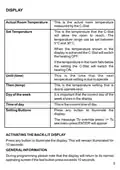
Actual Room Temperature
Set Temperature
This is the actual room temperature
measured by the C-Stat
This is the temperature that the C-Stat
will allow the room to reach. The
temperature range can be set between
5°C and 30°C
When the temperature shown in the
display is achieved the C-Stat will switch
the heating OFF.
If the temperature in the room falls below
the setting the C-Stat will switch the
heating ON.
Until (time)
This is the time that the next
temperature setting is due to operate
Then (temp)
Day of the week
This is the temperature setting that is
due to operate next
It is important that the correct day of the
week shows in the display
Time of day
This is the current time of day
Setting Buttons
Press any button to illuminate the
display.
The message 'To override press -/+ To
see menu press ENTER' will appear
ACTIVATING THE BACK-LIT DISPLAY
Press any button to illuminate the display. This will remain illuminated for
10 seconds
GENERALINFORMATION
During programming please note that the display will return to its normal
operating screen if the last button press exceeds 10 seconds.
5

| General | Details |
|---|---|
| Name | HORSTMANN C-Stat 17-B 7 Day Programmable Room Thermostat Instruction Manual |
| Make | Horstmann |
| Language | English |
| Filetype | PDF (Download) |
| File size | 0.63 MB |
 (1 votes, average: 5.00 out of 5)
 Loading...


tecnoswitch 60730-1 Electronic Recessed Thermostat User Guide

Danfoss Next Plus Electronic Intelligent Timer Thermostat Installation Guide

OJ ELECTRONICS MCD5 Touch Thermostat Instructions

GENERAL LIFE ARUNA 301S Digital Room Thermostat User Manual
DAIKIN ONE Smart Thermostat Instructions

Danfoss RT 8L Thermostat Installation Guide

Honeywell TH8321WF02 Vision Pro WiFi Programmable Thermostat User Manual

Danfoss 013R9355 Radiator Thermostat Instructions

Robertshaw RS9220 Digital Programmable Wall Thermostat Instruction Manual

FURRION FACW12ZA-BL Multi Zone Wall Thermostat Instruction Manual